Solved
I like to cancel my subscription and I cannot see how?
I want to cancel the whole subscription

I want to cancel the whole subscription
The process to cancel your QuickBooks Online (QBO) subscription varies based on how you purchased your plan, either directly from Intuit or through an app store, shawnrajabi.
Before doing so, we highly recommend exporting your data, reports, and lists to ensure you have the information you might need in the future.
If you signed up online through Intuit, you can go to the Subscriptions and billing menu within your QBO account to cancel your subscription. Please follow these steps to complete the process:
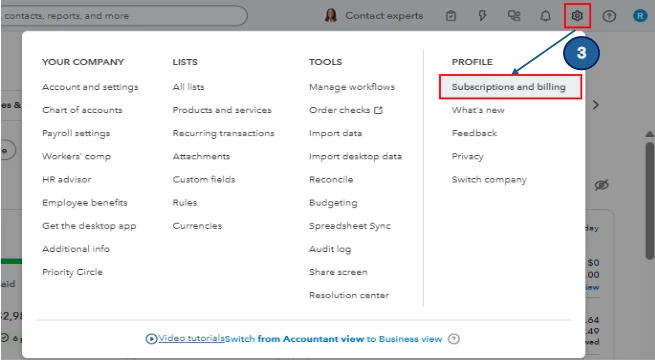
If you acquired your account through the Apple App Store (iOS, iPhone, iPad) or Google Play Store (Android phones and tablets), follow the official steps to cancel by checking out this article: Cancel your subscription.
Feel free to comment below if you need further assistance!
Enter your E-mail address. We'll send you an e-mail with instructions to reset your password.