
Get 50% OFF QuickBooks for 3 months*

Buy now
Switch to QuickBooks and 70% off for 3 Months
October 13, 2025
Solved

I turned on class tracking, but it is very awkward and won't be that useful to me, so I'd like to turn it all the way off. Is that a possibility?

  • October 13, 2025
  • 2 replies
  • 22 views
No text available
Best answer by Janiqueca_T

We're so glad to have you here, valefordlmt. Welcome to the Community!


Yes you can and I'd be happy to assist you with that. Let me guide you through the process of turning off Class Tracking.


Here’s how:
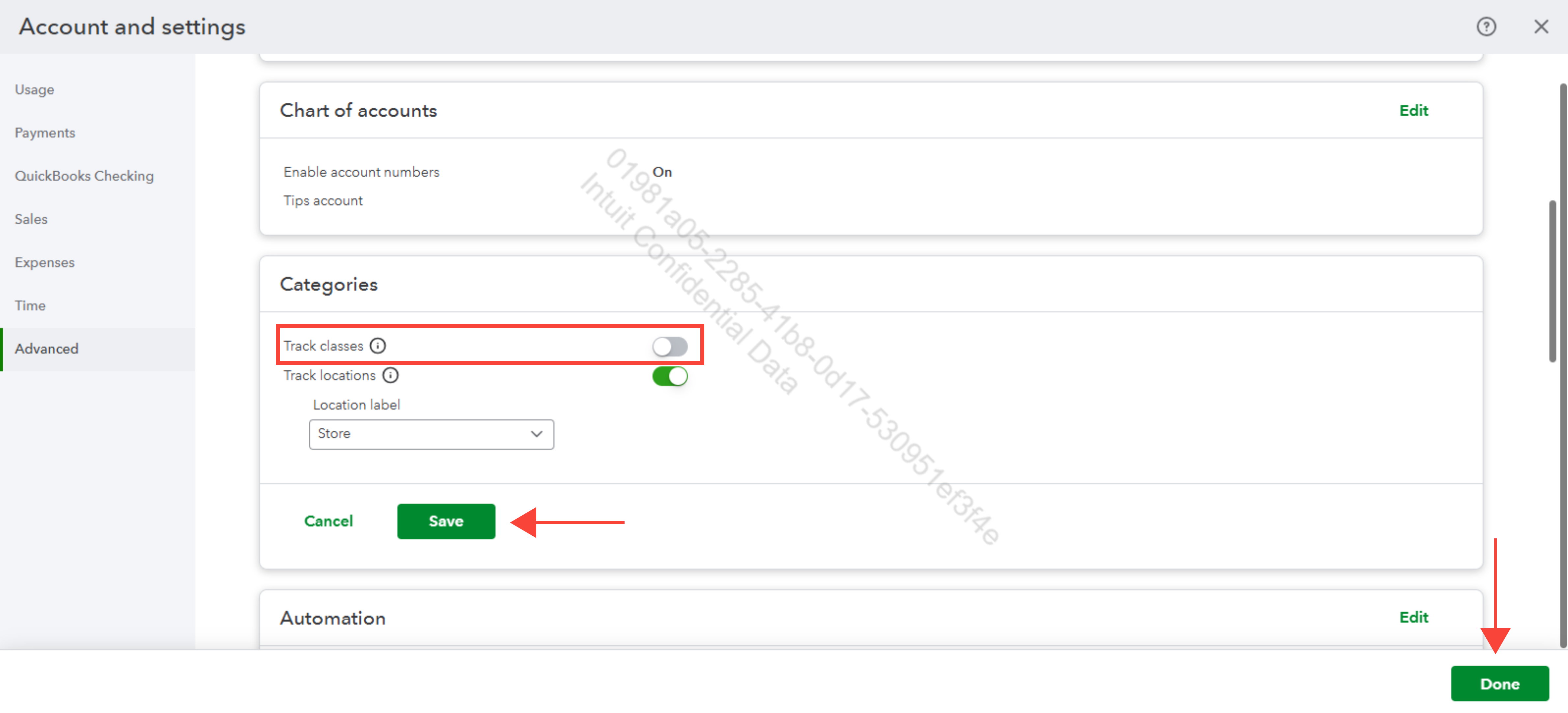
 

  1. Click the Gear icon, then select Account and settings.
  2. Go to Advanced and look for Categories.
  3. Turn off the Track classes switch.
  4. Select Save and Done.


You're all set! Feel free to reply below if you need further assistance.

2 replies

QuickBooks Team
October 13, 2025

We're so glad to have you here, valefordlmt. Welcome to the Community!


Yes you can and I'd be happy to assist you with that. Let me guide you through the process of turning off Class Tracking.


Here’s how:


  1. Click the Gear icon, then select Account and settings.
  2. Go to Advanced and look for Categories.
  3. Turn off the Track classes switch.
  4. Select Save and Done.


You're all set! Feel free to reply below if you need further assistance.

QuickBooks Team
October 14, 2025
Hi valefordlmt,

I just wanted to follow up to check if the resolution we provided helped resolve your issue.
Please let us know if everything is now working as expected or if you’re still experiencing any problems.
 
We’ll be glad to assist further if needed.
