
SUMMER SAVINGS 90% OFF QuickBooks for 3 months* Ends 8/27

Buy now
Switch to QuickBooks and 70% off for 3 Months
February 20, 2026
Solved

My bank feed is reporting expenses as deposits

  • February 20, 2026
  • 4 replies
  • 141 views

The bank feed record doesn’t match QB because the bank feed is reporting an expense recorded in QB online as a deposit at the bank. How to fix?

Best answer by EvethC

Hi there, CS12. It’s possible that an issue occurred during the transmission of transactions from your bank to QuickBooks. This can happen due to connectivity interruptions or formatting errors. Rest assured, we can absolutely resolve this for you. 


What we can do is exclude the affected transactions that were incorrectly transmitted. Then, we'll upload them to QuickBooks using a QBO, QFX, or CSV file, which you can download from your bank's website. This will guarantee that your transactions are properly recorded and organized.


To exclude the affected transactions:    
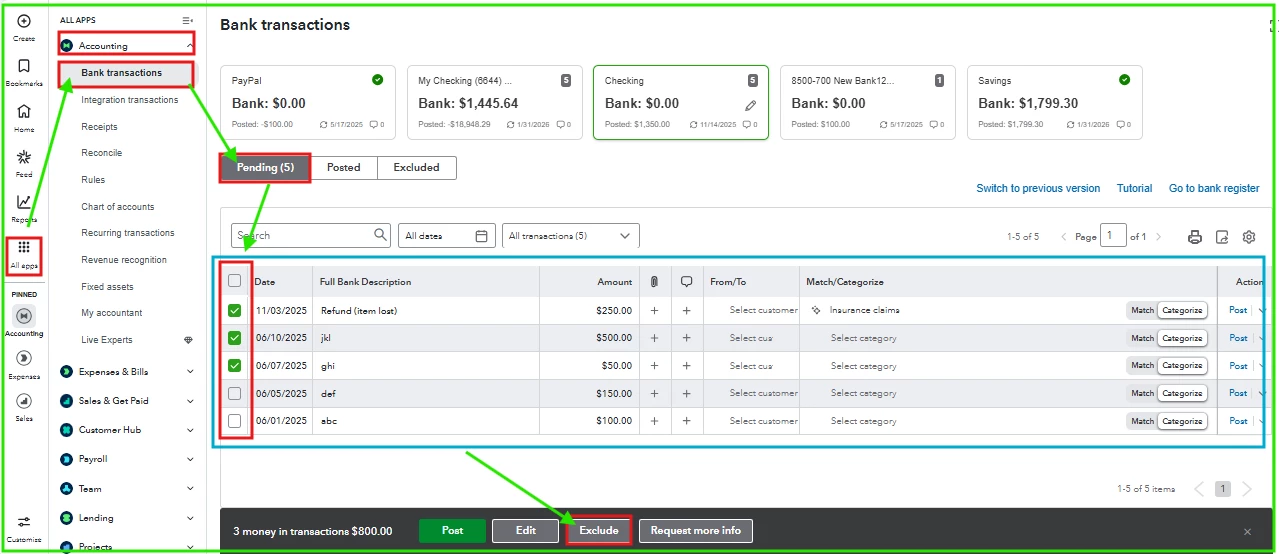
 

  1. Navigate to the Pending tab on the Bank Transactions page.
  2. Locate and select the checkbox of the transactions to exclude.
  3. Select Exclude.    


Moreover, consider upgrading to QuickBooks Online Advanced to reduce errors in bank feeds and transaction categorization. It offers improved automation and batch tools for reviewing and correcting imported data, making reconciliation easier and more efficient.


If you have any questions about modifying transactions to expenses, don't hesitate to reach out. We'll be here to help.

4 replies

EvethCQuickBooks TeamAnswer
QuickBooks Team
February 20, 2026

Hi there, CS12. It’s possible that an issue occurred during the transmission of transactions from your bank to QuickBooks. This can happen due to connectivity interruptions or formatting errors. Rest assured, we can absolutely resolve this for you. 


What we can do is exclude the affected transactions that were incorrectly transmitted. Then, we'll upload them to QuickBooks using a QBO, QFX, or CSV file, which you can download from your bank's website. This will guarantee that your transactions are properly recorded and organized.


To exclude the affected transactions:    


  1. Navigate to the Pending tab on the Bank Transactions page.
  2. Locate and select the checkbox of the transactions to exclude.
  3. Select Exclude.    


Moreover, consider upgrading to QuickBooks Online Advanced to reduce errors in bank feeds and transaction categorization. It offers improved automation and batch tools for reviewing and correcting imported data, making reconciliation easier and more efficient.


If you have any questions about modifying transactions to expenses, don't hesitate to reach out. We'll be here to help.

QuickBooks Team
February 21, 2026

Good day, CS12.
 
I just wanted to follow up to check if the assistance I provided helped address your concern.
 
We’ll be glad to assist further if needed.

CS121Author
February 21, 2026

Hi EvethC - Thanks for your response. Haven’t had a chance to implement. I called QB yesterday and spoke to a tech person who told me there’s a problem with my bank’s feed that has been reported. He said they’re working on it and he will call me back once resolved. Hopefully, it gets resolved soon as the bank feed showing as deposits, instead of expenses, is growing everyday! 

Again, thanks so much for your help. I will try your suggestions if QB tech support doesn’t get back to me next week. I do have one question, which is how do I download from my bank’s website the codes you mentioned?