
Get 50% OFF QuickBooks for 3 months*

Buy now
Switch to QuickBooks and 70% off for 3 Months
December 27, 2025
Solved

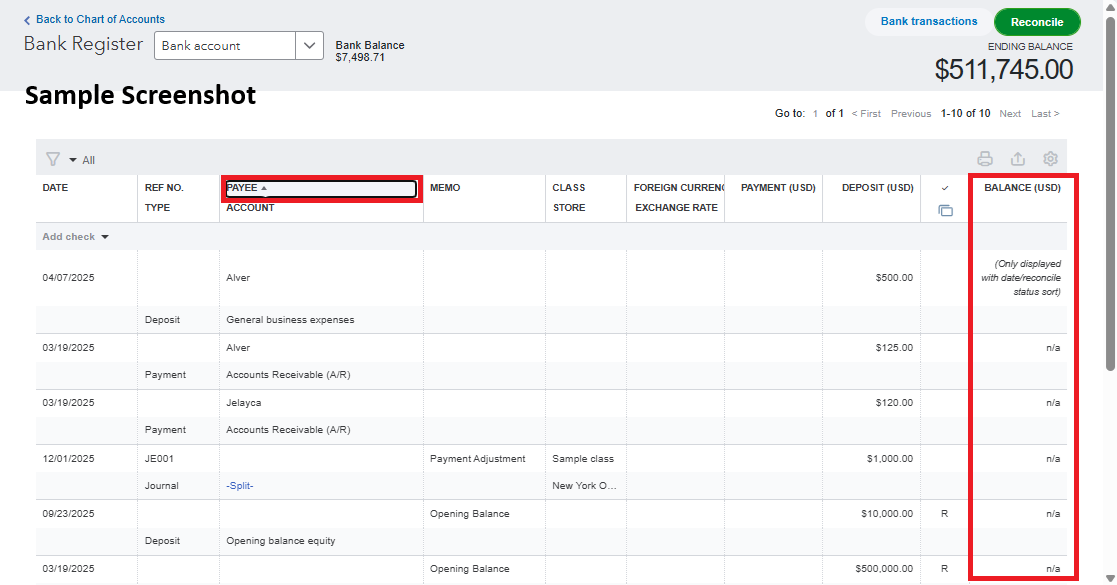
Balance not showing - error message: "Only displayed with date/reconcile status sort" - cleared cookies - now all transactions are out of order

  • December 27, 2025
  • 1 reply
  • 29 views

My balance is not showing. Instead I'm getting a "n/a" where the balance should be. I'm getting an error message as stated in the subject of this discussion. My running balance is set to display. I searched past queries and saw to clear my cookies. This did not work. I tried on a private browser in both Safari and Chrome. No luck. 

After I cleared cookies, now all of my transactions for years are out of order.

This is a nightmare and is making me re-consider my use of Quickbooks. 

Please assist before I go elsewhere for both of my businesses bookkeeping. I'd really like to not have to do that.
Best answer by RhoiceW

Hi there, SLR_Bham. I appreciate you for bringing this to our attention and for trying some troubleshooting steps to resolve the issue with the running balance not displaying. Let me assist you further and help resolve this for you.


If the balances in your Chart of Accounts are showing as N/A, this may be due to changes in the sorting filters within the account register, such as the date or header filters being accidentally adjusted.


Here's how to resolve this:


  1. Go to the affected account in your Chart of Accounts. 
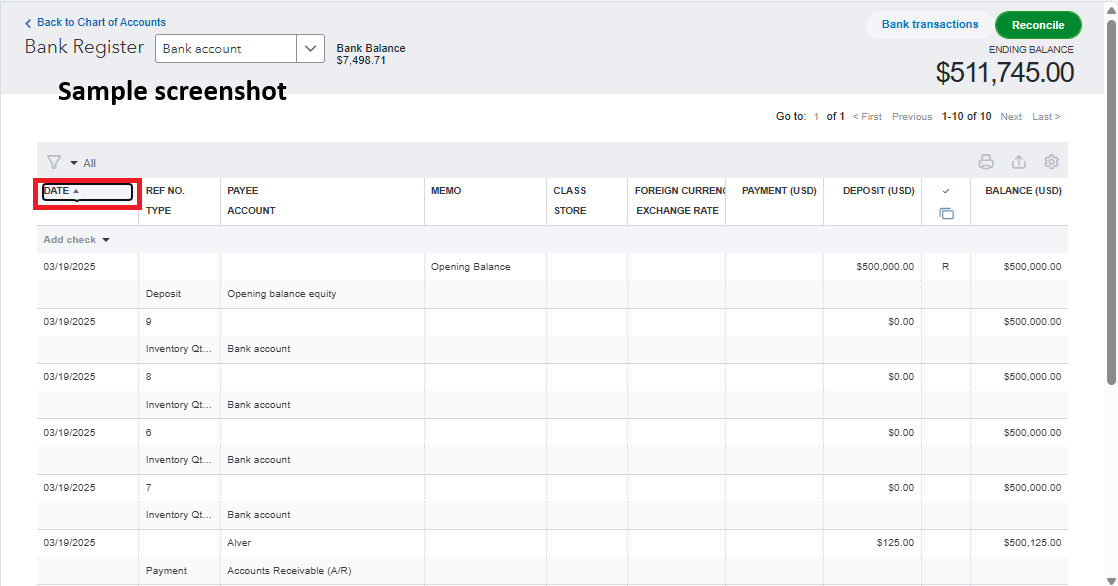
  2. Click the Sort by Date filter to arrange the transactions in chronological order. 
  3. Once sorted by date, the running balance should appear correctly.
     

This sample screenshot demonstrates what happens when the filters are clicked or adjusted.


The second screenshot shows that clicking the date filter will organize the transactions chronologically and display the balance.


If you have other concerns related to QuickBooks, don't hesitate to reply in this thread. We're always here to help.

1 reply

RhoiceWQuickBooks TeamAnswer
QuickBooks Team
December 27, 2025

Hi there, SLR_Bham. I appreciate you for bringing this to our attention and for trying some troubleshooting steps to resolve the issue with the running balance not displaying. Let me assist you further and help resolve this for you.


If the balances in your Chart of Accounts are showing as N/A, this may be due to changes in the sorting filters within the account register, such as the date or header filters being accidentally adjusted.


Here's how to resolve this:


  1. Go to the affected account in your Chart of Accounts. 
  2. Click the Sort by Date filter to arrange the transactions in chronological order. 
  3. Once sorted by date, the running balance should appear correctly.
     

This sample screenshot demonstrates what happens when the filters are clicked or adjusted.


The second screenshot shows that clicking the date filter will organize the transactions chronologically and display the balance.


If you have other concerns related to QuickBooks, don't hesitate to reply in this thread. We're always here to help.

SLR_BhamAuthor
December 27, 2025

Lol. Of course, it was a very simple user error that should have been one I thought of, but kept choosing other options to trouble shoot. Thank you!! I am very grateful that you assisted and this resolved before I close up for the night. It's a big relief and my day will go better tomorrow as I finish up this task. Thank you thank you thank you. 🙂

QuickBooks Team
December 27, 2025

Hello there, @SLR_Bham.


I am glad to hear that my colleague was able to assist you with resolving the issue of the balance not appearing in your QuickBooks Online account.


If you have any additional questions or concerns about your QuickBooks Online account, please don't hesitate to leave a comment below. We're here to help.