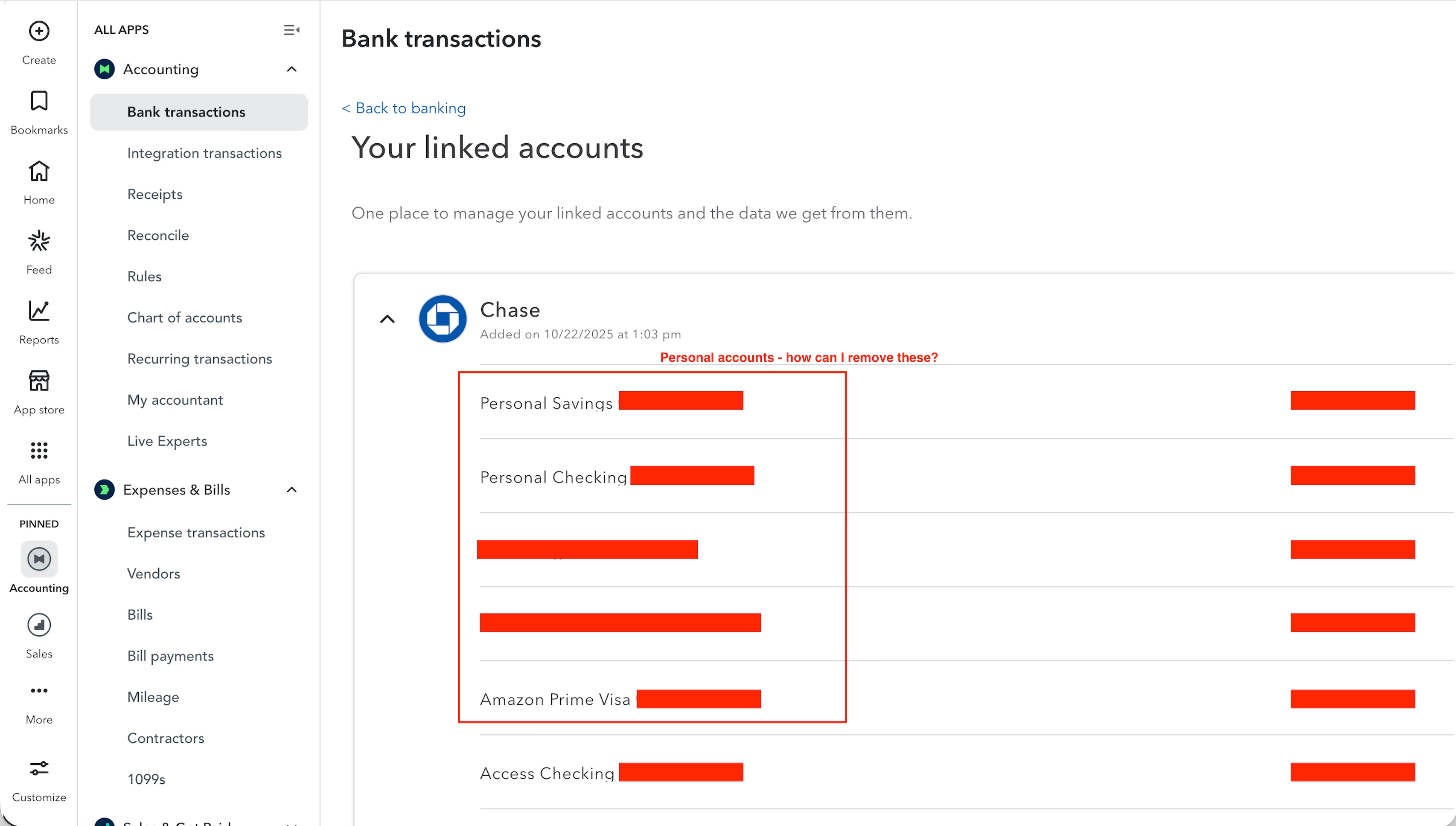
How can I remove personal bank accounts with no transactions?
When I first created my QuickBooks Online account, I linked my Chase login to it so that I can see my business bank account transactions. At the time, my Chase login had all my personal and business accounts linked together so that I can see them in with one login (i.e. I was able to log into Chase with one set of credentials and see my personal checking/savings accounts as well as my business checking accounts).
The issue is that after I authorized QuickBooks to access my Chase account, it now shows all my accounts in the Manage Connections page - including all my personal accounts. I don't think I explicitly agreed for those accounts to be accessed in QuickBooks. Regardless, there does not seem to be a way to remove them QuickBooks. They don't have any association to the business nor have I logged a single transaction/expense to them nor have I linked them to any Chart of Accounts account.
I've even gone as far as unlinking my personal accounts entirely from my Chase account login, removed the authorization for QuickBooks to access my Chase account, reconnected Chase to QuickBooks and this time only selected my business bank accounts, and yet my personal accounts are still showing up.
So, my question is - how can I completely remove these previously-linked personal bank accounts from QuickBooks which have 0 transactions associated with them and have no connections to my Chart of Accounts?