
Get 50% OFF QuickBooks for 3 months*

Buy now
Switch to QuickBooks and 70% off for 3 Months
June 18, 2025
Solved

Payee option under Filter function from bank register not working

  • June 18, 2025
  • 1 reply
  • 11 views

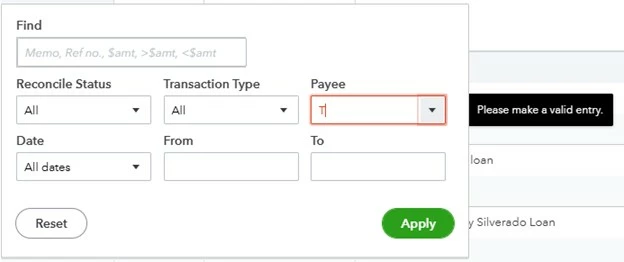
Recently, when I try to use the filter function from a Bank register, the PAYEE field does not work.  The drop down list is empty and when I type any letter it turns red and says "Please make a valid entry".  The filter function on PAYEE from the Expenses tab works fine.  This is Quickbooks Online.


Screenshot from the Bank Register Screen, Checking account.
 

Best answer by JaneDave_I

We appreciate you for providing us with a clearer picture of your concern, Grove.
 

Excessive data and browser issues can cause pages to fail to load properly. With that in mind, let's perform some troubleshooting steps to check if this is a browser-related problem:


  1. Use a supported browser to log in to QuickBooks Online (QBO).
  2. Clear your browser's cache.


Once done, restart your browser and log back into QBO to see if the Payee field in the Bank Register is now functioning as expected.


Alternatively, you can also use the funnel icon next to the PAYEE field. Click the dropdown arrow and select the upward arrow to sort your accounts alphabetically.


I'll also share this article in case you want to start matching your bank and credit card statements: Reconcile an account in QBO.


Feel free to reply to this post if you need further assistance.

1 reply

QuickBooks Team
June 18, 2025

We appreciate you for providing us with a clearer picture of your concern, Grove.
 

Excessive data and browser issues can cause pages to fail to load properly. With that in mind, let's perform some troubleshooting steps to check if this is a browser-related problem:


  1. Use a supported browser to log in to QuickBooks Online (QBO).
  2. Clear your browser's cache.


Once done, restart your browser and log back into QBO to see if the Payee field in the Bank Register is now functioning as expected.


Alternatively, you can also use the funnel icon next to the PAYEE field. Click the dropdown arrow and select the upward arrow to sort your accounts alphabetically.


I'll also share this article in case you want to start matching your bank and credit card statements: Reconcile an account in QBO.


Feel free to reply to this post if you need further assistance.
