
Get 50% OFF QuickBooks for 3 months*

Buy now
Switch to QuickBooks and 70% off for 3 Months
March 30, 2026
Question

AMP Bank feeds down and now not available

  • March 30, 2026
  • 3 replies
  • 7 views

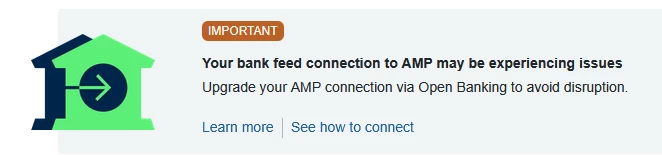
AMP bank feeds were down for many days. Was told to upgrade to open bank feeds:
 

Removed bank feed. Was approved for open banking with AMP, but now the bank is not even listed:
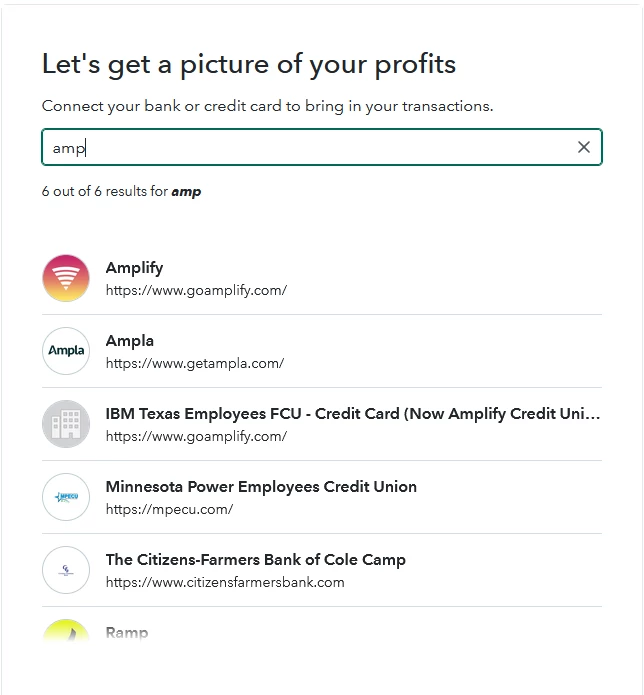
 

Have been waiting 10 days for a resolution to this but nothing yet. This is despite QBO claiming AMP bank supports open banking in an article published within this time: https://quickbooks.intuit.com/learn-support/en-au/help-article/bank-accounts/banks-support-open-banking-connections-quickbooks/L4WX6c8fz_AU_en_AU

3 replies

QuickBooks Team
March 30, 2026

I appreciate the detailed information, @apk19. I recommend contacting our Live Support team through the Help icon for next steps. They have the necessary tools to check your account and provide a resolution or updates.

Please let me know if you need help with anything else. I'm always here to assist!

apk19Author
April 6, 2026

Hi GebelAlaina_M

I already contacted live support through chat, back on 20 March 2026. Case ID 15156081758. I attached a screenshot showing AMP is not listed. 

I emailed asking for an update on 31 March and have since not received a response.

New Member
April 7, 2026

@apk19 I am aware of other ADRs trying to connect to to AMP via open banking and having some difficulties so don't be surprised if Intuit (like other parties) are hassling AMP for some technical assistance on resolving this. 

SIAB
Level 2
March 31, 2026

@apk19 

What file format can your download from your bank? csv or else?

April 20, 2026

Any update here? in the same situation as even can't upload transactions properly through the ui as there is no banking accounts available since disconnection. It is kind of a huge blocker for submitting tax returns from my side which makes it absolutely unacceptable. 

QuickBooks Team
April 20, 2026

I understand how much this affects your work, Andriy. For updates on banks that are not available in QuickBooks, it’s best to reach out to our Live Support team by clicking the Help icon to further review and guide you on the next steps to take.


After you click the Help icon at the top right of your screen, go to the Search tab and type Contact Us. Select the Contact Us option that shows up and choose Callback. If you want to check when we are available to help, you can take a look at this article to learn our support hours: Get Help with QuickBooks products and services.


Let us know if you have any follow-up questions by replying here.