
Get 50% OFF QuickBooks for 3 months*

Buy now
Switch to QuickBooks and 70% off for 3 Months
November 27, 2025
Solved

Changing Primary Work Location

  • November 27, 2025
  • 1 reply
  • 38 views

I am a company admin. When I got to payroll settings, there isn't an option for adding a new location. When I to try to edit current location, QBO says, "You can't edit the status of a primary location or a location with active employees". Help please. We have moved, old address is no longer valid. 

Best answer by Bryan_M

Hi there, Adam.


I appreciate your gesture in sharing the exact message you see that hinders you from changing the status of your primary location. Allow me to help you achieve your goal.


Please know that changing the status of your primary address is not possible. Additionally, if you already run a payroll from that location, updating its address will not be possible.


What you can do is add your new address from the Employee profile section. This added location will automatically reflect in the Payroll Settings tab, and you have the option to assign it to all. Here's how:


  1. From the All apps tab, select Payroll.
  2. Choose Employees.
  3. Go to each employee's profile who was assigned to the old address.
  4. Click the Edit icon in the Employment details section.
  5. Select the "Work location" dropdown and choose "Add work location" for the temporary address. Make sure it's in the same state as your primary location.
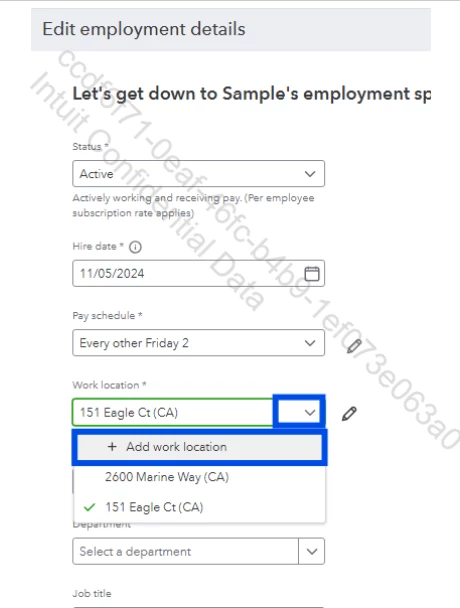
  6. Once done, click on Save.


After adding the new work location, go back to your Payroll Settings and choose where you want to assign it.


You can follow the steps below:

  1. From your Payroll Settings, return to the Work locations section.
  2. Find your new work location.
  3. Click the Edit button.
  4. Go to the Assigned employees dropdown, select either All employees or Active employees.
  5. After that, click on Save.


Feel free to return here if you have additional questions, and we’ll assist you promptly.

1 reply

Bryan_M
Bryan_MQuickBooks TeamAnswer
QuickBooks Team
November 27, 2025

Hi there, Adam.


I appreciate your gesture in sharing the exact message you see that hinders you from changing the status of your primary location. Allow me to help you achieve your goal.


Please know that changing the status of your primary address is not possible. Additionally, if you already run a payroll from that location, updating its address will not be possible.


What you can do is add your new address from the Employee profile section. This added location will automatically reflect in the Payroll Settings tab, and you have the option to assign it to all. Here's how:


  1. From the All apps tab, select Payroll.
  2. Choose Employees.
  3. Go to each employee's profile who was assigned to the old address.
  4. Click the Edit icon in the Employment details section.
  5. Select the "Work location" dropdown and choose "Add work location" for the temporary address. Make sure it's in the same state as your primary location.
  6. Once done, click on Save.


After adding the new work location, go back to your Payroll Settings and choose where you want to assign it.


You can follow the steps below:

  1. From your Payroll Settings, return to the Work locations section.
  2. Find your new work location.
  3. Click the Edit button.
  4. Go to the Assigned employees dropdown, select either All employees or Active employees.
  5. After that, click on Save.


Feel free to return here if you have additional questions, and we’ll assist you promptly.

November 29, 2025

Thank you! I kept clicking the edit button instead of the drop down menu. 

QuickBooks Team
November 29, 2025

Hi there, Adam.


I’m glad to hear your issue about changing primary work location is now resolved.


In case you need tips and related articles when managing your account, feel free to visit our Community website for more insights.


If there's anything else you need help with, please come by the Community. We're here to lend a hand.