
SUMMER SAVINGS 90% OFF QuickBooks for 3 months* Ends 8/27

Buy now
Switch to QuickBooks and 70% off for 3 Months
December 30, 2025
Solved

I need to Find Out if the Correct amount is on the Direct Deposit for this Pay Period and if Not how to fix it

  • December 30, 2025
  • 2 replies
  • 55 views

How do I fix the Correct Amount On a Direct Deposit or Make Sure the Correct amount is on there

Best answer by JeraldR

Hello, @JnChauling2025. It's a great idea to double-check those direct deposit totals to ensure everything runs smoothly, and I'm glad to help you with that.


To ensure everything is correct, you can refer to the Paycheck List to view all the checks you have created. Click on the Net Pay amount to see the detailed breakdown of taxes and deductions that contributed to the

final total. Here's how:
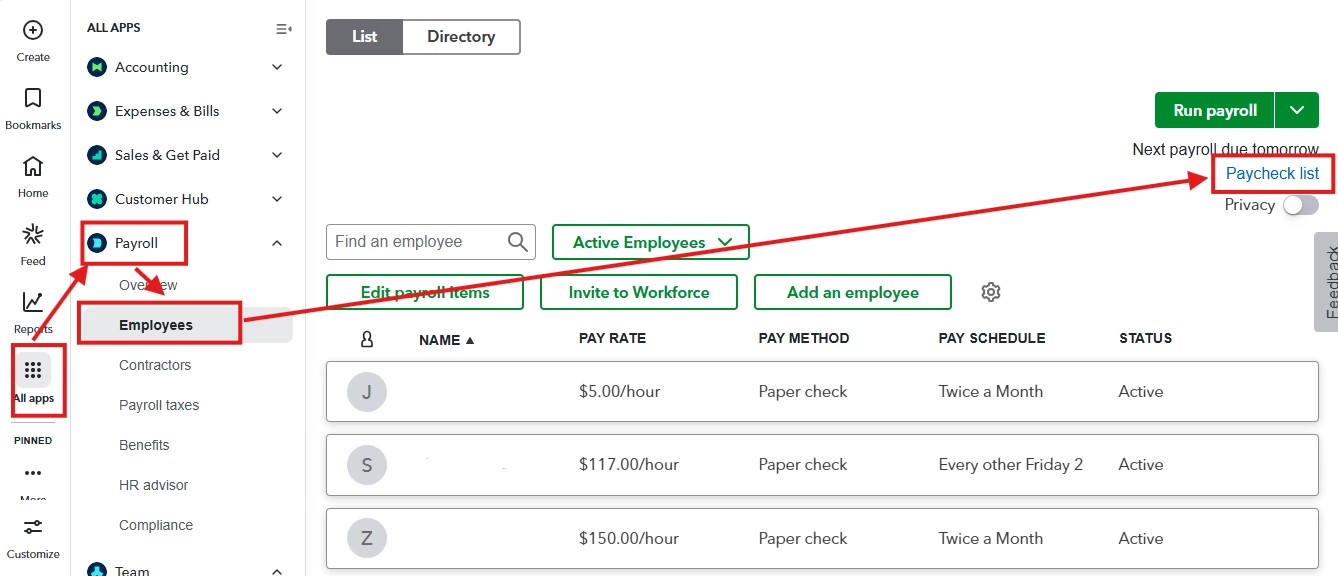
 

  1. Head to the All apps menu in the left corner of your screen.
  2. In the Payroll section, choose Employees.
  3. Go to the Paycheck List under Run Payroll.
  4. Open the specific paycheck for this pay period and confirm the Net Pay amount is correct.
  5. Ensure that all wages, deductions, and taxes have been calculated accurately.


Correcting a payment amount depends on whether the direct deposit has already transmitted to the bank. We can check the Status column for this entry in your Paycheck List.


If the status is still "Pending" and you are before the cutoff, you can Delete or Void the check and redo it. Here's how:
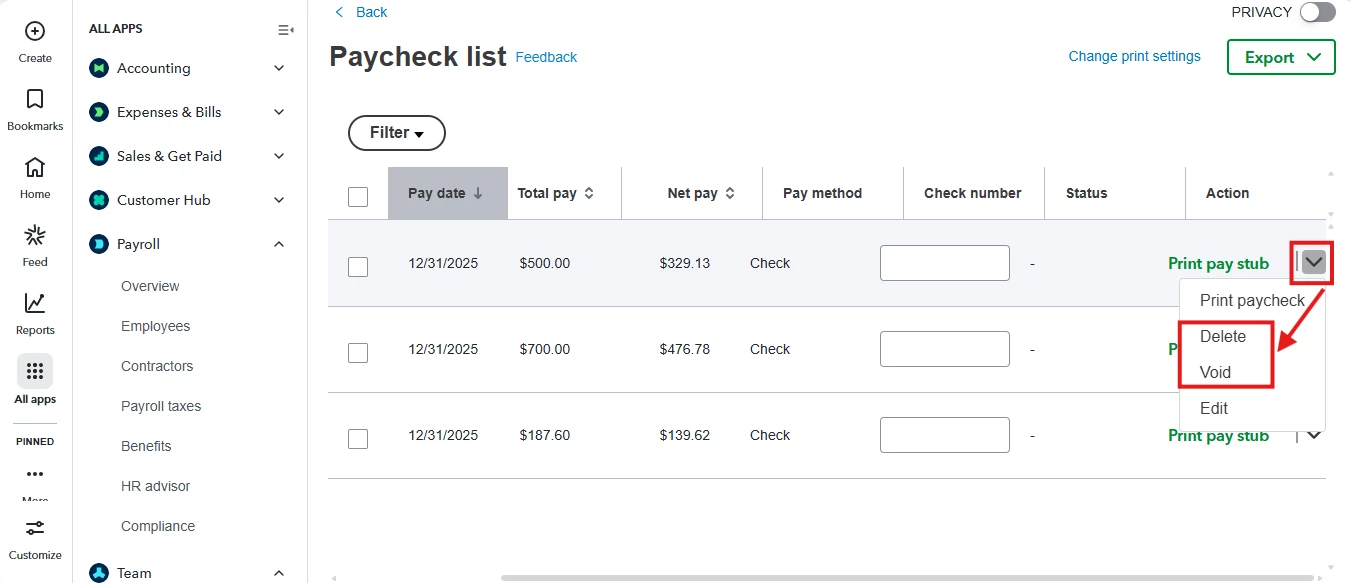
 

  1. Head to the Paycheck List under Run payroll.
  2. Click the Check dropdown under the Actions column.
  3. Choose either Delete or Void.


If you notice an issue after the deadline (when the payroll status is processed or processing), the funds have already been transferred or are on their way to the employee's account. In this situation, we should wait until the funds have been deposited before making any adjustments to the next paycheck. Also, we can ask the employee to return any overpayment if needed.


Feel free to check this article, know what your direct deposit lead time is: When to send your direct deposit payroll.


If you need more help or have more questions, please don't hesitate to reach out to us.

2 replies

JeraldRQuickBooks TeamAnswer
QuickBooks Team
December 30, 2025

Hello, @JnChauling2025. It's a great idea to double-check those direct deposit totals to ensure everything runs smoothly, and I'm glad to help you with that.


To ensure everything is correct, you can refer to the Paycheck List to view all the checks you have created. Click on the Net Pay amount to see the detailed breakdown of taxes and deductions that contributed to the

final total. Here's how:


  1. Head to the All apps menu in the left corner of your screen.
  2. In the Payroll section, choose Employees.
  3. Go to the Paycheck List under Run Payroll.
  4. Open the specific paycheck for this pay period and confirm the Net Pay amount is correct.
  5. Ensure that all wages, deductions, and taxes have been calculated accurately.


Correcting a payment amount depends on whether the direct deposit has already transmitted to the bank. We can check the Status column for this entry in your Paycheck List.


If the status is still "Pending" and you are before the cutoff, you can Delete or Void the check and redo it. Here's how:


  1. Head to the Paycheck List under Run payroll.
  2. Click the Check dropdown under the Actions column.
  3. Choose either Delete or Void.


If you notice an issue after the deadline (when the payroll status is processed or processing), the funds have already been transferred or are on their way to the employee's account. In this situation, we should wait until the funds have been deposited before making any adjustments to the next paycheck. Also, we can ask the employee to return any overpayment if needed.


Feel free to check this article, know what your direct deposit lead time is: When to send your direct deposit payroll.


If you need more help or have more questions, please don't hesitate to reach out to us.

QuickBooks Team
January 2, 2026

Hi there, @JnChauling2025.


I just wanted to follow up to check if the resolution we provided helped resolve your issue. 


Please let us know if everything is now working as expected or if you're still experiencing any problems. 


We'll be glad to assist further if needed.