
Get 50% OFF QuickBooks for 3 months*

Buy now
Switch to QuickBooks and 70% off for 3 Months
July 7, 2025
Solved

Sick Leave

  • July 7, 2025
  • 1 reply
  • 14 views

I am still experiencing issues with sick leave in QuickBooks Desktop Enterprise. The sick hours are not stopping at the max accrual, and I am having to do this all manually if they reach their limit. Is anybody else having this happen to them. The prompts seem very self-explanatory. This should not have to be done manually.  When I called Quickbooks, they informed me to remove the max carry-over limit...this did not solve the problem.
Best answer by BigRedConsulting

Have you set the accrual type to "for the year"?  If not, then when the max hours is reached, and then the employee uses sick time, sick time will start accruing again.


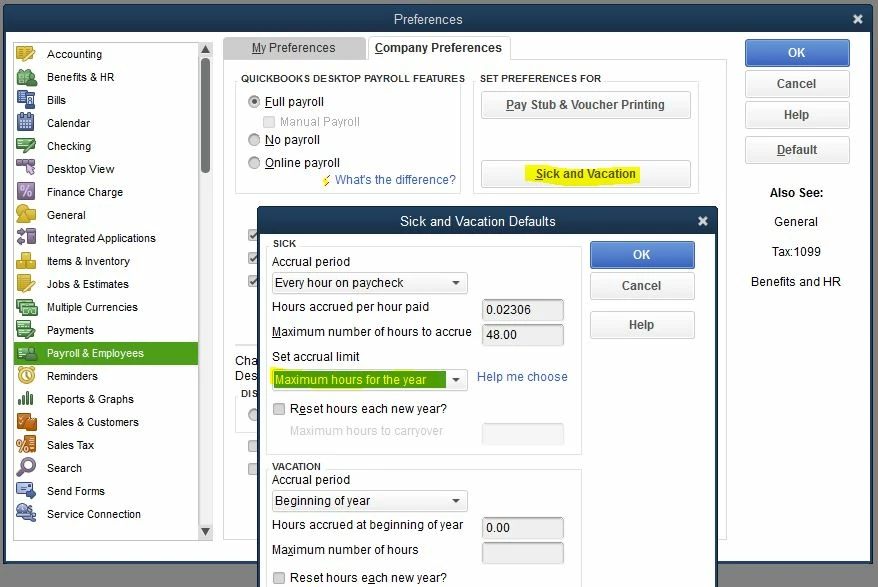
To set the max so that it does not restart, go to Edit | Preferences | Payroll & Employees | Company Preferences | Sick and Vacation, and then make sure you have picked "Maximum hours for the year" as shown below:


Also, on each employee record make sure the Sick year begins on January 1.

1 reply

BigRedConsulting
Level 15
July 7, 2025

Have you set the accrual type to "for the year"?  If not, then when the max hours is reached, and then the employee uses sick time, sick time will start accruing again.


To set the max so that it does not restart, go to Edit | Preferences | Payroll & Employees | Company Preferences | Sick and Vacation, and then make sure you have picked "Maximum hours for the year" as shown below:


Also, on each employee record make sure the Sick year begins on January 1.

jhoh1234Author
July 14, 2025

Yes, I have this all set up correctly but am still having to keep track of it all manually.

BigRedConsulting
Level 15
July 14, 2025

Why do you have to keep track of it manually?