Hello, @grahamjburley.
Let's try to isolate this unexpected behaviour by accessing your account using an incognito/private browser for possible browser-related.
Here are the corresponding hotkeys you can use:
- Google Chrome: press Ctrl + Shift + N
- Mozilla Firefox: press Ctrl + Shift + P
- Safari: press Command + Shift + N
Once logged in, let's first make sure that your employee's information is set up properly. Here's how:
- Go to the Employees menu.
- Select Employees.
- Choose the applicable employee.
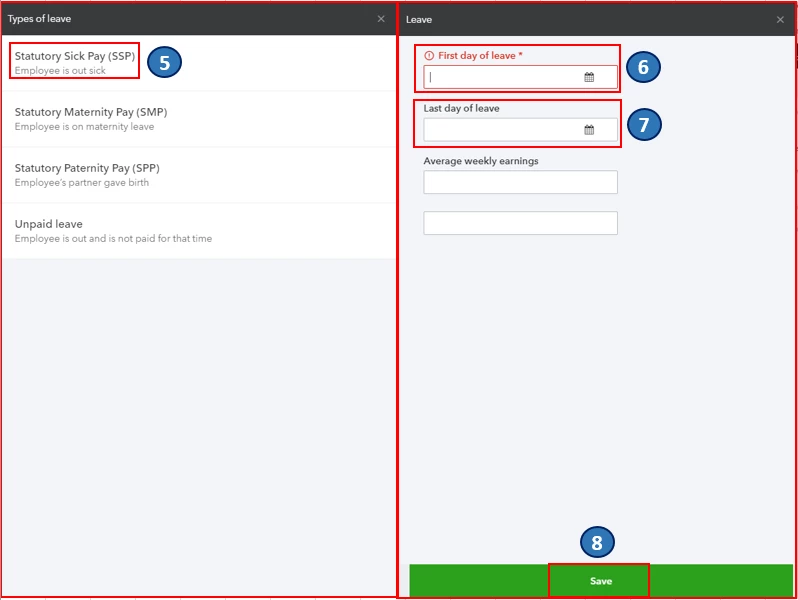
- Click the Actions drop-down arrow, then select Employee's Leave.
- Select Statutory Sick Pay (SSP).
- Enter the First day of leave by clicking the calendar button.
- If you’re unsure about the Last day of leave, you can choose to set the end date to the best of your knowledge.
- Click Save.
Once reviewed, let's try to run payroll again. If it calculates your employee's payroll correctly, you can clear your browser's cache and cookies. The stored browsing history can get corrupted and could cause unexpected behaviour. You can read through these articles for more guidance in managing your employees and payroll:
Post again here if you have other questions. I'm just a few clicks away.

