


Quick Answers: A Mini Guide to Estimated Quarterly Taxes
Hello QuickBooks users, and thanks for joining us. These mini guides are designed to instill confidence while navigating your QuickBooks account so you can focus on running your business. This month's guide covers estimated quarterly taxes: What they are, who needs to pay them, how to calculate what you owe, and how QuickBooks can help you stay on top of them. With the Q2 deadline coming up on June 15, there's no better time to get this sorted. Let's dive in!
-What Are Estimated Quarterly Taxes?
When you work a traditional job, your employer withholds taxes from each paycheck and sends them to the IRS on your behalf, this is known as "withholding." But if you're self-employed or earn income that isn't covered by withholding, that responsibility falls on you. You do your own withholding by making estimated tax payments four times a year.
These payments cover your federal income tax, as well as your Social Security and Medicare taxes for your self-employed work. And here's something important to know: as a self-employed person, you pay both halves of Social Security and Medicare. A W-2 employee typically pays one half while their employer covers the other, but when you work for yourself, the full amount is on you. This is one reason why your estimated payments may feel higher than you'd expect.
The basic idea is simple:
| Estimated Annual Tax Liability ÷ 4 = Quarterly Payment |
|---|
If you don't pay enough throughout the year, the IRS may charge an underpayment penalty which is currently 8% of the unpaid amount, even if you pay your full balance when you file.
-Who Needs to Pay?
You generally need to make estimated tax payments if you expect to owe more than $1,000 in federal income tax (or $500 for corporations) and your income isn't fully covered by withholding. This typically includes income from:
- Independent contracting
- Freelancing
- Sole proprietorships
- Partnerships
- S-corporation shareholder income
A few ways to avoid making separate estimated payments: If your withholdings equal 90% or more of what you'll owe for the year, you likely won't need to file quarterly taxes separately. This can apply if:
- You have a working spouse: They can increase their withholding to cover your estimated taxes.
- You also have a W-2 job: You can increase withholding from your own W-2 wages to offset the tax on your business income.
- Your LLC elects S-corp status: This lets you take a salary with withholding to cover taxes on both your salary and your share of business profits.
-2026 Payment Deadlines
Estimated tax payments are due four times a year. Here's the full 2026 schedule:
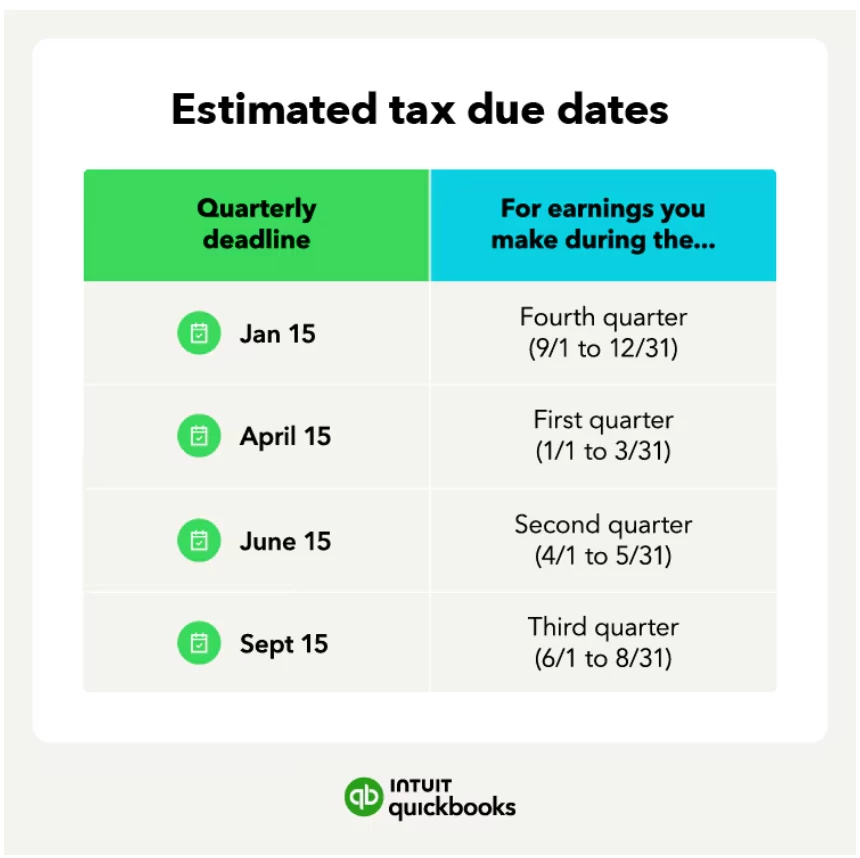
If any of these dates fall on a weekend or legal holiday, the deadline shifts to the next business day.
Note: Your state may also require estimated tax payments, and state due dates and requirements can differ from the IRS schedule. Check your state's tax authority for details.
-How Much Should You Pay?
The IRS offers two methods to calculate your quarterly payments:
Method 1: Annualize your current year taxes
Forecast your income and deductions for the year and calculate your expected tax obligation. You'll want to pay at least 90% of what you expect to owe. This method works well if your income varies throughout the year. For example, if your business is seasonal or picks up at certain times. If your income increases mid-year, you can adjust your remaining installments to account for it.
Method 2: Use your prior year tax
Look at what you paid last year and divide by four, that's your quarterly installment. For example:
If your tax obligation last year was $5,000, your quarterly payment would be $1,250 ($5,000 ÷ 4).
If you expect your income this year to be similar to or higher than last year, the prior year method is usually the easiest and safest approach.
-How QuickBooks Self-Employed Estimates Your Taxes
If you use QuickBooks Self-Employed, much of this calculation is done for you automatically. Here's how it works:
- QuickBooks adds up your self-employed income, then subtracts your expenses and deductions to calculate your business profit.
- It uses your current profits to estimate your income for the rest of the year, updating your estimates each time you categorize a new transaction.
- It factors in your tax profile, including any already-taxed household income, like a spouse's W-2 wages and applies standard deductions.
Your estimated payments may seem high in the first quarter since QuickBooks assumes your current profits will continue for the next three quarters. These estimates become more accurate as you add more transactions throughout the year.
To review your estimated payment and due date:
1. Go to Taxes from the left menu.
2. Select the Quarterly tab.
3. Choose the quarter you want to review. QuickBooks shows your estimated amount and due date.
-Important: What QuickBooks Self-Employed does not calculate
QuickBooks Self-Employed only estimates your federal estimated quarterly taxes. It does not calculate:
- State income taxes
- Sales tax
- AGI phase-outs or alternative minimum tax (AMT)
- Tax credits
- Medical expenses, stock payouts, or 401(k) draws
- One-time lump-sum distributions
- Special-case standard deductions (e.g., if you're blind or over 65)
For anything outside of federal estimated taxes, QuickBooks recommends tracking your income in QuickBooks and calculating other taxes in TurboTax or working with an accountant if your situation is complex.
-Record Your Tax Payment in QuickBooks Self-Employed
Once you've made your payment, you'll want to record it in QuickBooks Self-Employed to keep your books accurate.
If the account you paid from is connected to online banking, you don't need to enter anything manually, just categorize it as a tax payment when it downloads.
If you paid from an account that isn't connected to online banking, or you paid by mail, record it manually:
1. Go to the Transactions menu.
2. Select Add transaction.
3. In the description field, enter "(Date and fiscal year) quarterly federal tax payment."
4. Enter the amount and the date you made the payment.
5. Select Select a category, then Taxes, then Estimated Taxes.
5. When you're done, select Save.
-How to Pay the IRS
The IRS makes paying relatively easy. Your main options are IRS Direct Pay (free, at irs.gov/payments), EFTPS (free, allows you to schedule payments in advance at eftps.gov), by phone, or by mail with a completed Form 1040-ES.
| 💡 Pro tip: Not all of your income is yours to spend. Every time income comes in, remember that a portion needs to go toward estimated taxes. Consider creating a separate savings account or a dedicated "Estimated Taxes" account to hold those funds apart from your everyday business money. This keeps you from accidentally spending what you owe, and means no scrambling when June 15 arrives. |
|---|
You've got this!
Estimated taxes are one of the biggest adjustments that comes with working for yourself, but once you understand the schedule and how QuickBooks can help you stay on top of it, it becomes a manageable and predictable part of running your business. Staying current with your payments means fewer surprises at year-end and more confidence in your finances. As always, we're here to help you stay on track.
For more detailed guidance, check out these resources:
- Estimated taxes 2026: Who pays and how to make payments
- How QuickBooks Self-Employed tracks self-employment taxes