Get 50% OFF QuickBooks for 3 months*

Buy now
Switch to QuickBooks and 70% off for 3 Months
January 9, 2021
Solved

QB MAC 2016

  • January 9, 2021
  • 4 replies
  • 37 views

What is the latest version of Mac OS that the 2016 QB Pro will run on. I'm currently running it on High Sierra.

I have QB Mac Desktop 2016 R33, and would like to update my Mac OS.  


Will 2016 run on Catalina, which was released in 2019 and 'should' be compatible with 2016, keeping in mind Intuit 3-year plan to support the APP ?  If not what is the latest version of Mac OS that 2016 runs on?


We will update to QB MAC 2021 as soon as business gets a little better and we upgrade our MAC and can afford the QB 2021 version.


Thanks,

Phil

Best answer by LieraMarie_A

Thanks for getting in touch with us here, @PhastPhil


QuickBooks for Mac 2016 only supports Mac OS X v10.14 (Mojave), 10.13 (High Sierra), Mac OS 10.11 (El Capitan), and Mac OS X v10.12 (Sierra). For more information, see this article: QuickBooks for Mac 2016 User’s Guide.


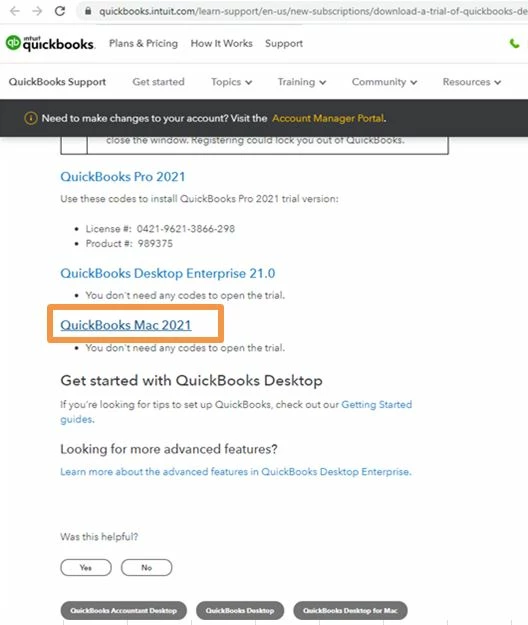
If you're interested, you may try the 30-day trial of QuickBooks Mac 2021. However, before installing the QuickBooks trial version, ensure that the system meets the proper configurations to run the QuickBooks smoothly. Once done, you can now start installing the latest trial version of QuickBooks Mac version.


Here's how:

  1. Go to this link: Download a trial of QuickBooks Desktop.
  2. Select QuickBooks Mac 2021.
  3. Open the QuickBooks.exe file you downloaded.
  4. Close all running applications.
  5. Double-click the downloaded installer The QuickBooks installation window opens automatically.
  6. Drag the QuickBooks icon to the Applications folder. The Applications folder opens automatically.
  7. Double-click the QuickBooks icon to open the application.


Check out this article for your reference: Install and set up QuickBooks Desktop for Mac.


Keep me posted if you need a hand with running your business in QuickBooks. Assistance is just one click away. Have a great day. 

4 replies

Fiat Lux - ASIA
Level 14
January 9, 2021

Catalina is released on October 2019 and company supports QBD 2016 until May 2019. I am not sure QBD 2016 supports Catalina.

PhastPhilAuthor
January 9, 2021

YES, that was my question ?


I know there were issues with Mojave and releases before R33, but not sure if they fully supported Catalina with R33.


It won't be a problem - as I'm reinstalling the Mac OS on a newer MAC I just purchased, and I'll update to the latest version that QB MAC 2016 will support - might be Mojave or Catalina, as I know it works on High Sierra.


Appreciate your reply....


Phil

January 9, 2021

my MacBook Air  just updated to Big Sur and will not run Quicklook 16 desktop...any fix for this?  I tried re installing the software..no fix it

Level 10
January 9, 2021

Hello there, @Anniegirl.


Currently, Big Sur is still under beta testing. This means that it'll only work with some QuickBooks Desktop (QBDT) for Mac versions. The supported versions are QBDT for Mac 2020 R6 and QBDT for Mac 2021 R3 and later versions. 


Your QuickBooks Desktop (QBDT) for Mac (2016) isn't a supported version with the latest MacBook OS (Big Sur). You may consider upgrading to either QBDT for Mac 2020 or 2021 so you can get back to business in no time. You can learn more about this through this article: Intuit’s support policy for QuickBooks for Mac running on macOS 11 Big Sur.


In the meantime, I'm also adding this article to learn more about the changes, improvements, and fixes made to QuickBooks Desktop for Mac 2020 and 2021: 


I appreciate your patience regarding this matter. If you have other concerns about system requirements and updates with QBDT for Mac, please let me know by adding a comment below. I'm just around to help. Take care always.

PhastPhilAuthor
January 10, 2021

HI,

Thanks greatly for your detailed response.


I'm well aware of the issues with Big Sur and the M1 Apple Silicon....no simple solution for Intuit, and I'm sure you folks will address and solve the bugs for a smooth operation of QBDT for Mac soon.


However, until I can justify the upgrade cost for QBDT 2021, I'll have to use my QB 2016 licensed copy, which I'm doing now on my Mac Pro (High Sierra) and my Macbook Air 2017, also running High Sierra.  I'm planning on buying a new MacMINI M1 as soon as I can afford the QB2021 update.


My question, specifically was: Which NEWER OS of Mac OS X will QBDT 2016 for MAC support, such as Mojave or Catalina?  I would like to run QB2016 on the latest version of MacOS and it was not apparent when I looked through the Q&A on line, which newer version QB2016 supported.  I would running this on my MacBook Air until I get the MacMINI.


Thanks

Phil

March 25, 2021

Apple has aged us out of 2016 QB for intuit, just didn't or couldn't "fix" it so I guess well all have to bite the QB and buy a new version... 

March 14, 2022

Not sure if this is at all helpful... I am running QBDT 2016 on my 2015 MacBook Pro. I updated to Catalina some time last year and QB2016 is still operating just fine for my purposes. I do not use payroll, tax payments or synced bank account features so I am not able to speak to that functionality. But for invoicing, reconciling and year end reports for tax accounting, it is a okay.