
Get 50% OFF QuickBooks for 3 months*

Buy now
Switch to QuickBooks and 70% off for 3 Months
May 28, 2025
Solved

Entering credit card refunds if the credit card is set up as a bank

  • May 28, 2025
  • 1 reply
  • 10 views

Hi


I have a client who does their own bookkeeping but uses me for software support. They set up a credit card account as a bank account (instead of a credit card account) a couple years back now and are only just running into this issue. They have received refunds from suppliers on the credit card and aren't sure how to enter them. I originally thought entering them as a credit note but then they can't be reconciled off. Not sure what other options there are in QuickBooks or maybe I'm missing something glaringly obvious!

Best answer by Aldren18

I’ll guide you through recording a supplier refund in QuickBooks Online (QBO), Zach.


Since QBO treats refunds as money coming into the account, the most effective method is to record the refund as a Bank Deposit into the credit card (bank) account. This will accurately increase the account balance, just as a refund should.


To keep your records clear and easy to track, I recommend adding a Memo that notes the deposit is a refund from the specific vendor.


Here’s how to do it:


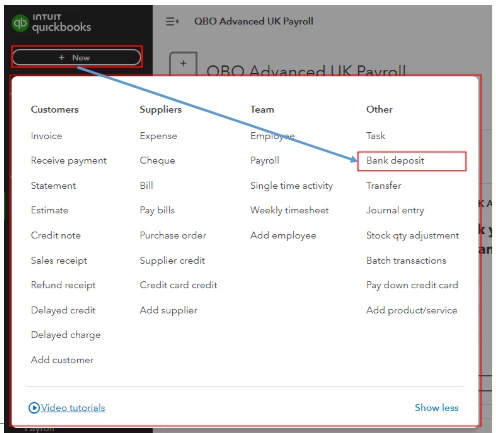
  1. Click the + New button and select Bank Deposit.
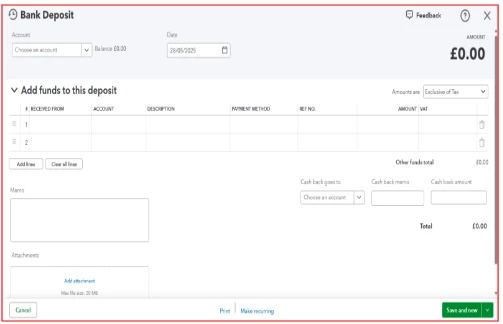
  2. From the Account dropdown at the top, choose the credit card account.
  3. In the Add funds to this deposit section, enter all the necessary details, including the supplier’s name and the refund amount.
  4. In the Memo field, add a note indicating that this deposit is for the refund.
  5. Click the Save button to record the deposit.


I've included screenshots for your reference below:


When it’s time to reconcile, match this deposit against the corresponding refund transaction in your bank feed or credit card statement.


You might also find this article helpful if you want to save changes to a specific report: Customize reports in QBO.


Please revisit this thread with any questions or updates.

1 reply

Aldren18QuickBooks TeamAnswer
QuickBooks Team
May 28, 2025

I’ll guide you through recording a supplier refund in QuickBooks Online (QBO), Zach.


Since QBO treats refunds as money coming into the account, the most effective method is to record the refund as a Bank Deposit into the credit card (bank) account. This will accurately increase the account balance, just as a refund should.


To keep your records clear and easy to track, I recommend adding a Memo that notes the deposit is a refund from the specific vendor.


Here’s how to do it:


  1. Click the + New button and select Bank Deposit.
  2. From the Account dropdown at the top, choose the credit card account.
  3. In the Add funds to this deposit section, enter all the necessary details, including the supplier’s name and the refund amount.
  4. In the Memo field, add a note indicating that this deposit is for the refund.
  5. Click the Save button to record the deposit.


I've included screenshots for your reference below:


When it’s time to reconcile, match this deposit against the corresponding refund transaction in your bank feed or credit card statement.


You might also find this article helpful if you want to save changes to a specific report: Customize reports in QBO.


Please revisit this thread with any questions or updates.
