Solved
VAT Exclusive Estimates
Hello,
My Estimates show amounts including VAT on the 'Rate' column when printing or previewing, even when the 'Amnts Inculusive' box is unchecked. How do I turn this off? I am using QuickBooks Premier Accountant 2018.

Hello,
My Estimates show amounts including VAT on the 'Rate' column when printing or previewing, even when the 'Amnts Inculusive' box is unchecked. How do I turn this off? I am using QuickBooks Premier Accountant 2018.
Hi @Ashleigh1
I could do that, but it wouldn't show the unit Cost/Rate, which customers want to see.
It appears there's no known solution to the problem.
I appreciate you coming back, @Ashleigh1.
Thanks for keeping us updated with the results of every troubleshooting steps you've taken so far. At this time, we can try creating an estimate using a sample file to check if you're having a problem with only one file and not the program itself. You can also open it from a different location to check if the problem might be coming from a damaged folder.
You can visit this article for available trail links: QuickBooks Test-Drives and Trial Links.
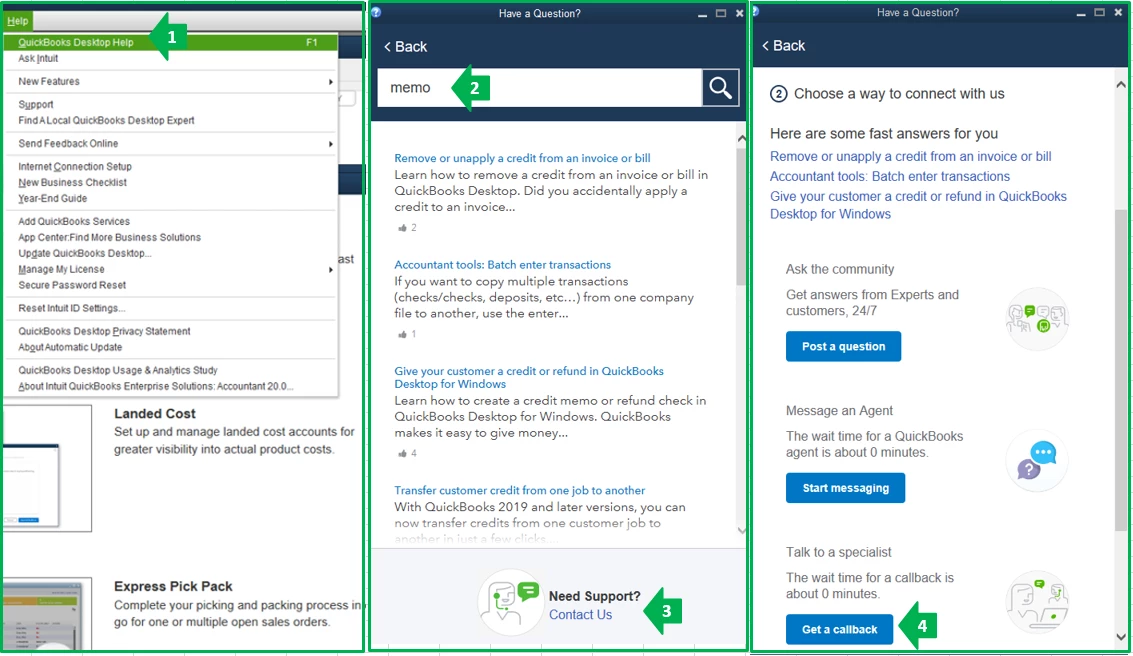
If the same thing happens, I suggest contacting our QuickBooks Care Support. This needs a thorough investigation which they can best handle using the special tools such as screen sharing.
Here are some steps to contact support:
You can always reach back to me if you have follow-up questions. I'm always happy to help. Wish you all the best of luck!
Enter your E-mail address. We'll send you an e-mail with instructions to reset your password.