
SUMMER SAVINGS 90% OFF QuickBooks for 3 months* Ends 8/27

Buy now
Switch to QuickBooks and 70% off for 3 Months
March 16, 2023
Question

Error 401 with responseMessage: "4225" when trying to access Quickbooks online with ANY account

  • March 16, 2023
  • 7 replies
  • 59 views

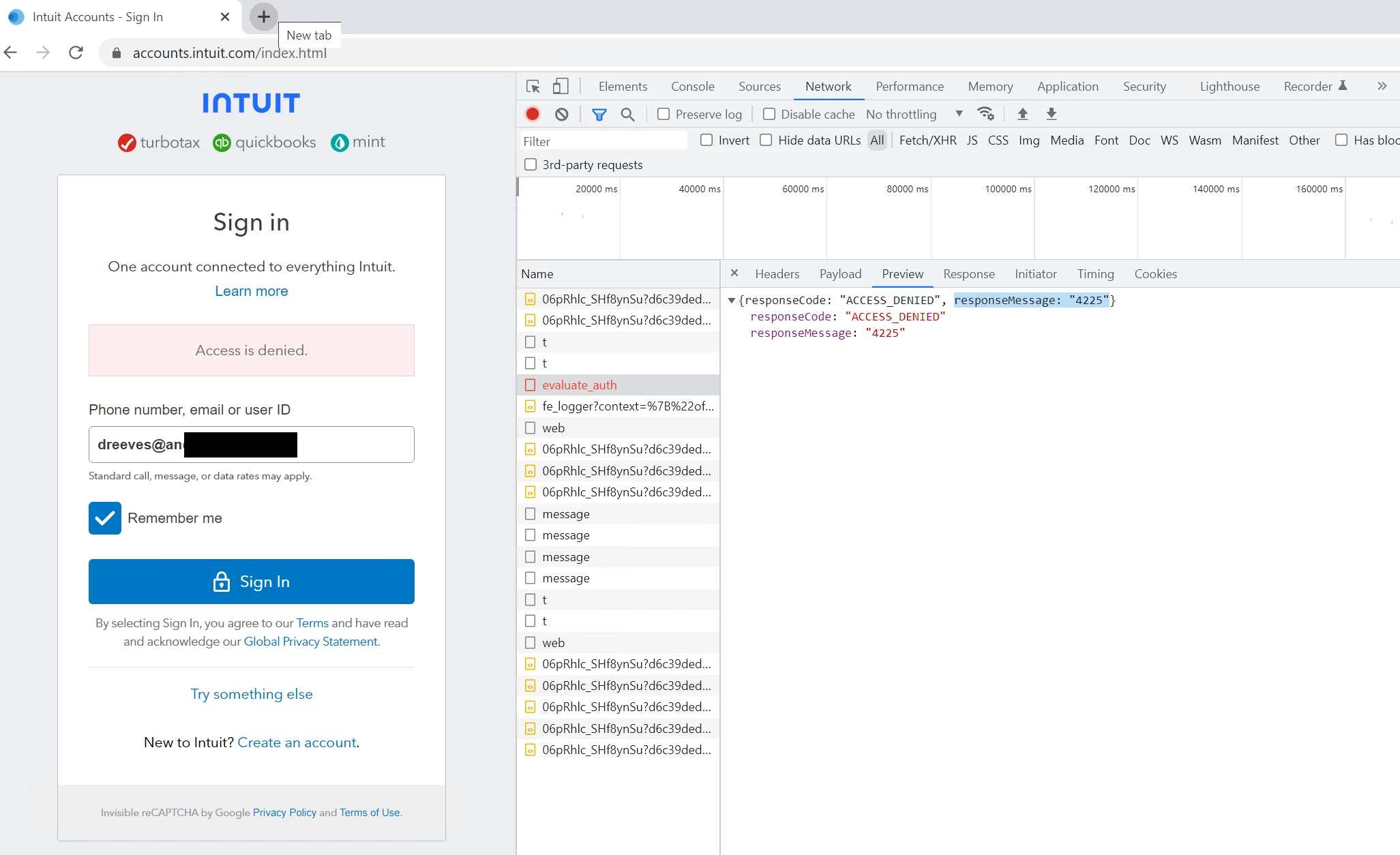
For whatever reason our Azure Virtual Desktops (Windows 10 Multisession hosts) get this Denied Access error on Accounts.intuit.com no matter what account we try on any browser, on any host. The hosts are behind an Azure Firewall but we're seeing nothing blocked on our end and we're catching a 401 error with a 4225 message - ACCESS DENIED. Outside the AVD platform it works fine. 


7 replies

Moderator
March 16, 2023

It's a great pleasure to welcome you here in the Community, @Dreeves14. I'd be happy to provide information about this error. 


I appreciate you posting your detailed concern and a screenshot. Since QuickBooks Online works fine outside AVD, the best option for this is reaching out to Azure Virtual Desktop Support. They are the right team who can investigate your account and provide the appropriate solution for this issue. 


You may want to check this article to know what computer and browser you need for the best experience when using QuickBooks:  System requirements for QuickBooks Online.


If you want to change your credentials in QuickBooks Online in the future, you can also browse this article: Update or change your Intuit Account login information.


Having you here in the Community forum is greatly appreciated. We always have your back if you need further assistance with any QuickBooks-related concerns. Feel free to reach out to us again. Have a nice day!

Dreeves14Author
March 16, 2023

Its not a password issue, its not an account issue. QB Online is blocking us when we're in AVD, its 100% on QB's end but its nearly impossible to get a competent support person through Intuit to even look at an issue like this.


I can put any email address under the sun in that field and hit "Sign In" inside AVD and it gives me that same error. I do it anywhere else, I get the "We can't find anyone with..." 


In AVD


I hit signin, ACCESS DENIED, same error in Dev Tools over and over and over... 401 error with response 4225

December 24, 2025

Has anyone found the cause/resolution for this?  I have several users experiencing this issue within AVD. Some users work without issue, while others receive the access is denied error. It works fine outside of AVD.


I did find that by clearing both folders in this directory, that it works for a short period of time:

C:\Users\(The users folder that cannot login)\AppData\Local\Intuit\Common\


Lacerte ended up working, but QuickBooks Online still doesn't for the same users.  Any help would be greatly appreciated!


QuickBooks Team
December 24, 2025

Hi there, Ctheron. Thanks for reaching out to the Community forum.


Based on the description of your concern, this issue appears to be related to how QuickBooks Online (QBO) interacts with Azure Virtual Desktop (AVD) for certain users. While clearing the mentioned folders provides a temporary fix, this suggests technical compatibility or account-related issues.


Therefore, I recommend reaching out to our live support team for assistance. They can review QuickBooks behavior within AVD, address account-specific or configuration issues to ensure seamless functionality.


Here's how to reach them:


1. Click the Help (?) icon located at the upper right corner of your QBO account.

2. In the Assistant tab, enter Talk to an expert.

3. Follow the prompts to connect via chat or request a callback. You can also use the Search tab to enter your question, then select Contact Us to reach our support team.


You can review their support hours in this article to reach out at a time that works best for you: Get help with QuickBooks products and services.


If you need further assistance, please let us know in the comments below.