
Get 50% OFF QuickBooks for 3 months*

Buy now
Switch to QuickBooks and 70% off for 3 Months
September 22, 2025
Solved

How do I delete a class on the Bank Deposit page?

  • September 22, 2025
  • 1 reply
  • 7 views

I use the Account, description, payment method, amount and class. There is one class I want to delete. How do I do that?

Best answer by FaithA

You can't delete a class directly from the Bank Deposit page, Marcy. However, you can make them inactive by going through the All lists in the settings first.


Follow these steps:
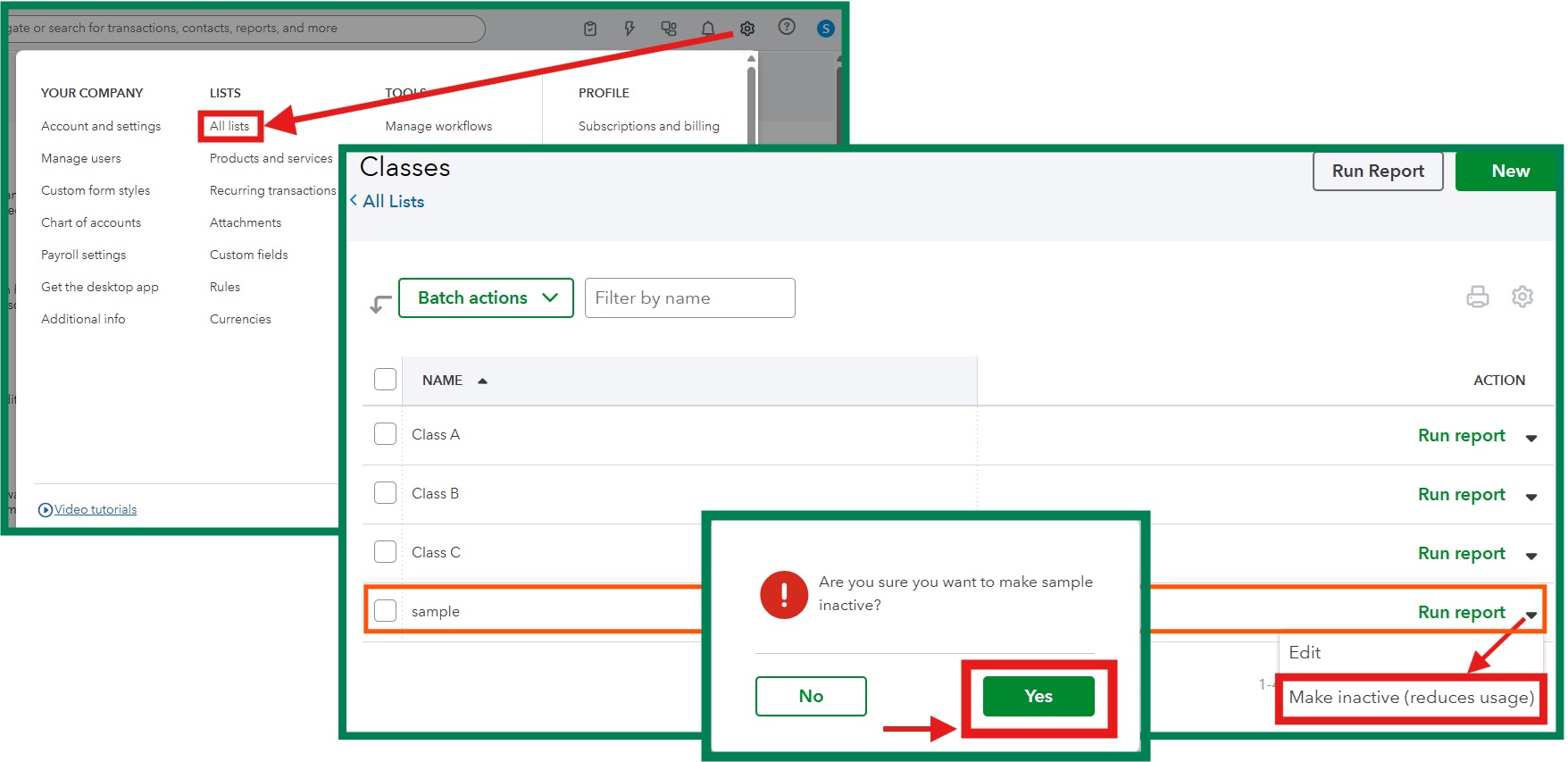
 

  1. At the upper-right, click the Gear icon ⚙︎ and select All Lists
  2. Click on Classes. Locate the class to inactivate. 
  3. Under the ACTION column, click the drop-down arrow beside Run report
  4. Click Make inactive
  5. Select Yes to confirm. 


If you have other questions, don't hesitate to comment them in this thread. We're here to help. 

1 reply

FaithAAnswer
Level 1
September 22, 2025

You can't delete a class directly from the Bank Deposit page, Marcy. However, you can make them inactive by going through the All lists in the settings first.


Follow these steps:


  1. At the upper-right, click the Gear icon ⚙︎ and select All Lists
  2. Click on Classes. Locate the class to inactivate. 
  3. Under the ACTION column, click the drop-down arrow beside Run report
  4. Click Make inactive
  5. Select Yes to confirm. 


If you have other questions, don't hesitate to comment them in this thread. We're here to help. 

September 24, 2025

This answered my question and I was able to do what I wanted to do. Thank you!

QuickBooks Team
September 24, 2025

It's great to see that you've got a way to inactive a class on your Bank Deposit page, Marcy.
 
We are always here to assist you with managing your bank deposits in QuickBooks Online (QBO) or with any issues you have.


Feel free to reach out at any time in the Community space.