
SUMMER SAVINGS 90% OFF QuickBooks for 3 months* Ends 8/27

Buy now
Switch to QuickBooks and 70% off for 3 Months
June 26, 2025
Solved

How do I print check stubs (remittance advice) with my vendor checks?

  • June 26, 2025
  • 4 replies
  • 212 views
No text available
Best answer by Ethel_A

We can generate and print a report that includes a detailed list of all bills and bill payment checks to share with vendors, @lorif-printcocor.


Currently, QuickBooks Online is unable to print remittance advice. As a workaround, you can print and email the Transaction list by the vendor report to your vendor.


Here's how:
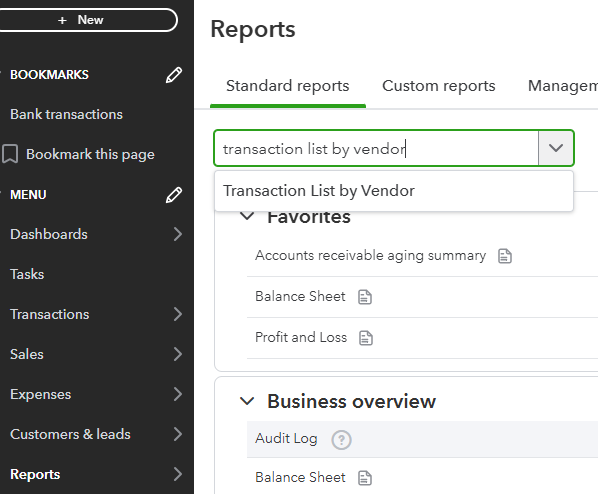
 

  1. Click the Reports from the left menu.
  2. Enter the Transaction lists by vendor.


  3. Tap Customize and select the info you need, like the Date, and Filter the data you need.
  4. Hit Run report.
  5. Click Export to Excel.


I've also included a detailed resource about paying bills which may come in handy moving forward: Learn about QuickBooks Bill Pay.

If you need assistance managing remittance advice in QBO, consider consulting our QuickBooks Live Expert Assisted. They can provide valuable tips and support efficiently.


If you have any questions, don't hesitate to comment below.

4 replies

Ethel_AQuickBooks TeamAnswer
QuickBooks Team
June 26, 2025

We can generate and print a report that includes a detailed list of all bills and bill payment checks to share with vendors, @lorif-printcocor.


Currently, QuickBooks Online is unable to print remittance advice. As a workaround, you can print and email the Transaction list by the vendor report to your vendor.


Here's how:

 

  1. Click the Reports from the left menu.
  2. Enter the Transaction lists by vendor.


  3. Tap Customize and select the info you need, like the Date, and Filter the data you need.
  4. Hit Run report.
  5. Click Export to Excel.


I've also included a detailed resource about paying bills which may come in handy moving forward: Learn about QuickBooks Bill Pay.

If you need assistance managing remittance advice in QBO, consider consulting our QuickBooks Live Expert Assisted. They can provide valuable tips and support efficiently.


If you have any questions, don't hesitate to comment below.

BigRedConsulting
Level 15
June 26, 2025

RE: Currently, QuickBooks Online is unable to print remittance advice.


Odd.  The real QuickBooks Desktop has been able to do it for over a decade, I think.

April 11, 2026

How can I receive and print my check stubs 

Bryan_M
QuickBooks Team
April 11, 2026

Hi there, @nsrbjr_1958. Printing a remittance advice check stub is currently unavailable in QuickBooks Online (QBO). However, there's a way to send it to a vendor to acquire a copy.


First off, record the transaction as an expense. Then, from the All apps > Expenses & Bills > Vendors. Pick the vendor you want to send the remittance notice to, and then select the correct transaction box. Please take note that this only works for bill payment entries. Choose Send remittance. You may edit or add additional info to the body of the message. Once done, send it.


I'll also share this article for additional information before sending the remittance notice: How to send remittance advice in QuickBooks Online.


Alternatively, please run the Transaction Lists By Vendor report and filter it in the Customize tab to display bill payments in a check stub. Once you finalize it, print the report.


Let us know if you have additional questions so that we can assist you as soon as possible.
