
Get 50% OFF QuickBooks for 3 months*

Buy now
Switch to QuickBooks and 70% off for 3 Months
November 6, 2025
Solved

How do I split a vendor invoice between multiple locations? For example, I have an invoice for group benefits that need to be allocated to 4 out of 10 locations.

  • November 6, 2025
  • 1 reply
  • 16 views
No text available
Best answer by carneil2

We can only use location in a single transaction, ttaylor6.


The option to split bills between multiple locations isn't available. As a workaround, you can use the Class Tracking feature to track other locations in a single transaction.


First, enable it in your Accounts and Settings.
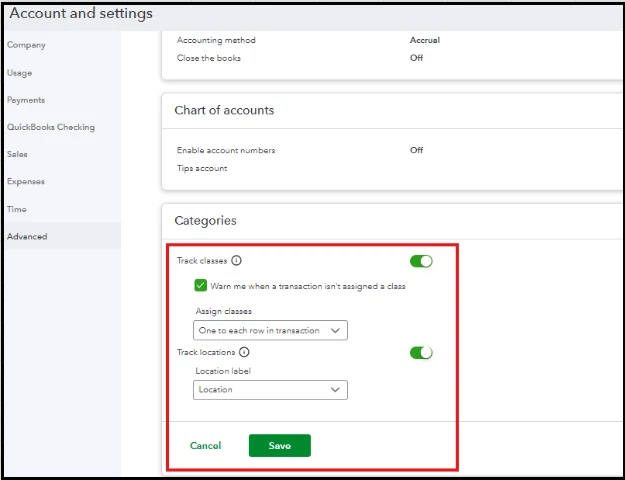
 

Then, create a new class for the different location and assign it to individual line items on a bill: 


  1. Click the Gear icon, then select All list
  2. Select the Classes option.
  3. Click the New button to add a new class for the other location. 
  4. After creating the new class, assign it to a bill on the individual line item. 


Learn more about managing your classes here: Create and manage classes in QuickBooks Online.


Alternatively, you can create multiple bills for each location.


For any further queries, feel free to drop your comment below.

1 reply

carneil2QuickBooks TeamAnswer
QuickBooks Team
November 6, 2025

We can only use location in a single transaction, ttaylor6.


The option to split bills between multiple locations isn't available. As a workaround, you can use the Class Tracking feature to track other locations in a single transaction.


First, enable it in your Accounts and Settings.


Then, create a new class for the different location and assign it to individual line items on a bill: 


  1. Click the Gear icon, then select All list
  2. Select the Classes option.
  3. Click the New button to add a new class for the other location. 
  4. After creating the new class, assign it to a bill on the individual line item. 


Learn more about managing your classes here: Create and manage classes in QuickBooks Online.


Alternatively, you can create multiple bills for each location.


For any further queries, feel free to drop your comment below.
