
Get 50% OFF QuickBooks for 3 months*

Buy now
Switch to QuickBooks and 70% off for 3 Months
November 14, 2025
Solved

How do I stop Credits automatically applying to invoices.

  • November 14, 2025
  • 1 reply
  • 12 views

How do I stop a credit from being applied to an invoice?

Best answer by Rusimyhr

Welcome to the Community space, @sharonmcmanis.


You can turn off the automation feature for applying credits to the invoices from your Accounts and settings.. Here's how:
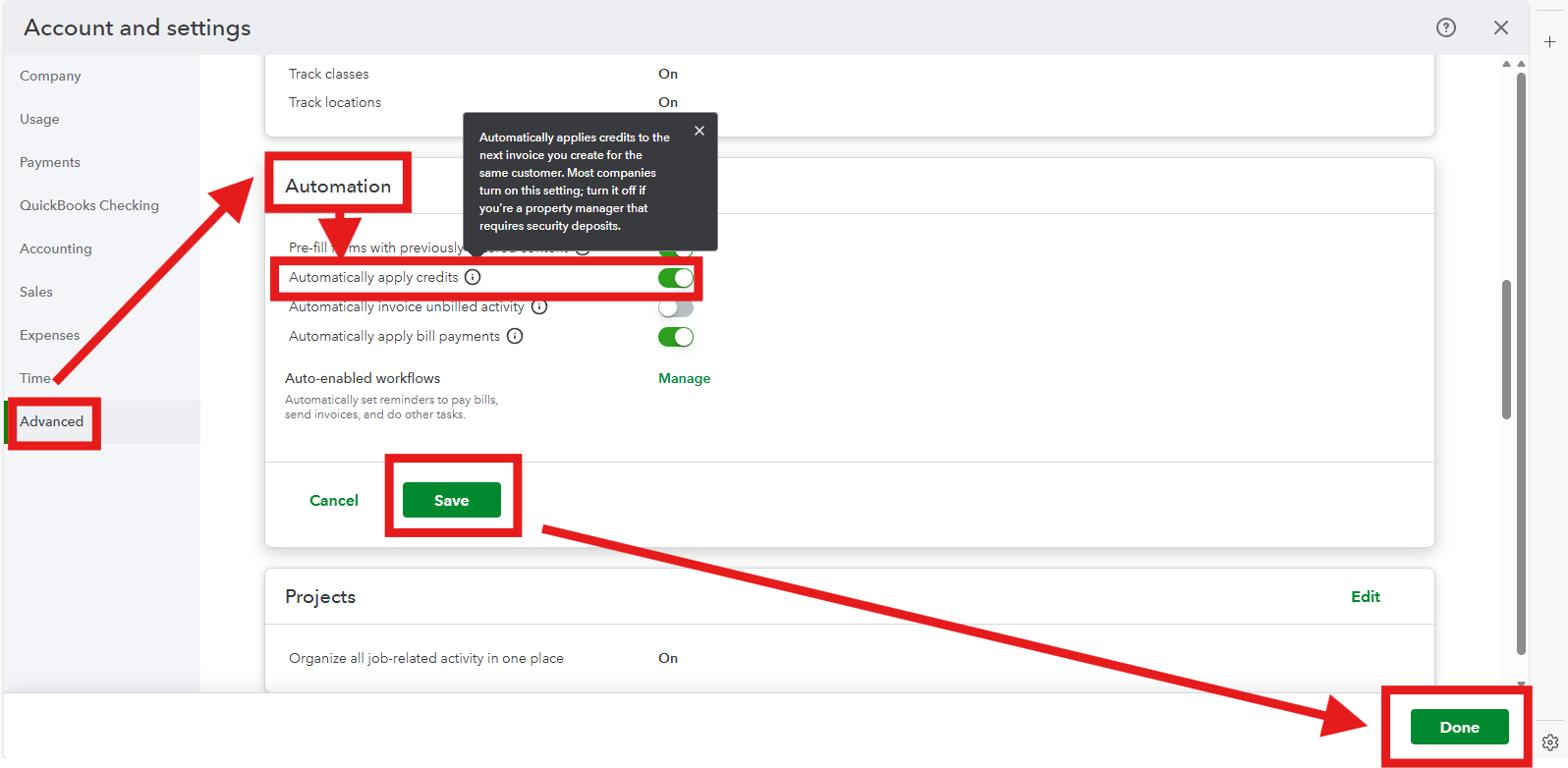
 

  1. Navigate to the Gear icon and select Account and settings.
  2. Go to the Advanced tab.
  3. Under the Automation section, look for the option Automatically apply credits and turn this option off.
  4. Click Save and then Done to finalize the update.                                            


This adjustment ensures credits will no longer be applied automatically to invoices, giving you full control over when and how they are used. 


If there's anything else we can assist you with, please feel free to reach out to us.

1 reply

RusimyhrQuickBooks TeamAnswer
QuickBooks Team
November 15, 2025

Welcome to the Community space, @sharonmcmanis.


You can turn off the automation feature for applying credits to the invoices from your Accounts and settings.. Here's how:


  1. Navigate to the Gear icon and select Account and settings.
  2. Go to the Advanced tab.
  3. Under the Automation section, look for the option Automatically apply credits and turn this option off.
  4. Click Save and then Done to finalize the update.                                            


This adjustment ensures credits will no longer be applied automatically to invoices, giving you full control over when and how they are used. 


If there's anything else we can assist you with, please feel free to reach out to us.