How to change the setup of the receive payment screen Desktop Pro Plus 2024
- July 10, 2025
- 3 replies
- 51 views
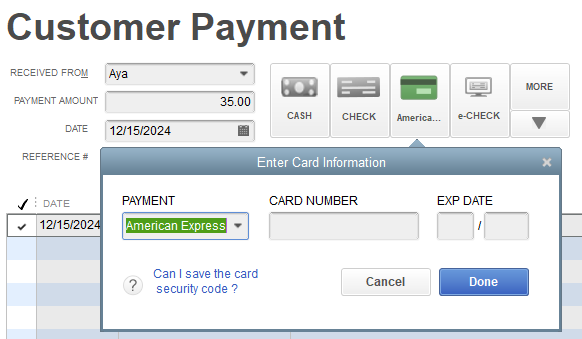
I've been trying to figure out how to change the layout of the receive payments screen. I've found the layout designer, and have read several other articles, but what I've found isn't what I am trying to do. On the receive payment page, there is a button that when clicked, it opens another window with a drop down so you can pick which credit card someone is paying with. My goal is to have the different credit card options on their own clickable buttons so I don't have to use a drop down. In other words, I want each credit card name (Visa, MC, AMEX, etc) to the right of the line that has CASH, CHECK, ECHECK, etc. When processing a lot of payments, it would save a lot of time if I didn't have to use the drop down to select the credit card type. We never store the credit card info, so I don't need that field either on the drop down section. Honestly, I'm not sure this can even be done, but I thought I'd ask. Sorry for the quality of the screen shot. Thank you.