You can perform browser troubleshooting steps to resolve the bookmarks issue, @SarahCO.
First, let’s clear your browser's cache and cookies specific to Intuit to remove excess data. As an alternative, you can try using a different supported browser to avoid compatibility issues.
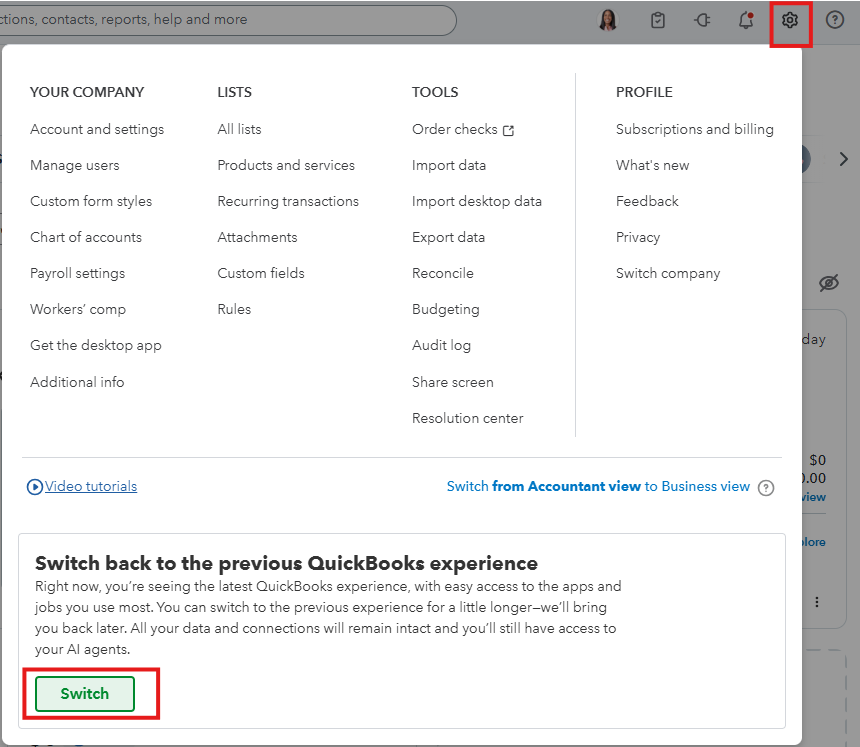
However, if you want to opt out of the new QBO experience or interface. Here's how:
- Log in to your QuickBooks Online account as the primary admin.
- Go to Settings and select the Switch button to revert to the previous QuickBooks interface.
You may also want to explore our QuickBooks Live Expert Assisted Team, which can assist you with your transactions, accounts, and reconciliations.
We're always here to help if you have any other concerns about QuickBooks.
