
Get 50% OFF QuickBooks for 3 months*

Buy now
Switch to QuickBooks and 70% off for 3 Months
New Member
July 7, 2026
Question

No longer able to track returns for donors in Bank Deposit

  • July 7, 2026
  • 2 replies
  • 56 views

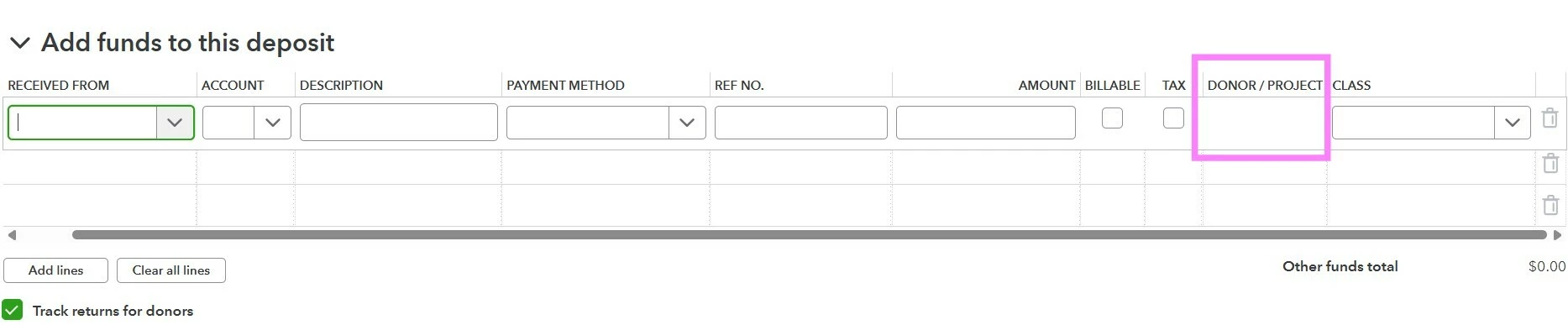
QBO has removed the ability to track returns by donor/project in a Bank Deposit transaction.


When the "Track returns for donors" check box is selected, the Donor/Project field is no longer editable, and only auto-populates w/ who the return was received from. This is a huge loss in functionality because we need to be able to track that we received a refund from a vendor, for an expense that was originally charged to a grant (Project), and we need the refund to show up in the project while showing the original vendor the refund came from.


To provide a concrete example: my client paid for event insurance for an event they received a grant for. In the original expense transaction, I selected the grant (Project) in the Donor/Project field so the cost of the event insurance came out of the total grant (project) amount. The event insurance was cancelled and refunded, and typically I would create a Bank Deposit transaction, put the event insurance vendor in the “Received from” field and the grant (Project) in the Donor/Project field. Now QBO will not let me edit the Donor/Project field and will only allow that filed to autopopulate with the donor/vendor in the “Received from” field.


This makes QBO unusable for nonprofits, because we need to track both that the refund came from the original vendor, and that the funds should be returned to the grant that they originally came out of.

See image below of the now un-editable “Donor/Project” field:
 

Please bring this feature back ASAP

2 replies

New Member
July 7, 2026

I am experiencing the same frustration and issues. After sitting on the phone for 2 hours and 45 minutes, I was told this is a “current product limitation” in QuickBooks Online.

I am the only bookkeeper at an independent car dealership that sells anywhere from 100-200 vehicles a month… so in other words, I’m always extremely busy. I need to be able to log a deposit as received from the lender our customer financed through and have that deposit linked to the project/customer, so everything is linked between vendors/customers and is easy to find when looking back for audits.

I was informed by QBO support that the engineers expect users to create a vendor credit and link the line items to the customers there, then create your deposit slip with the account class as accounts payable. Then, you’ll have to create a bill payment to link the deposit and the vendor credit together so they zero out the A/P balance. I was able to figure out that you can remove the bank account you are “making the bill payment” from as long as the deposit line item and vendor credit amount are exactly the same (which they should be), otherwise when you go to reconcile, there will be a lot of $0.00 bill payments in whichever account is listed on the bill payment.

This is extremely frustrating and time consuming. QBO engineers, please fix this issue and put it back to how it was. I really don’t have time for all of these extra steps just to log a simple deposit that was received from a vendor on behalf of a customer. There was nothing wrong with how it worked before… What’s that saying everyone uses about everything? Oh, I think it’s If it ain't broke, don't fix it”.

All that was done with this “product update” (AKA a major product downgrade) was annoy and frustrate the end users. Unless these engineers want to come to our offices everyday and work for us on QuickBooks payroll to make up for all of this time we will have to spend doing a million extra steps, I would hope they use their smart brains to put this simple and useful feature back to how it was in the next 24 hours… Otherwise, I’m sure I could reach out to some accounting and bookkeeping friends and have them give some great suggestions of alternative accounting software. If it’s not back up and running like it was, I’ll share the answers I get so others that are annoyed with this have alternative options!

cody_a
Community Manager
July 7, 2026

I completely understand how disruptive it is to have your workflow interrupted, especially when managing high-volume transactions that rely on seamless field functionality. I’ve personally escalated this issue to the product team so they can dig deeper into what's happening.

Our experts will review the details you've already shared here, so you won't have to repeat yourself or walk through unnecessary workarounds. You can expect to be contacted by one of our experts with the next steps within the next business day. We’ll also update this thread as soon as we have more information.

cody_a
Community Manager
July 7, 2026

Accurate fund accounting is vital for your nonprofit, and it's clear how this Bank Deposit field restriction is disrupting your ability to track vendor refunds back to your grant projects.

We want to get this sorted out for you, so we've looped in our Next Level Help team. An expert will review your Community comments and support history to ensure we have all the context. You can expect them to reach out to you within the next business day to discuss the next steps.