
Get 50% OFF QuickBooks for 3 months*

Buy now
Switch to QuickBooks and 70% off for 3 Months
February 5, 2026
Solved

on the Expense/pay page i would like the attachment to show when a receipt is attached to the transaction. I had it once and then it disappeared.

  • February 5, 2026
  • 1 reply
  • 13 views
It is time consuming to have to open each transaction to see if the receipt is attached.

    Best answer by JeraldR

    Hello there, Laurel.


    I'd be glad to help you find that attachment column again, where you can see if that transaction has attachments.


    Here's how:


    1. Open your QuickBooks Online Company. 
    2. Head to My Apps, then Expense & Bills tab. 
    3. In the Expense transactions tab, navigate to Customize settings in the upper right of your screen. 
    4. Click the Columns dropdown. 
    5. Check the Box next to Attachments.


    If a receipt is attached, you'll see a number (e.g., "1") or a paperclip icon on that row. See screenshot: 
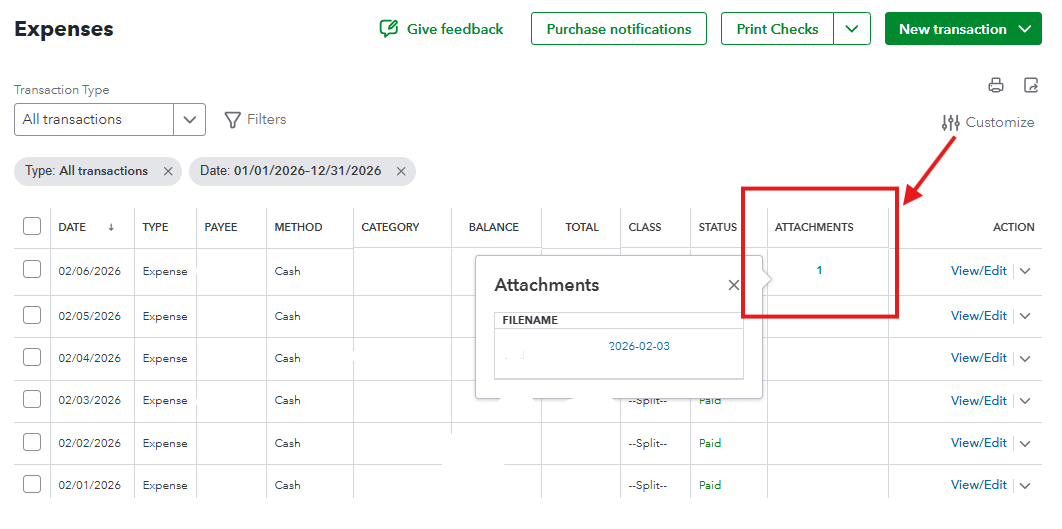
     

    If you've checked the box and still don't see it, your browser may be zoomed in too far (e.g., 110% or higher). QuickBooks will pinch columns out of view to save space.


    We're happy to answer any other questions or concerns.

    1 reply

    JeraldRQuickBooks TeamAnswer
    QuickBooks Team
    February 5, 2026

    Hello there, Laurel.


    I'd be glad to help you find that attachment column again, where you can see if that transaction has attachments.


    Here's how:


    1. Open your QuickBooks Online Company. 
    2. Head to My Apps, then Expense & Bills tab. 
    3. In the Expense transactions tab, navigate to Customize settings in the upper right of your screen. 
    4. Click the Columns dropdown. 
    5. Check the Box next to Attachments.


    If a receipt is attached, you'll see a number (e.g., "1") or a paperclip icon on that row. See screenshot: 


    If you've checked the box and still don't see it, your browser may be zoomed in too far (e.g., 110% or higher). QuickBooks will pinch columns out of view to save space.


    We're happy to answer any other questions or concerns.