
SUMMER SAVINGS 90% OFF QuickBooks for 3 months* Ends 8/27

Buy now
Switch to QuickBooks and 70% off for 3 Months
New Member
July 16, 2025
Solved

printing a year of attachments from vendor bills

  • July 16, 2025
  • 2 replies
  • 31 views

We have a Use Tax Audit and I need to print a years worth of vendor attachments as all the original vendor bills are attached to various AIA's. Is there a way I can print all of 2024 vendor bill attachments without having to go to each bill and clicking the attachment and printing? Thanks
Best answer by NicoleAscencionS

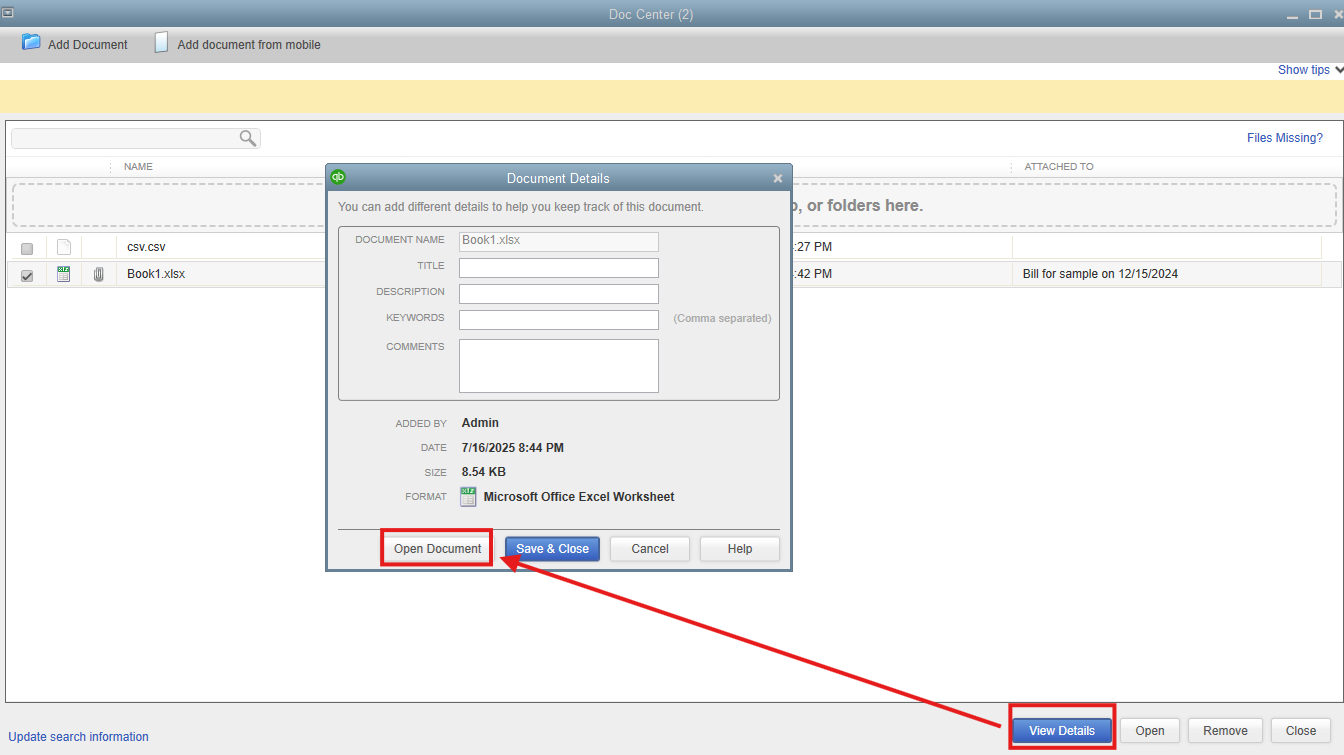
You can go to the Document Center to directly print the attachments, Perk.


Here's how:


  1. Go to the Company menu, then Documents.
  2. Choose Doc Center.
  3. Locate the attachment you want to print and select View Details.
  4. Click Open Document and print it.


Please note that you'll need to manually open and print each attachment.


To learn more details about this feature, you can review this article: QuickBooks Document Center: FAQs.


Keep us posted below if you have additional questions about printing attachments in QuickBooks. The Community is always here to assist you.

2 replies

Moderator
July 16, 2025

You can go to the Document Center to directly print the attachments, Perk.


Here's how:


  1. Go to the Company menu, then Documents.
  2. Choose Doc Center.
  3. Locate the attachment you want to print and select View Details.
  4. Click Open Document and print it.


Please note that you'll need to manually open and print each attachment.


To learn more details about this feature, you can review this article: QuickBooks Document Center: FAQs.


Keep us posted below if you have additional questions about printing attachments in QuickBooks. The Community is always here to assist you.

PerkAuthor
New Member
July 18, 2025

Thank you. I was hoping I didn't have to go one at a time! I thought I would, but I figured it wouldn't hurt to ask. Have a great day!