
QuickBooks Enterprise 2024 - "Administrator Permissions Needed" on Windows Server 2025 RDS - Exhausted All Options
Environment:
QuickBooks Enterprise Solutions: Contractor Edition 24.0 (v34.0.4018.3401)
Windows Server 2025 Standard (Build 26100)
Remote Desktop Services with RD Gateway
Active Directory domain environment
Company file hosted locally on C: drive
The Problem:
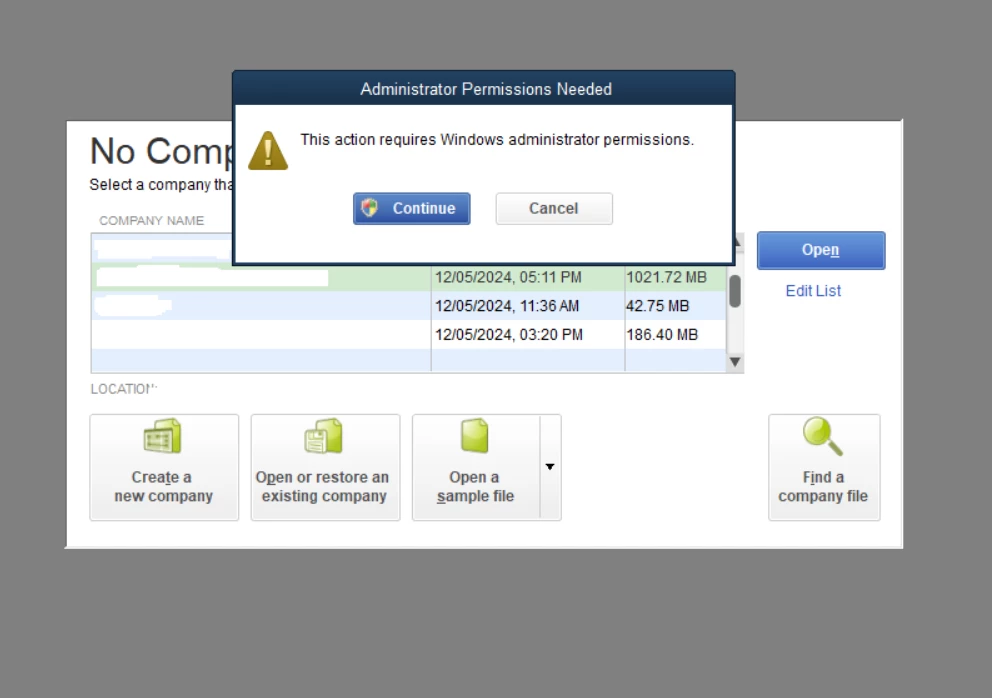
We are hosting QuickBooks Enterprise 24.0 on Windows Server 2025 in an RDS environment. Two standard domain users connect via RD Gateway to a dedicated session host. Every time a non-admin user opens QuickBooks or tries to open the company file, they receive:
"Administrator Permissions Needed - This action requires Windows administrator permissions"
Followed by Error -6210, 0 if they cancel the prompt.
The root cause is DBManagerExe.exe, which QuickBooks calls with the StartMonitorService argument on every launch. This executable has requireAdministrator baked into its manifest, making it impossible for standard users to run it.
Everything We Have Tried:
1. Granted QBDataServiceUser34 full control on all company file directories and QuickBooks program files folder.
2. Granted Remote Desktop Users full control on the QuickBooks program files directory and all company file locations.
3. Confirmed QuickBooksDB34 and QBCFMonitorService are both set to Automatic, running as Local System with "Allow service to interact with desktop" enabled.
4. Set NoInteractiveServices = 0 in HKLM\SYSTEM\CurrentControlSet\Control\Windows.
5. Created a scheduled task that runs at every user logon as SYSTEM with highest privileges, executing DBManagerExe.exe StartServer and net start QuickBooksDB34 to ensure the database service is running before QuickBooks opens.
6. Tried setting __COMPAT_LAYER=RunAsInvoker as a per-user environment variable. This suppressed the UAC prompt but caused Error -6210, 0 because DBManagerExe.exe genuinely needs elevation to manage the service.
7. Tried the RunAsInvoker registry compatibility flag under HKLM\SOFTWARE\Microsoft\Windows NT\CurrentVersion\AppCompatFlags\Layers. Same result.
8. Disabled automatic updates by emptying the DownloadQB34 folder, denying Write and Delete permissions for Everyone and SYSTEM, and setting AutoUpdate=0, AutoDownload=0, AutoUpdateFrequency=0 in the registry.
9. Set MULTIUSERMODE=Y in each user's QBWUSER.INI and made the files read-only.
10. Verified all shortcuts use local paths, not UNC paths.
11. Confirmed company file is on the local C: drive, not a network share.
12. Installed and updated QuickBooks using change user /install and change user /execute as required for RDS.
13. Set ConsentPromptBehaviorUser = 0 to auto-deny elevation for standard users. The prompt still appeared as a QuickBooks internal dialog, not a Windows UAC prompt.
The Outcome:
None of these solutions resolved the issue permanently. We have given up and granted both users local Administrator privileges on the server, which is obviously not ideal from a security standpoint but is the only thing that actually works.
The Question:
Has anyone found an actual fix for this that does not involve making end users administrators? Is Intuit aware that DBManagerExe.exe's elevation requirement makes QuickBooks Enterprise fundamentally incompatible with standard user accounts on RDS?