
Get 50% OFF QuickBooks for 3 months*

Buy now
Switch to QuickBooks and 70% off for 3 Months
April 15, 2026
Question

Template Column Not Printing

  • April 15, 2026
  • 1 reply
  • 7 views

New issue that we just noticed: We have a custom template called TTC Pick List based on Sales Order and all of a sudden not all columns are printing, notably the Backordered field which we labeled as Needed.


Everything looks good in Layout Design but when looking at it in Print Preview or actually printing that one column doesn’t show / print. No changes have been made to the template.
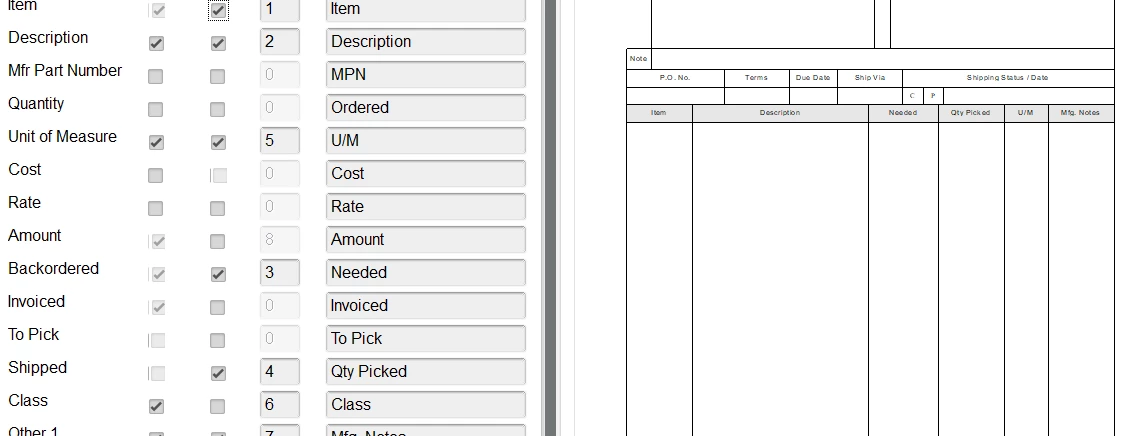
We are using Enterprise 24 remotely hosted and everything is up to date. Every other template seems to be printing correctly and even some TTC Pick List print all the required columns so we can’t a common denominator for the one that don’t.

1 reply

Level 8
April 15, 2026

Hey there, @TTCLLC1


We appreciate you coming to the Community with your concerns about printing a certain template. 


Based on the details you gave, let's try some troubleshooting steps to help narrow down the cause or get this resolved. Using the Verify and Rebuild tool within your QuickBooks Desktop will help resolve common data issues. Here's how: 


Verify your company data

Run the verify utility to scan your company file for errors or data damage.


  1. Go to Window, then select Close All.
  2. Go to File, then select Utilities.
  3. Press Verify Data.


Rebuild your company file data

If the verify tool finds data damage, use the rebuild tool to repair your company file. A backup is required before you can rebuild. Note: If you use Assisted Payroll, contact us before you rebuild your data.


  1. Go to File, then Utilities, then select Rebuild Data.
  2. QuickBooks will ask to make a backup before it rebuilds your company file.
  3. Press OK.
  4. Choose where you want to save your backup, then click OK. Do not replace another backup file.
  5. Enter a new name in File name and  Save.
  6. Tap OK when you get the message "Rebuild has completed".


Feel free to reach back out if you have any other questions. I'll be waiting for your response!