
SUMMER SAVINGS 90% OFF QuickBooks for 3 months* Ends 8/27

Buy now
Switch to QuickBooks and 70% off for 3 Months
May 8, 2024
Question

Deposit Detail - Doubles the Total

  • May 8, 2024
  • 6 replies
  • 67 views

Hello,

Modern View Deposit Detail is doubling the deposit amounts. The Classic View Reports do not have this same issue. Deposit Detail report lists the total deposit amount then each individual deposit under the total. Then at the bottom of each it totals the deposit total and each individual amount. We don't use invoicing in QBO. Just strait deposits. I do not upload the bank statements. Community help answers all have to do with matching, invoicing or uploading bank statements - none of that we use. 


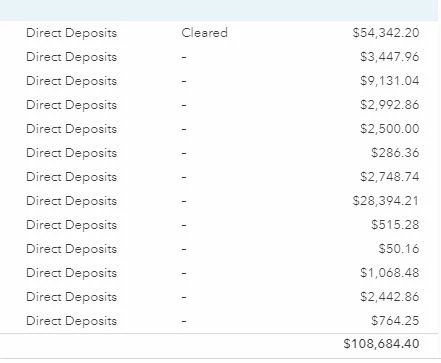
Example 1: The top lines show the actual deposit amount of $54,342.20. Then lists each deposit amount. At the bottom the total is $108,684.40 - - It should show just $54,342.20. - There for the deposit detail report has doubled the actual deposit amount. 
Example 2:

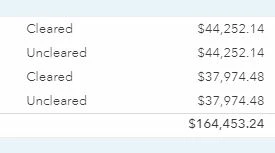
There were 2 deposits on this date: I do not have double entries. 44,252.14 and 37,974.48 is $88226.62 not the 164k listed at the bottom total. 
 

I do not see anything to change this in the report options.


Please let me know how to fix. In the community only found replies to showing the splits below the total. I agree. But that is not the problem. The problem is the total at the bottom that doubles.

Thank you for reading all this!!!


6 replies

QuickBooks Team
May 8, 2024

Hi there, 781. I can assist you by connecting you with our support team to address any challenges you may have encountered in running the detailed report in QuickBooks Online (QBO).


I've also replicated running the Deposit details report on my end. However, it shows there are differences between the Modern view and the Classic view.


To avoid displaying a duplicate amount in your report, you can customize the report using the Modern view.


Here's how:
 

  1. Go to Reports. Then, search the Deposit detail report.
  2. Click the report. Tick Filter.
  3. On the Filter field, select Transaction type on the dropdown button under Filter by.
  4. On the Options field, tick Equals on the dropdown button.
  5. Then, select Deposit under the Value field.
  6. For the uncleared amount, click Add filter.
  7. On the Transaction type, select Cleared.
  8. On the Options field, select Equals.
  9. On the Value field, select Uncleared.


Also, you can check this article to learn how to personalize and get the most out of your financial reports: Customize reports in QuickBooks Online


Comment on the post if you still have concerns about running a report in QBO. I'm always here to help.

781Author
May 8, 2024

Hello,


Thank you for the reply. I currently switch every time to the classic reports. The Modern reports have to many issues still. I thought the Classic reports we are being discontinued soon so I wanted to start using the Modern to get used to those. But so far, the data does not layout in a form that is as balanced as the Classic. 


"However, it shows there are differences between the Modern view and the Classic view. I suggest contacting our online support for further investigation about double deposit amounts."


I suggest QBO work on a fix since QBO agent replicated the same problem. I don't see how a phone call from me can fix a QBO programming difference when switching back and forth form Classic to Modern Views. Classic View is correct - Modern View is not. My phone call is not going to fix that, but I will call when I get a moment. 


Thank you for the response. 

New Member
August 4, 2026

I searched on this same issue and found this entry. But it was TWO YEARS AGO?! I can’t switch to Classic view anymore, and the issue still remains after two years. any updates on how to get a report that does NOT duplicate the lines?

QuickBooks Team
August 4, 2026

While seeing duplicated amounts can be confusing, please know that the report is working as designed. This is simply a result of how QuickBooks Online displays data across different views.

In the old Classic View, QuickBooks Online kept things simple. It hid the accounting details and only showed you the final amount that was debited from your bank account. However, in the Modern View, QBO handles detailed report display for both sides of the accounting ledger entry.

This means you will see a positive line representing the debit to your bank account right alongside a negative line representing the credit to the source account.

Let us know in the comments if you have follow-up questions. 

New Member
August 5, 2026

Then I am definitely confused about its helpfulness. It does not show a positive and a negative entry. It shows the same amount twice, both positive. If I export this to excel and total it, I get double the actual deposit total. If the report is trying to show both sides of the entry, a two-column, debit/credit format would be more beneficial. If a negative sign is placed before the duplicate entry, a column total would be zero, also unhelpful.