Solved
How can I print or download my Journal entries?
There's no way to print in the journal entry page. Where can I do it

There's no way to print in the journal entry page. Where can I do it
You're right, Andiie, there isn't a direct "print" button on the individual journal entry page in QuickBooks Online (QBO).
While you can use the browser's Ctrl+P shortcut, the printout isn't very accurate or professional-looking because it captures the entire page, including icons.
The best way to get a clean, professional copy of your journal entries is to run a specific report. Here's how you can do it:
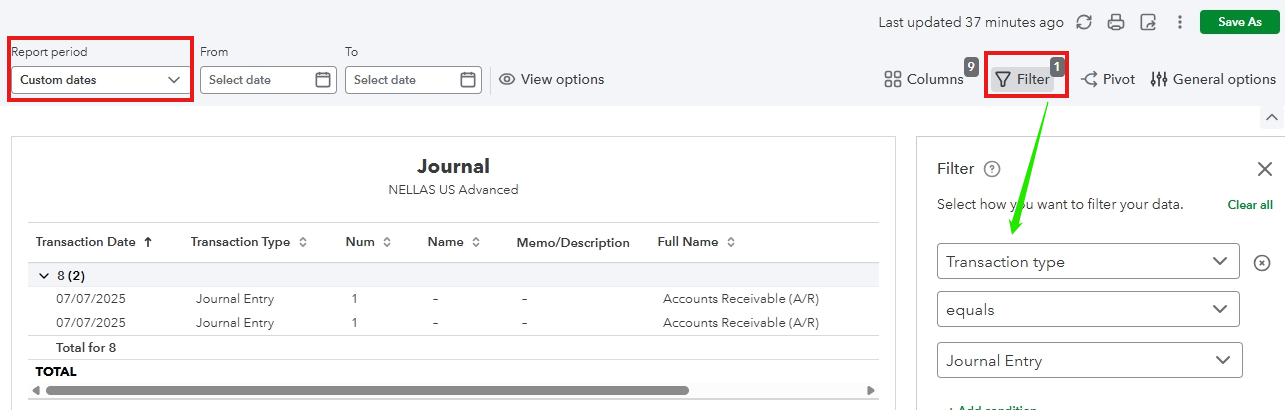
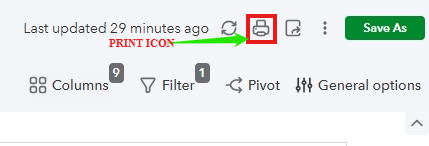
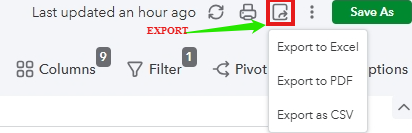
After you have customized your report, you will see the options to print or export it at the top of the report page.
You can click the Print icon to print the report directly to your printer, or choose the Export icon to download it as an Excel, PDF, or CSV file.
This method ensures you get a clean, organized document that's perfect for your records or for sharing with your accountant.
Please reach out to us again if you have more questions or concerns about QuickBooks. You can leave a reply below so we can address it carefully.
Enter your E-mail address. We'll send you an e-mail with instructions to reset your password.