
Get 50% OFF QuickBooks for 3 months*

Buy now
Switch to QuickBooks and 70% off for 3 Months
July 4, 2025
Solved

How do I print out my Intuit bill?

  • July 4, 2025
  • 1 reply
  • 27 views

My Intuit is paid by Intuit charging my bank account. I received an email saying that my bill has been paid. I need a copy of the bill. How can I get it?

Best answer by Rea_M

You can go to the Subscriptions and billing menu to print your Intuit bill, jeffface.


A copy of your Intuit bill can be easily accessed in your QuickBooks Online (QBO) account. To get one, follow the steps below:
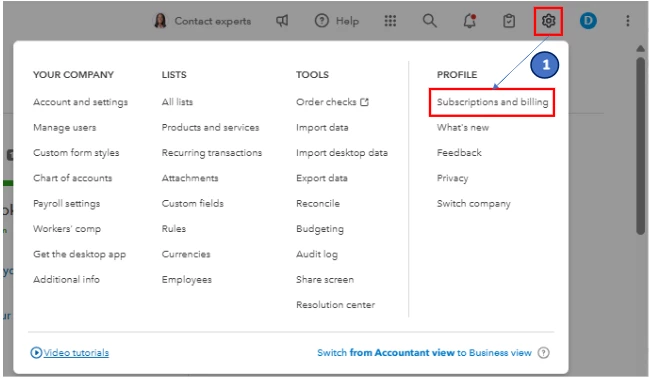
 

  1. Go to Settings or the Gear icon and select Subscriptions and billing
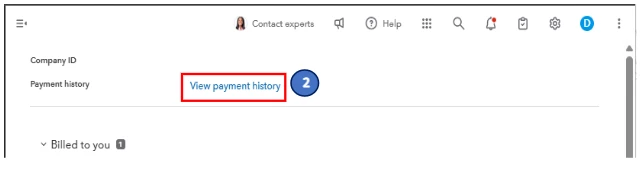
  2. Click the View payment history link. 
  3. On the Billing and payment history page, locate and open the bill to see its preview. 
  4. Click print or the Print icon and then follow the on-screen instructions to proceed.


For more insight into your Intuit bill, please see this article: View your payment history.


Enhance your QuickBooks experience by partnering with our QuickBooks Live Expert Assisted team. With their expertise, you can simplify your processes and receive advice designed to address the specific needs of your business.


If there's anything else you need help with, let us know by adding a comment below.

1 reply

Rea_MAnswer
Level 10
July 4, 2025

You can go to the Subscriptions and billing menu to print your Intuit bill, jeffface.


A copy of your Intuit bill can be easily accessed in your QuickBooks Online (QBO) account. To get one, follow the steps below:
 

  1. Go to Settings or the Gear icon and select Subscriptions and billing
  2. Click the View payment history link. 
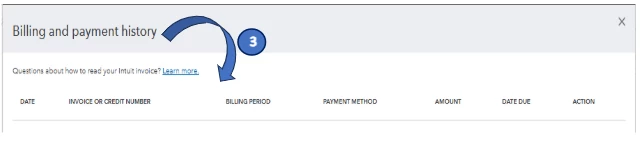
  3. On the Billing and payment history page, locate and open the bill to see its preview. 
  4. Click print or the Print icon and then follow the on-screen instructions to proceed.


For more insight into your Intuit bill, please see this article: View your payment history.


Enhance your QuickBooks experience by partnering with our QuickBooks Live Expert Assisted team. With their expertise, you can simplify your processes and receive advice designed to address the specific needs of your business.


If there's anything else you need help with, let us know by adding a comment below.

jefffaceAuthor
July 5, 2025

Thank you for your quick response ... especially on a holiday. 

I'm still a new (4 months) Quickbooks Online user.  I had already gotten as far as the Billing and Payment History page.  It shows the payment, but I was frustrated because clicking on the payment line does nothing.  I didn't realize that I had to click on the "3-dots" at the end of the line. 

I wish Intuit would just include a link to the bill in their "Thank you for your payment" email, as all our other vendors who bill to that debit card do. 

Again ... thanks. 

QuickBooks Team
July 5, 2025

That would indeed be a helpful feature, Jeff.


We encourage you to share your feedback about adding a bill link to the QuickBooks Online payment confirmation emails. Your suggestions help guide future updates and improve the user experience.


Here's how:


  1. Select the Settings icon.
  2. Under the Profile column, choose Feedback.
  3. Write your suggestions and click Next.


To view your Intuit bill, please feel free to access this article: View your payment history.


Your feedback helps shape future updates. Thank you for sharing, and feel free to reach out with any additional questions or concerns.