
Get 50% OFF QuickBooks for 3 months*

Buy now
Switch to QuickBooks and 70% off for 3 Months
October 12, 2023
Solved

How do I remove old offsetting JEs from A/R aging report?
  • October 12, 2023
  • 1 reply
  • 24 views

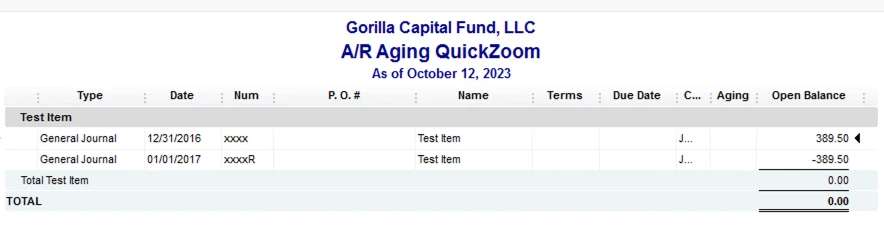
My A/R aging report is cluttered by quite a few $0 balance customers because of offsetting JEs entered by a previous employee. How can I clear these so they do not show up on the aging report?

Best answer by Rainflurry

There is no invoice, just a journal entry increasing the balance in the A/R account and then another journal entry reducing the balance in the A/R account by the same amount.


@SSMGC 


A journal entry that increases A/R will show up under Outstanding Transactions when you go to Receive payments (New > Receive payment).  The credit will show under Credits.  You can apply the credit there.  Sorry about the confusion. Yeah, technically it's not an invoice but the journal entry is closed out the same way as an invoice.    

1 reply

QuickBooks Team
October 13, 2023

Let’s find out how to delete journal entries in QuickBooks Desktop, @SSMGC.


In QuickBooks Dekstop, we have the option to delete journal entries.

In such cases, we delete the erroneous entry from the account. Deleting a journal entry allows you to remove it from your records and correct any inaccuracies. Nonetheless, deleting entries can have an impact on your financial data.


Follow the steps below:


  1. Click the General Journal transaction from your Accounts Receivable Aging QuickZoom report.
  2. Once the Journal entry is open, locate the delete button from the upper corner.
  3. Click OK to confirm the deletion.


A friendly advice. It is always advisable to consult with an accountant or bookkeeper before making any significant changes to your records in QuickBooks. Do you want to have one? Visit this article: The ProAdvisor Program.


In QuickBooks Desktop, you can monitor and manage your sales and expenses, customer, job, and sales reports. These reports are designed to provide you with valuable insights into your business's financial performance. See this page for more guidance: Customize customer, job, and sales reports in QuickBooks Desktop.


I'm always here if you need more guide while handing your journals in QuickBooks Desktop. Keep safe. 

SSMGCAuthor
October 13, 2023

Unfortunately I cannot delete these JEs as they are from different closed periods. In this case, it is a year end JE that is then reversed on the 1st of the following year.

Rainflurry
Level 11
October 13, 2023

@SSMGC 


Go to Receive Payments.  Apply the unused credit to the invoice.