
Get 50% OFF QuickBooks for 3 months*

Buy now
Switch to QuickBooks and 70% off for 3 Months
July 2, 2025
Solved

How do you print or save a profit and loss report?

  • July 2, 2025
  • 1 reply
  • 35 views
No text available
Best answer by Ivan_G

You can print or save a copy of your Profit and Loss data by opening the report directly, appex.


Here's how:
 

  1. Go to the Reports menu, then the Standard reports tab.
  2. Type "Profit and Loss" in the Type report name here field.
  3. Open the report.
  4. Modify the Report period to pull up the precise range of data.
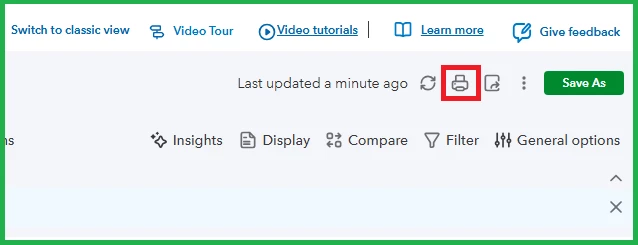
  5. Click the Printer icon.
    • Modern view:
    • Classic view:
  6. Set up the Report Print Settings accordingly.
  7. Once done, click Print to print the report or Save as PDF to download a copy in a PDF file format on your device.


You can also store your reporting modifications to save time editing its filters, columns, or date range. To learn how, please check out this article: Save a customized report.


Are you using QuickBooks Online (QBO) Simple Start, Essentials, or Plus versions and need further flexibility for your reporting needs? You may be interested in exploring the QBO Advanced plan. With this, you can create and customize your report based on your business preference.


Let us know if you have other inquiries by replying to this thread.

1 reply

Ivan_GModeratorAnswer
Moderator
July 2, 2025

You can print or save a copy of your Profit and Loss data by opening the report directly, appex.


Here's how:
 

  1. Go to the Reports menu, then the Standard reports tab.
  2. Type "Profit and Loss" in the Type report name here field.
  3. Open the report.
  4. Modify the Report period to pull up the precise range of data.
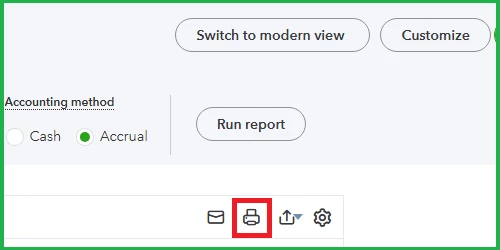
  5. Click the Printer icon.
    • Modern view:
    • Classic view:
  6. Set up the Report Print Settings accordingly.
  7. Once done, click Print to print the report or Save as PDF to download a copy in a PDF file format on your device.


You can also store your reporting modifications to save time editing its filters, columns, or date range. To learn how, please check out this article: Save a customized report.


Are you using QuickBooks Online (QBO) Simple Start, Essentials, or Plus versions and need further flexibility for your reporting needs? You may be interested in exploring the QBO Advanced plan. With this, you can create and customize your report based on your business preference.


Let us know if you have other inquiries by replying to this thread.
