Thanks for always getting back here to continue with the troubleshooting, Playawest45.
If the deposits were not deleted, they would become unapplied payments or credits. You just need to apply them again through the Receive payments function.
Here's how:
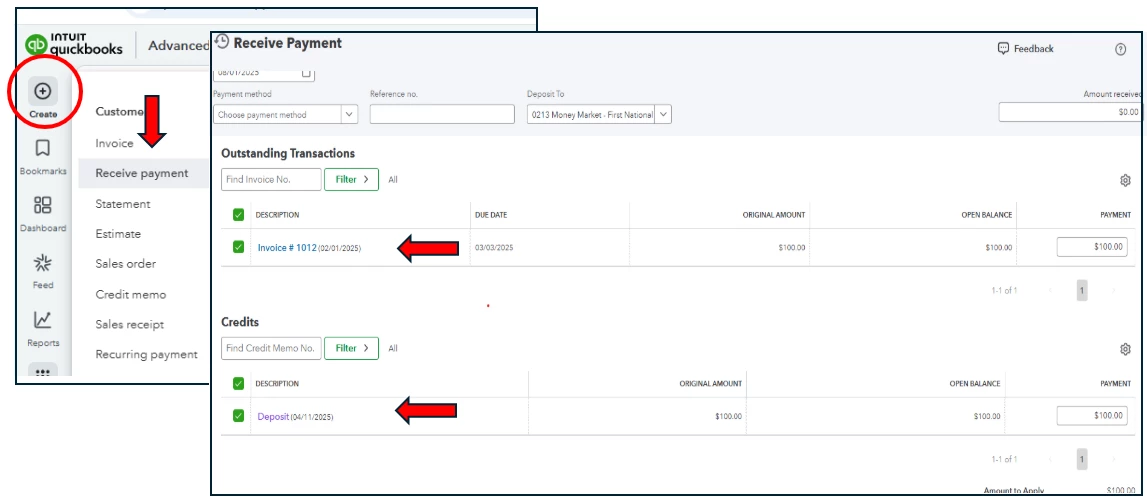
- Click the + New button and choose Receive payment.
- Choose the name of the customer in the drop-down list for Customer ▼, then select the customer’s name. This displays all unpaid and outstanding credits for your customer.
- Proceed to the Payment date field, then enter the day you received the payment.
- Proceed to the Outstanding Transactions section and select the invoice or invoices you need to mark as paid.
- Scroll down to the Credits section and choose the deposit.
- Click Save and close.
Here's an article about this process for more details: Link a bank deposit to an invoice.
If the deposits or payments were deleted, you can follow the usual process of recording the transactions. You can check out this article for a step-by-step guide: Record invoice payments.
Don't hesitate to always tap on us for follow-up and new questions about QuickBooks.
