
Get 50% OFF QuickBooks for 3 months*

Buy now
Switch to QuickBooks and 70% off for 3 Months
June 26, 2025
Solved

Is there a report that shows budgets or activity with rows of classes on the left, and with periods in columns?

  • June 26, 2025
  • 1 reply
  • 43 views
No text available
Best answer by LouiseG12

QuickBooks doesn't have a built-in report with classes as rows and periods as columns, instead, you can run a Budget vs Actuals report as an alternative.


In this report, Classes are shown as columns instead of rows on the left, and they're divided into Actuals, Budget, Over Budget By, and Percent of Budget.


Here's how you can run the report:
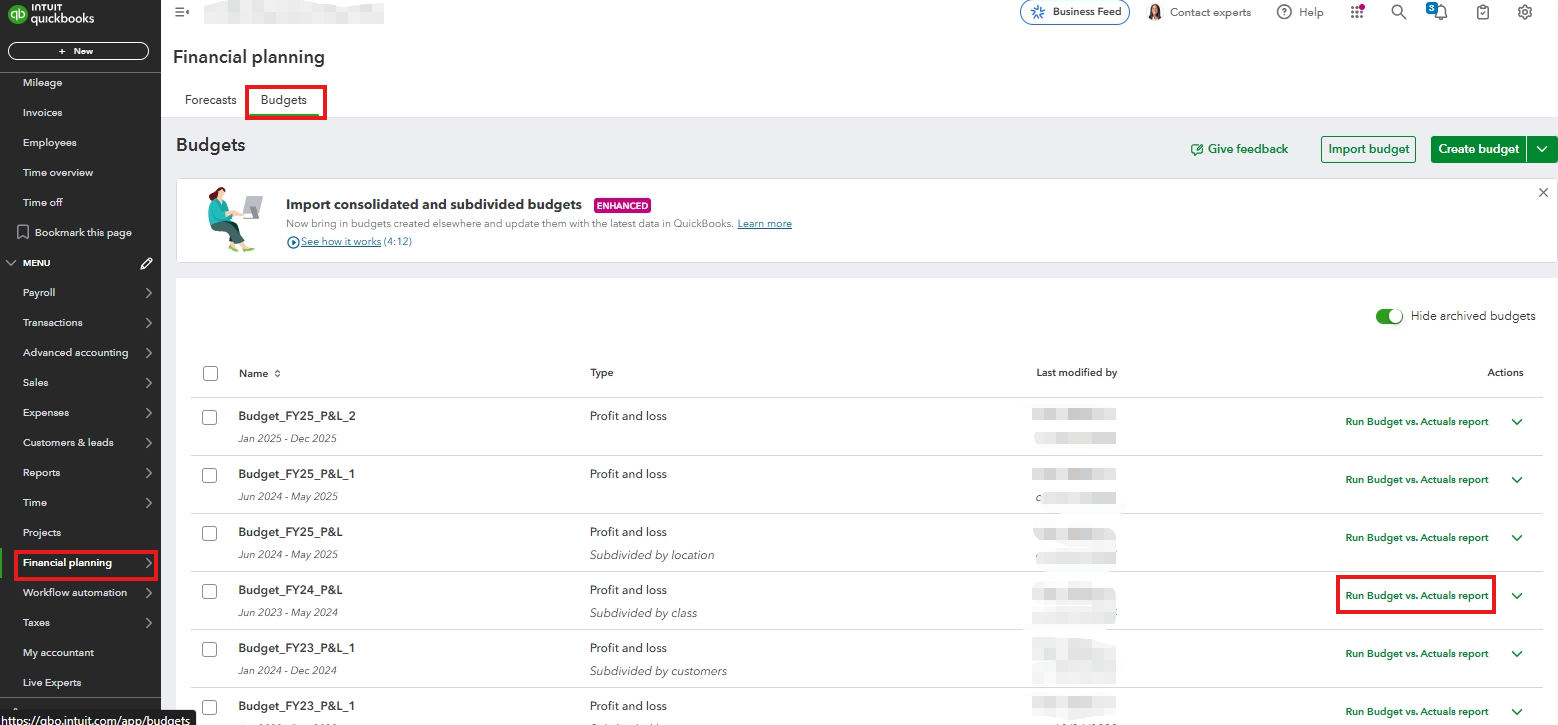
 

  1. Go to the Financial Planning menu.
  2. Click Budgets.
  3. Find the Profit and loss Subdivided by class, then click Run Budget vs Actuals report.


Speaking of, what do you mean by period? Are you referring to a specific timeframe, such as fiscal year? If so, you might want to consider exporting the report filtered by fiscal year settings. This gives you a better view of the details.


To save your customized report for quick access later, check out this article: Save a customized report in QuickBooks Online.


You can always drop a comment below if you have additional questions or concerns.

1 reply

LouiseG12QuickBooks TeamAnswer
QuickBooks Team
June 26, 2025

QuickBooks doesn't have a built-in report with classes as rows and periods as columns, instead, you can run a Budget vs Actuals report as an alternative.


In this report, Classes are shown as columns instead of rows on the left, and they're divided into Actuals, Budget, Over Budget By, and Percent of Budget.


Here's how you can run the report:
 

  1. Go to the Financial Planning menu.
  2. Click Budgets.
  3. Find the Profit and loss Subdivided by class, then click Run Budget vs Actuals report.


Speaking of, what do you mean by period? Are you referring to a specific timeframe, such as fiscal year? If so, you might want to consider exporting the report filtered by fiscal year settings. This gives you a better view of the details.


To save your customized report for quick access later, check out this article: Save a customized report in QuickBooks Online.


You can always drop a comment below if you have additional questions or concerns.

October 13, 2025

How to run a Profit Loss v budget for ONE class at a time without a totals column on the right?

Tori B
QuickBooks Team
October 13, 2025

Hey there, @jmg789.


Thanks for following along with the thread and sharing your concerns. 


At this time, there isn't an option available to remove the Totals column from the report. For now, you can export the report and manually remove it from there. To do that, all you'll need to do is click on the UP arrow at the top right corner of the report. 


In the meantime, I think this would be the perfect opportunity to send this suggestion to our Product Development Team. Our developers review each request and consider them all for future updates. You can use the link below to submit your feedback at any time. 


Please let me know if there is anything else I can assist you with. I'm always happy to help. Have a good one!
