
Get 50% OFF QuickBooks for 3 months*

Buy now
Switch to QuickBooks and 70% off for 3 Months
February 23, 2026
Solved

Zeroing Out a 1099- NEC After it Has Already Been Corrected

  • February 23, 2026
  • 2 replies
  • 25 views

I think I did this out of order. I mistakenly sent a 1099-NEC to our landlord and she notified me that it needs to be a 1099-MISC. I went to QBs and corrected the 1099-NEC to a 1099-MISC. She then informed me that I also need to send a corrected 1099-NEC showing zero income. How do I do that? The 1099-NEC in QBs has been corrected once and so the option to correct it again (or void it) and zero it out no longer exists.

Best answer by Jayson_E

Hi, 44Joules. We appreciate you providing detailed information about your situation and the efforts you've put into resolving it.


In QuickBooks Online (QBO) Payroll, when a 1099 is corrected due to an incorrect form type (such as changing from 1099-NEC to 1099-MISC), the system automatically files two forms with the IRS:


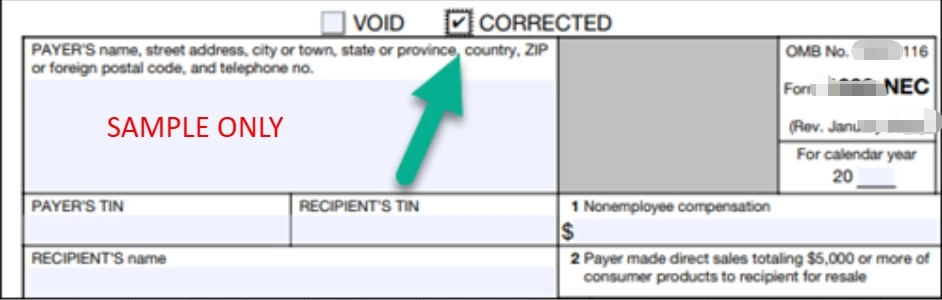
  1. A corrected 1099-NEC, updated with zero payment amounts ($0.00) and the CORRECTED box checked. Contractor details, including name and TIN, remain unchanged.
  2. A new 1099-MISC that reflects the correct payment amounts and form type.


You can check if the correction has been processed by selecting the View option next to the 1099-NEC on your screenshot. If the CORRECTED checkbox is marked and the payment fields show $0, you can print or download it for your landlord.


However, if the corrected form isn’t visible or the updates don’t appear, we recommend reaching out to our Live Payroll Support team during their support hours for assistance. They have the tools to review your filing history and verify that both corrections were submitted properly to the IRS.


Feel free to add a reply below if you have other concerns.

2 replies

Jayson_EQuickBooks TeamAnswer
QuickBooks Team
February 23, 2026

Hi, 44Joules. We appreciate you providing detailed information about your situation and the efforts you've put into resolving it.


In QuickBooks Online (QBO) Payroll, when a 1099 is corrected due to an incorrect form type (such as changing from 1099-NEC to 1099-MISC), the system automatically files two forms with the IRS:


  1. A corrected 1099-NEC, updated with zero payment amounts ($0.00) and the CORRECTED box checked. Contractor details, including name and TIN, remain unchanged.

  2. A new 1099-MISC that reflects the correct payment amounts and form type.


You can check if the correction has been processed by selecting the View option next to the 1099-NEC on your screenshot. If the CORRECTED checkbox is marked and the payment fields show $0, you can print or download it for your landlord.


However, if the corrected form isn’t visible or the updates don’t appear, we recommend reaching out to our Live Payroll Support team during their support hours for assistance. They have the tools to review your filing history and verify that both corrections were submitted properly to the IRS.


Feel free to add a reply below if you have other concerns.

44JoulesAuthor
February 24, 2026

Thank you! This is the answer I was hoping for, haha.

QuickBooks Team
February 24, 2026

Hi there, @44Joules.


We’re glad that my colleague was able to address your concerns about handling a 1099-NEC and provide the correct answer.


If you have any further questions, require additional clarification, or need further assistance, please don’t hesitate to contact us.