
Get 50% OFF QuickBooks for 3 months*

Buy now
Switch to QuickBooks and 70% off for 3 Months
April 8, 2023
Question

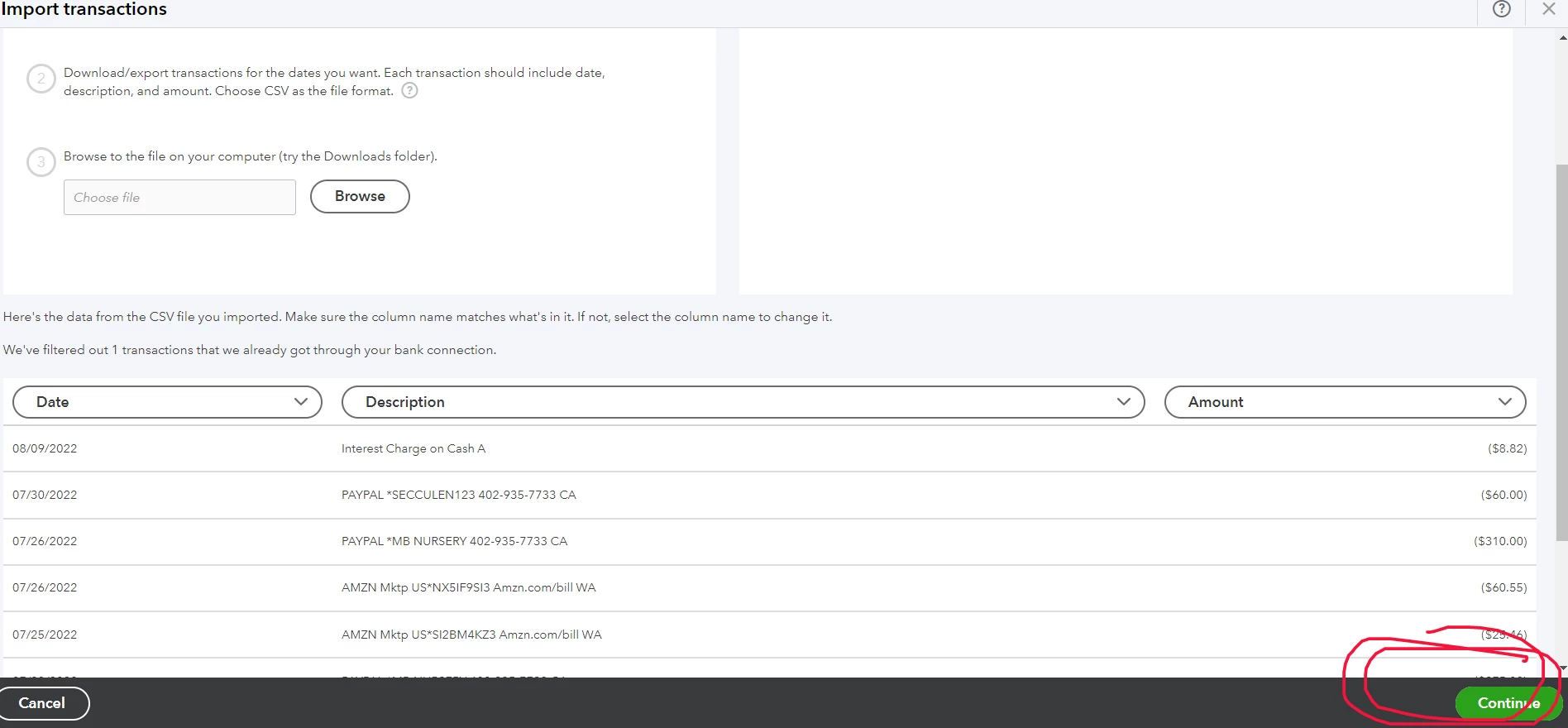
CSV file error, everything works fine until I click "continue"
  • April 8, 2023
  • 1 reply
  • 0 views


CSV file error, everything works fine until I click "continue" Dear moderators please do not send me a generic copy-and-paste reply, lets not stop wasting each other time. I have read all articles from this website related to this error but no solution. 

1 reply

QuickBooks Team
April 10, 2023

Hi jungle555,


Thanks for reaching out here.  It's essential that you're able to import your transactions to QuickBooks Self Employed without error.  I'd be glad to provide some insight here!


To ensure your able to 'continue' through the process, you'll need to edit your spreadsheet and remove special characters from the fields, such as the (*) associated with the Descriptions).  Review your spreadsheet for other characters and make the necessary adjustments.  Once you've cleared these, you'll be able to import your transactions without further delay.


Should you require additional assistance, please don't hesitate to contact QuickBooks Self-Employed support.  They'll have the ability to work with you directly and ensure you're able to accomplish your QuickBooks goals in a timely fashion.


Feel free to reach out again, with other questions.  We'd be happy to help!