
Get 50% OFF QuickBooks for 3 months*

Buy now
Switch to QuickBooks and 70% off for 3 Months
September 25, 2025
Solved

Is there a way to see all invoice activity in QB Self-Employed? When I click on an invoice, it shows the date I first sent the invoice, but not the reminder sent dates.

  • September 25, 2025
  • 1 reply
  • 11 views
No text available
Best answer by ShyMae

I appreciate you taking the time to research and even checking out interface photos, Lionheart. That's a great way to ensure you choose the best option for your needs.


To answer your question, we do have a QuickBooks Solopreneur vs. QuickBooks Self-Employed blog, where you can find a side-by-side comparison of the features offered in both products.


If you decide to upgrade to QuickBooks Solopreneur, here's a sample screenshot showing how you can track the sent date of your invoice reminders.
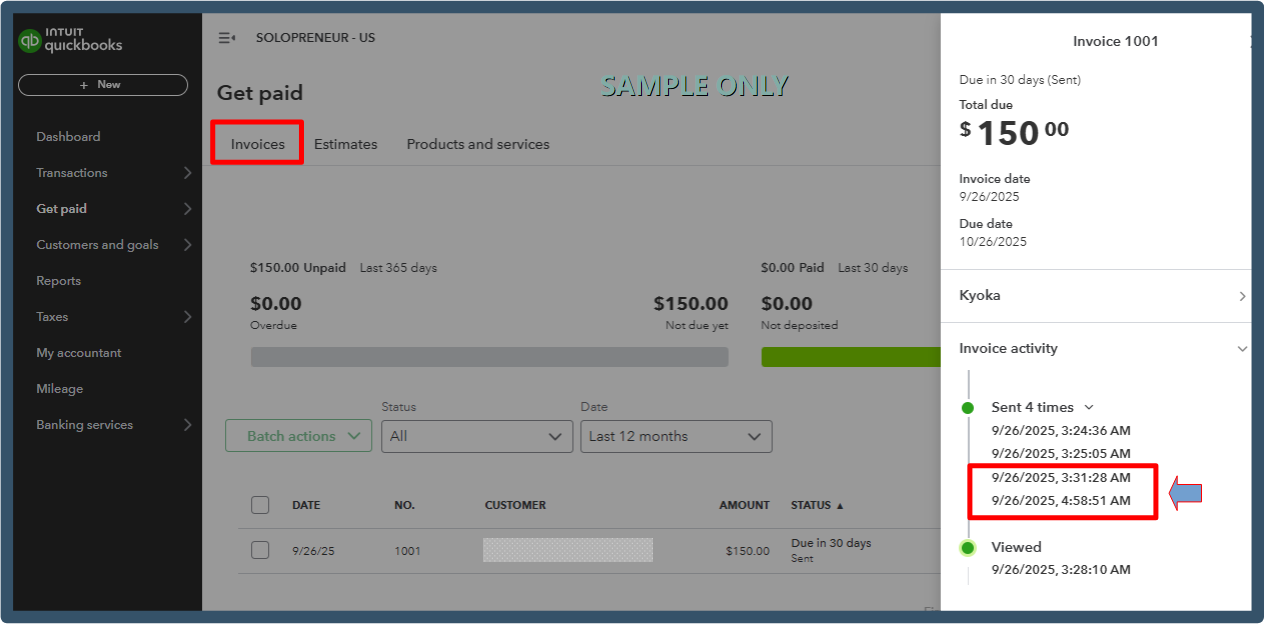
 

If you have any further questions, don't hesitate to reach out. Best wishes!

1 reply

QuickBooks Team
September 25, 2025

Thanks for reaching out to this forum, lionheart.


Currently, QuickBooks Self-Employed doesn't have the feature to display the specific dates for when your reminders were sent. The only information that is available when you view your invoice activity is Sent, Opened, Viewed,  and Paid.


Since being able to track the exact dates for your reminders is something you need, you can consider upgrading to QuickBooks Solopreneur. This version is designed specifically for solo traders and comes with this feature, along with other tools to help you manage your invoicing more effectively.


If you have other questions, feel free to comment them below.

September 25, 2025

Interesting, it seems like that version is actually cheaper than what I am paying now. The images I've seen of the interface look very similar. Is there a place I can see a side by side comparison of features between Self-Employed and Solopreneur?
