
Get 50% OFF QuickBooks for 3 months*

Buy now
Switch to QuickBooks and 70% off for 3 Months
March 22, 2026
Question

Pay Types not Showing in Weekly Timesheets

  • March 22, 2026
  • 2 replies
  • 34 views

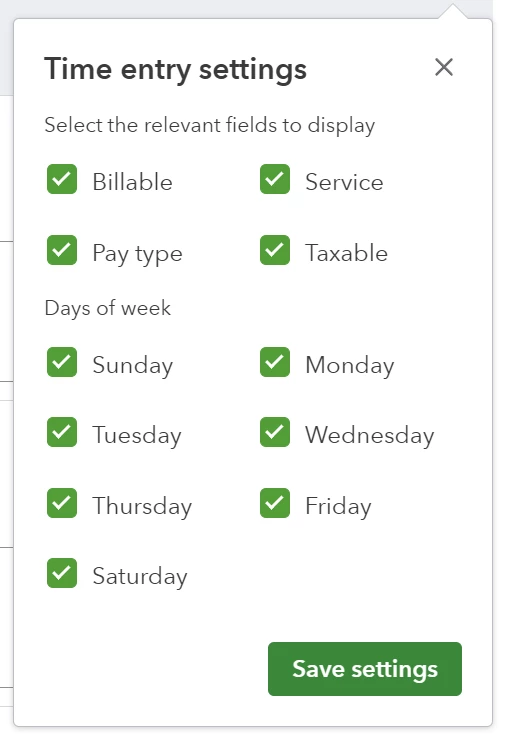
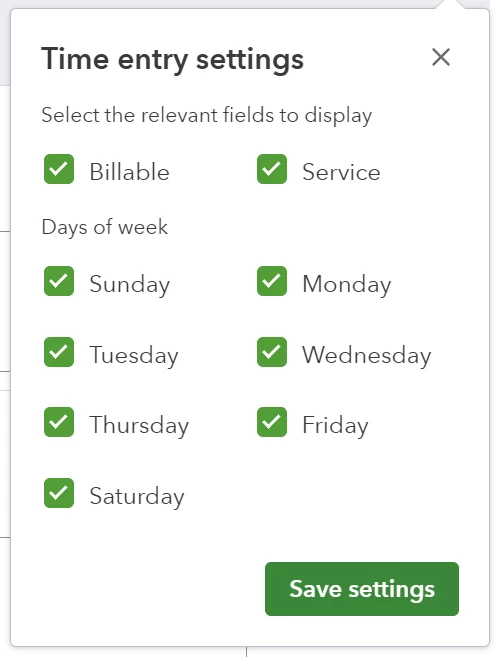
I have two companies (A & B) every week I use the weekly timesheets tab located under Create > Team > Weekly timesheet, both companies have had the ability to choose pay type from the weekly timesheet screen to choose overtime or another pay type if fit, as of two weeks ago company B (under a different QBO account entirely) no longer has the option to select pay type.


I am not sure what is going on and what changed but this is causing an issue when it comes to project tracking for any overtime expenses. Company A on the other hand still has all the options, I tried comparing the settings between the two companies and did not see anything that would cause this issue.
 

2 replies

EduardA
QuickBooks Team
March 22, 2026

Welcome to the Community, @Timonn. Have you tried selecting an employee or vendor in the Weekly Timesheet? The Pay type feature won't appear until you select one, based on our testing.


Should you have any concerns or follow-up questions, feel free to reply in the comments.

TimonnAuthor
March 23, 2026

Correct, when you choose an employee that dialog box should pop up but it does not, it works as intended for Company A but not for Company B

QuickBooks Team
March 23, 2026

Hello Timonn, thanks for clarifying that. Since the dialog box isn't appearing for Company B, it confirms we are looking at a data gap on the individual profiles.

The timesheet draws options directly from the active employee records. If Company B employees lack overtime or specific pay types in their payroll setup, the timesheet cannot offer those choices and defaults to regular pay.

Try opening an employee profile in Company B that needs overtime. Then, verify their pay settings to ensure those types are active. Comparing that screen to an employee in Company A should reveal the difference.

If you need anything else, let us know in the comments. We're always here to help.

TimonnAuthor
March 23, 2026

Pay types exist as they should in each employees file


Morgan_B
QuickBooks Team
March 23, 2026

Thank you for checking that, Timonn.


To rule out any browser related issues, I recommend clearing the cache. The cache can become too full from time to time, creating certain viewing and performance errors. Clearing it will remove anything that's preventing the pay types from loading properly. Here's how to do this in Chrome for example:


  1. At the top right, click More (vertical ellipsis), then Delete browsing data.
  2. Choose a time range, like Last hour or All time.
  3. Select the types of information you want to remove.
  4. Click Delete data.


The following article provides similar steps depending upon which browser you're using: Clear cache and cookies to fix issues when using QuickBooks Online.


Please give this a try and see how things look afterward. If the issue persists, you may want to reach out to the QuickBooks Online Support Team. They'll be able to take a more in depth look to see what's causing the problem with the pay types. Feel free to drop a comment below if you have any other questions in the meantime.