Solved
Adding a new company to desktop Pro 2021
I'm adding another company (I have several already). During set up one of the mandatory fields is your email. It's grayed out and I can't go any further. can someone help? Thank you.

I'm adding another company (I have several already). During set up one of the mandatory fields is your email. It's grayed out and I can't go any further. can someone help? Thank you.
Thanks for reaching out regarding your concern, @Beth1107. Let me help you proceed in creating your files.
When you create a new company in QuickBooks Desktop (QBDT), an Intuit window will pop up, prompting you to log in. You'll need to disregard that for now and sign it in later to prevent the email field from being grayed out. Refer to the sample screenshot below:
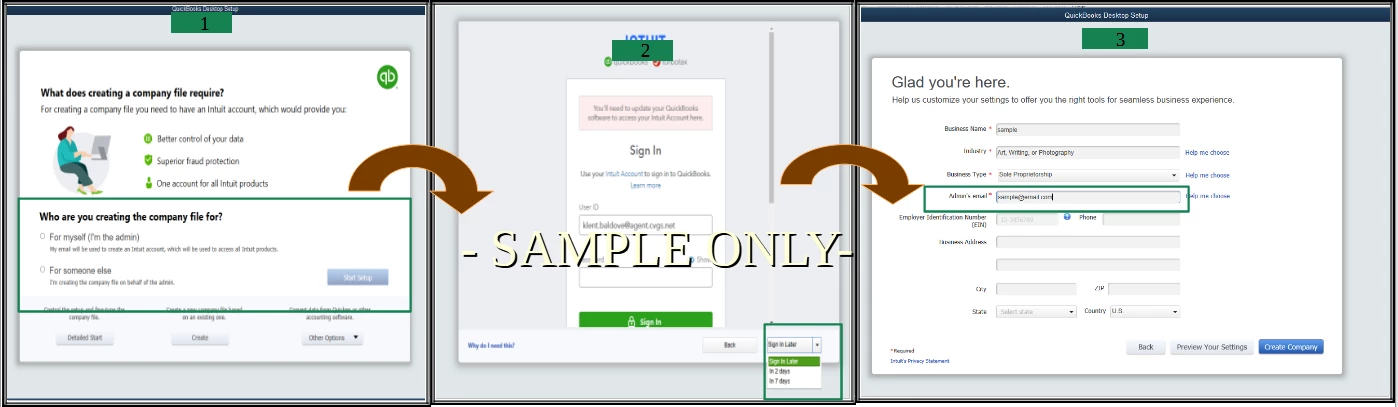
After that, you can then click the Create Company button to proceed.
Feel free to visit our Help Articles page for tips in managing your QuickBooks Desktop files.
I'm always here to help if you have other questions about managing your files. Have a good day ahead.
Enter your E-mail address. We'll send you an e-mail with instructions to reset your password.