You may have 3 options
1. Convert data to old QB Desktop with a non subscription license to lower your cost.
2. Convert data to QB Desktop as the first step and convert it again to QB Online if you prefer a cloud based app to manage your data.
3. If you still want to use QB Self-Employed, you can't convert data from Quicken. It's best to ask your bank and financial institution what file formats you can download from them.
QuickBooks Self-Employed automatically retrieves 90 days' worth of transactions from your bank account, ron28.
Depending on the financial institution, this period may extend to a full year. For transactions beyond the default download window, you can ask or download a CSV copy of the transactions from your bank's website. Then, manually import it into QBSE.
First, make sure that the file follows the correct format for the import to be successful. Follow Format CSV files in Excel to get bank transactions into QuickBooks.
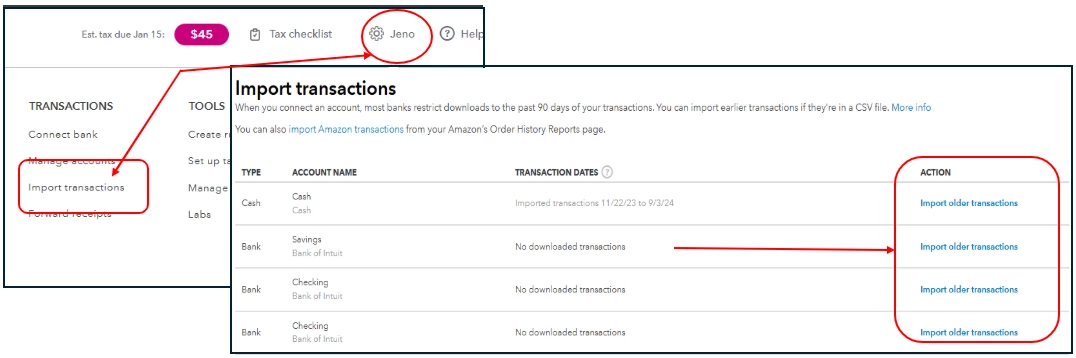
Next, follow these steps on how to import the file if you decide to proceed:
- Click the Gear icon and select Import transactions.
- Choose an account and click Import older transactions.
- Follow the succeeding steps to import the file.
After that, you can check out this article on how to assign categories after importing them: Categorize transactions in QuickBooks Self-Employed.
The Community is always here if you need anything else.

