I know another way to pull up that data, alext-pobox-com.
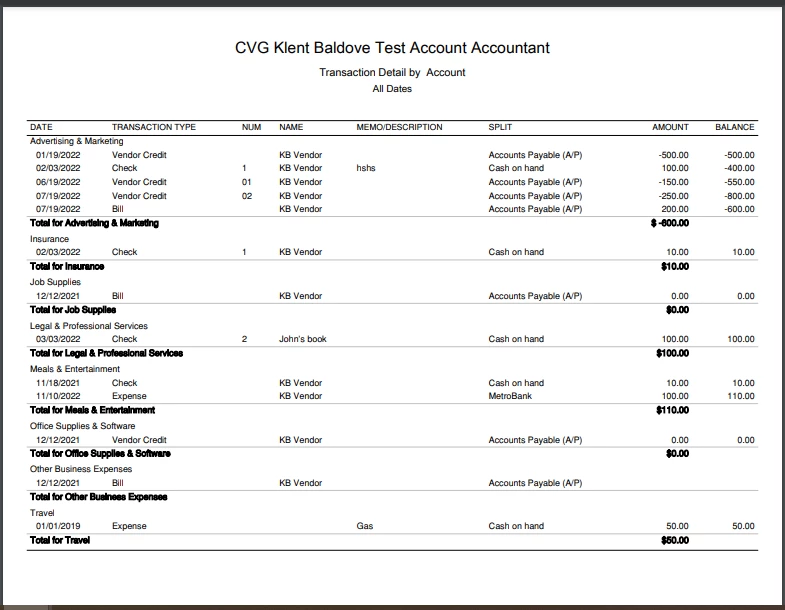
You can run the Transaction Detail by Account report in QuickBooks Online. Then, customize it to view your expenses grouped by category. I'll show you how to do it:
- Go to the Reports menu.
- Under For my accountant, select Transaction Detail by Account.
- Click the Customize button, then set the appropriate report date and accounting method.
- Tick the Split checkbox, under Rows/Columns.
- Head to the Filter section and select these options from the Transaction Type drop-down menu:
- Bill
- Bill Payment (Check)
- Bill Payment (Credit Card)
- Cash Expense
- Check
- Credit Card Expense
- Credit Card Credit
- Vendor Credit
- Choose All Expenses Accounts from the Distribution Account drop-down menu.
- Hit Run report.
This is how it looks like after the customization:
I also encourage reading these articles to ensure that you'll get the most out of QBO's reporting capabilities:
Don't hesitate to tap me again if you need a helping hand in tracking your other business transactions. I'll be right here to continue assisting.
