SUMMER SAVINGS 90% OFF QuickBooks for 3 months* Ends 8/27

Buy now
Switch to QuickBooks and 70% off for 3 Months
New Member
December 22, 2025
Solved

Removing a personal credit card that was connect to the bank in error.

  • December 22, 2025
  • 1 reply
  • 37 views

When I connected several business credit cards to my business, my bank also connected a personal card.


I have disconnected the card from the bank, and excluded all of the transactions, but I need to remove the account from the chart of account, AND make sure the account is zeroed out.


Since I believe that you can never remove an account once it is added, my only option is to make that account inactive.


Will that zero out the account too, since it should have never been added.


I discovered the issue AFTER the bank was connected and I had selected the cards to add, apparently the bank added other cards too.  And I only discovered this when I had to create accounts for QBAO during the linking process.  There needs to be an option to disconnect that card during the setup process.


Any additional suggestions would be appreciated


Thanks

Elliot
Best answer by TrixieD

Hello there, Golf. 

When making your personal credit card account inactive, an adjusting entry is automatically created to offset the balance. However, the transactions remain in the account and on financial reports.

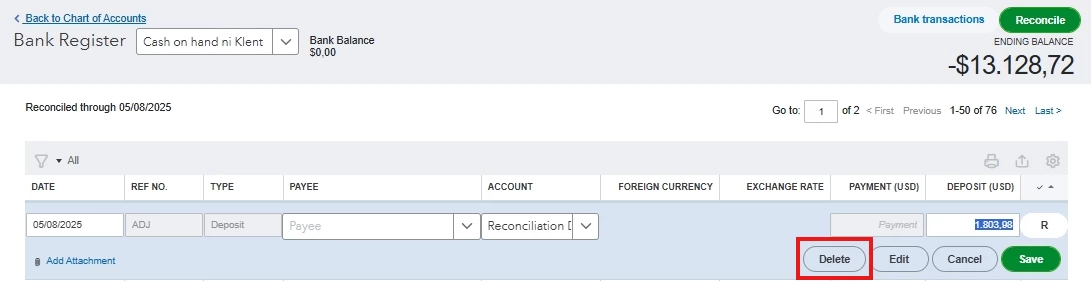
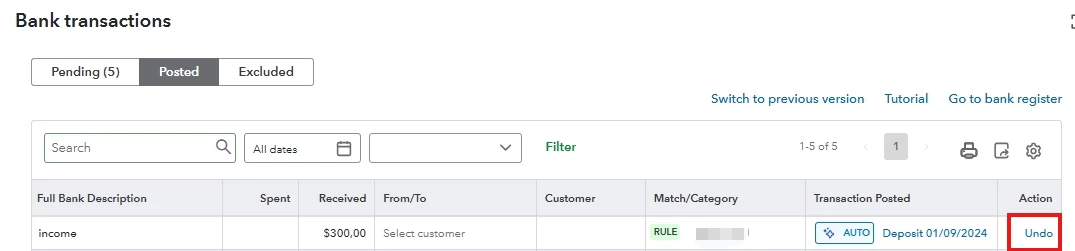
Before making the card inactive, it is important to undo any added transactions from the Banking page and delete the manually added entries.


When setting up bank feeds, your financial institution will present all eligible accounts/cards under that login. In the selection screen, any accounts that were selected will be connected. While there's no option to unlink a connected account during the setup process, you can unselect the unwanted cards before finalizing the connection.

If you have additional concerns, you can reply here at anytime. We're here to guide you.

1 reply

TrixieDQuickBooks TeamAnswer
QuickBooks Team
December 22, 2025

Hello there, Golf. 

When making your personal credit card account inactive, an adjusting entry is automatically created to offset the balance. However, the transactions remain in the account and on financial reports.

Before making the card inactive, it is important to undo any added transactions from the Banking page and delete the manually added entries.


When setting up bank feeds, your financial institution will present all eligible accounts/cards under that login. In the selection screen, any accounts that were selected will be connected. While there's no option to unlink a connected account during the setup process, you can unselect the unwanted cards before finalizing the connection.

If you have additional concerns, you can reply here at anytime. We're here to guide you.