
Get 50% OFF QuickBooks for 3 months*

Buy now
Switch to QuickBooks and 70% off for 3 Months
Best answer by UKTopQuestions

I'd be happy to show you how you can find the account details from your Banking page. It's not hard at all, and just takes a few clicks.


Here's what you'll want to do:

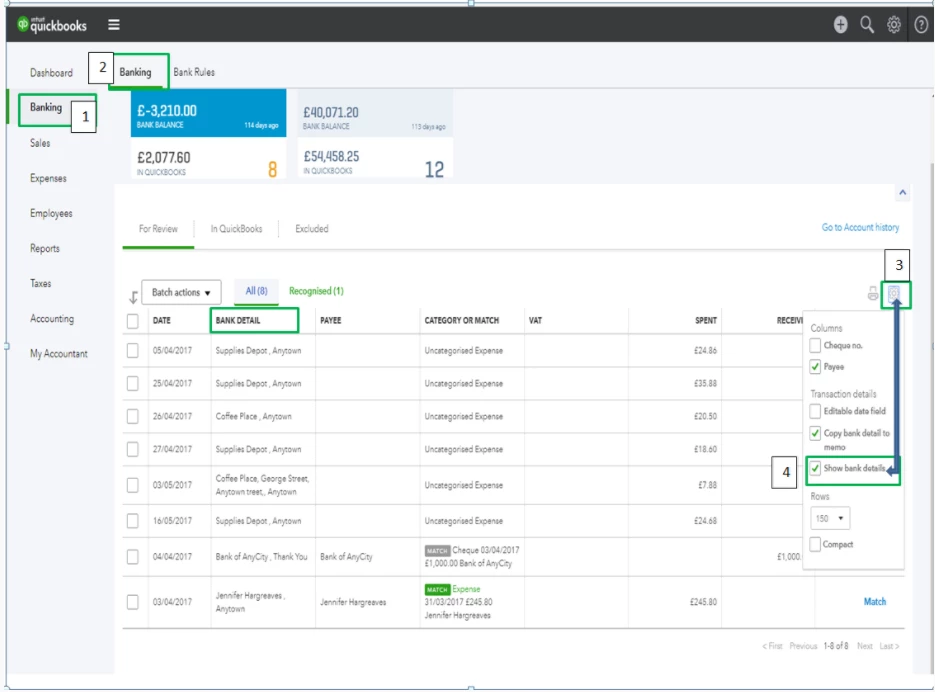
1) Click Banking on the left navigation panel and select the Banking sub-tab.

2) Click the small Gear icon above the Action column.

3) Select the Show bank details from the drop-down options.


Presto, you now have the Bank Detail column on your Banking page!  I've added a screenshot below for your reference.
 

1 reply

UKTopQuestionsAuthorAnswer
March 29, 2018

I'd be happy to show you how you can find the account details from your Banking page. It's not hard at all, and just takes a few clicks.


Here's what you'll want to do:

1) Click Banking on the left navigation panel and select the Banking sub-tab.

2) Click the small Gear icon above the Action column.

3) Select the Show bank details from the drop-down options.


Presto, you now have the Bank Detail column on your Banking page!  I've added a screenshot below for your reference.
