
Get 50% OFF QuickBooks for 3 months*

Buy now
Switch to QuickBooks and 70% off for 3 Months
March 1, 2026
Solved

Bank balance not updating.

  • March 1, 2026
  • 1 reply
  • 16 views

Previous treasurer resigned.

We removed him from our bank and added a new treasurer.

We removed his name as primary in QB (1 user version) and added  the new Treasurer.

The bank balances are no longer updating.

 

Best answer by ZuzieG

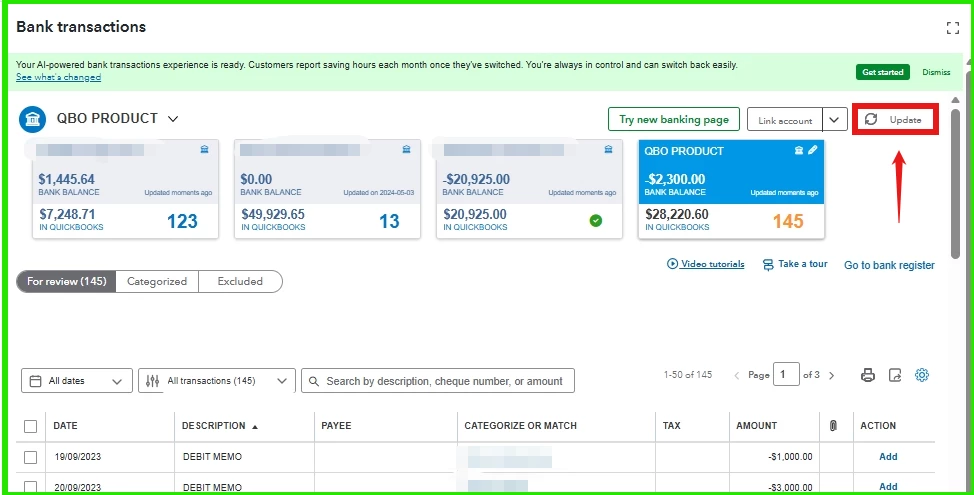
Hi Treasurer2026, you can click the Update button to refresh the connection and update the balance. Otherwise, you would receive an error indicating a specific issue.


If there's no error, please ensure you can log in to your account directly via the bank's website. If you've updated your banking credentials, you can reflect those changes in QuickBooks using the steps below.


Here's how:


  1. Go to the Bank transactions page.
  2. Select your bank account.
  3. Click the Pencil icon, then select Edit sign-in info.
  4. Enter your updated bank information.
  5. Hit Save and connect.


Before we wrap up, I suggest you explore QuickBooks Live Bookkeeping to streamline your accounting, maintain precise financial records, and access professional support. This could free up valuable time, allowing you to concentrate on expanding your business.


If you have any more questions or encounter further challenges, please don't hesitate to reply or start a new post. I'm here to help. Thank you for sharing your concerns!

1 reply

ZuzieGQuickBooks TeamAnswer
QuickBooks Team
March 1, 2026

Hi Treasurer2026, you can click the Update button to refresh the connection and update the balance. Otherwise, you would receive an error indicating a specific issue.


If there's no error, please ensure you can log in to your account directly via the bank's website. If you've updated your banking credentials, you can reflect those changes in QuickBooks using the steps below.


Here's how:


  1. Go to the Bank transactions page.
  2. Select your bank account.
  3. Click the Pencil icon, then select Edit sign-in info.
  4. Enter your updated bank information.
  5. Hit Save and connect.


Before we wrap up, I suggest you explore QuickBooks Live Bookkeeping to streamline your accounting, maintain precise financial records, and access professional support. This could free up valuable time, allowing you to concentrate on expanding your business.


If you have any more questions or encounter further challenges, please don't hesitate to reply or start a new post. I'm here to help. Thank you for sharing your concerns!

QuickBooks Team
March 4, 2026

Hi, Treasurer2026.
 
I’m following up to see if the solution we provided worked for you.
 
Did it resolve the issue, or are you still experiencing difficulties?
 
We're happy to assist further if you need any more help.