
Get 50% OFF QuickBooks for 3 months*

Buy now
Switch to QuickBooks and 70% off for 3 Months
July 16, 2025
Solved

Deleted Bank Feeds

  • July 16, 2025
  • 1 reply
  • 9 views

I am manually importing a bank statement into QuickBooks in order to be matched to invoices or deposits, my question is when I delete a deposit and the customer payment, if I reupload it says no new transactions available in my transaction list. How am I able to re upload this transaction once again into QuickBooks so it can be used?
Best answer by mv32

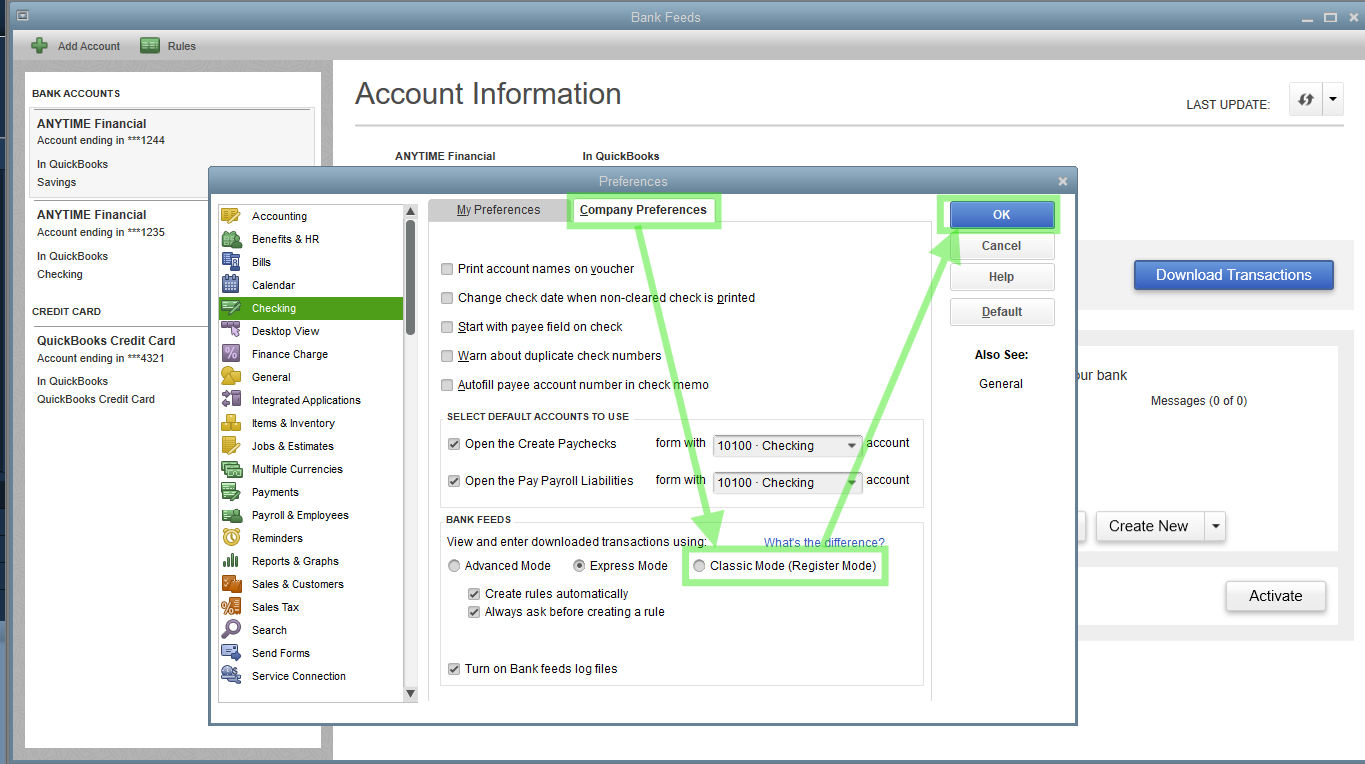
The 'No new transactions available' message appears because the entry recently imported was deleted and the system recognized it, @KG1515. To reupload this transaction, I suggest switching your Bank Feeds to Classic Mode.


Here's how:


  1. Go to the Banking menu and then select Bank Feeds.
  2. Choose Change Bank Feeds Mode.
  3. From the Company Preferences tab, select Classic Mode (Register Mode).
  4. Click OK, and then hit OK.


Once done, reupload the file. If the issue persists, please follow Step 4 via this article to rectify it promptly: Fix Web Connect import errors.


Feel free to comment if you need more help.

1 reply

mv32Answer
Level 8
July 16, 2025

The 'No new transactions available' message appears because the entry recently imported was deleted and the system recognized it, @KG1515. To reupload this transaction, I suggest switching your Bank Feeds to Classic Mode.


Here's how:


  1. Go to the Banking menu and then select Bank Feeds.
  2. Choose Change Bank Feeds Mode.
  3. From the Company Preferences tab, select Classic Mode (Register Mode).
  4. Click OK, and then hit OK.


Once done, reupload the file. If the issue persists, please follow Step 4 via this article to rectify it promptly: Fix Web Connect import errors.


Feel free to comment if you need more help.