
Get 50% OFF QuickBooks for 3 months*

Buy now
Switch to QuickBooks and 70% off for 3 Months
August 23, 2025
Solved

How to Merge 2 connected bank account into one.

  • August 23, 2025
  • 4 replies
  • 45 views

We plan to physically move 2 bank accounts into one for our church.   These banks accounts are both connected to our bank in QBO.   I want to make sure that I correctly understand how to do the merge.  Can you help me with the steps to take?   Including whether or not I have to disconnect one or both bank accounts before proceeding with the merge.   If I do have to disconnect, is there anything special that must be done when reconnecting the single bank account.   

Thank you for your help.  Bonnie

Best answer by KayePe

You can merge accounts in the Chart of Accounts in QuickBooks Online, @Blondie18.


Beforehand, I appreciate the details you shared about the assistance you need with merging accounts in QBO. To start, you’re correct that both connected bank accounts in QBO need to be disconnected first. Let me guide you through the steps:


  1. In the My Apps, click Accounting and go to Bank Transactions.
  2. Select the tile for the bank account.
  3. Choose the Pencil icon, then select Edit account details.
  4. Select the Disconnect this account on save checkbox and hit Yes.
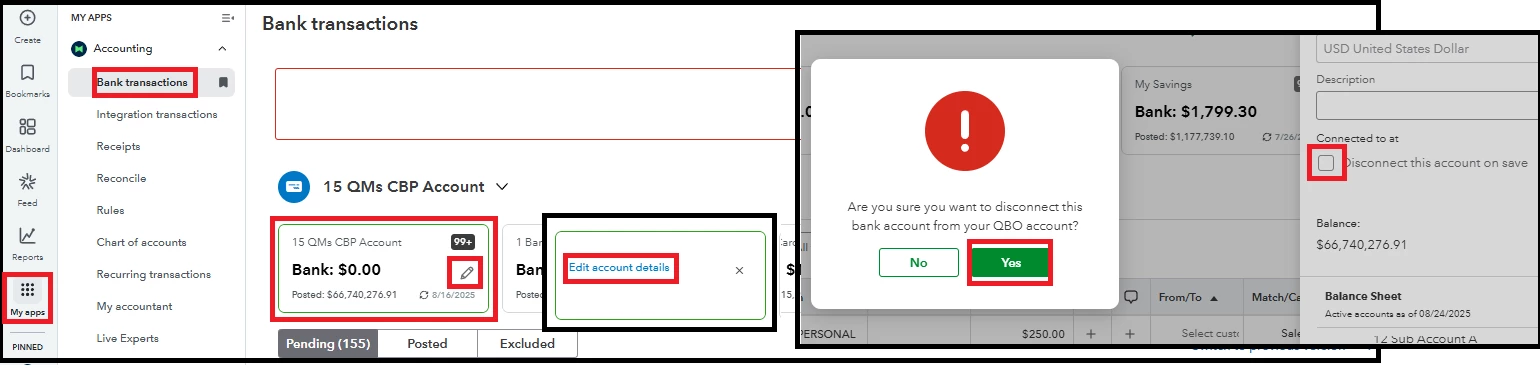


After that, you’re ready to merge the accounts. Here’s how:


  1. From the Accounting column, select Chart of Accounts.
  2. Open the account to keep, click the Action dropdown, and hit Edit.
  3. Note the Account Name, Type, and Detail Type, and return to the Chart of Accounts.
  4. Find the account you want to merge, then click the Action dropdown and select Edit.
  5. Update the Account Name and Detail Type to match the account you want to keep.
  6. If done, click Save. A prompt will appear; select Yes, merge accounts to confirm.
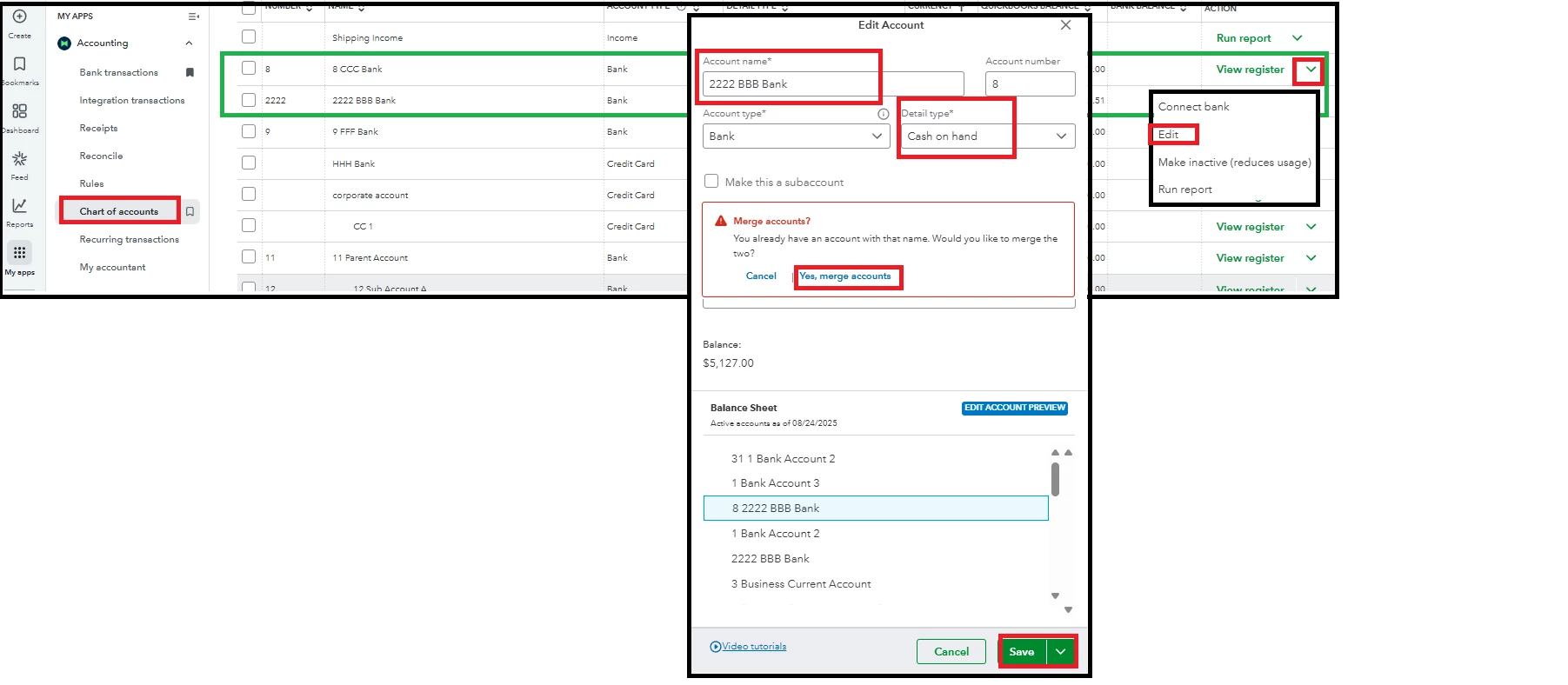


For additional insights and more detailed steps, check out this article: Merge duplicate accounts.


Once completed, you can reconnect the account you kept during the merging process.


Managing your financial records can sometimes be complex, but our QuickBooks Live Expert Assisted team is here to support you. They will help you pinpoint essential dashboards and provide insights to improve your comprehension and effectiveness in managing your business.


If you have additional questions, let us know. We're always here to help.

4 replies

KayePeQuickBooks TeamAnswer
QuickBooks Team
August 23, 2025

You can merge accounts in the Chart of Accounts in QuickBooks Online, @Blondie18.


Beforehand, I appreciate the details you shared about the assistance you need with merging accounts in QBO. To start, you’re correct that both connected bank accounts in QBO need to be disconnected first. Let me guide you through the steps:


  1. In the My Apps, click Accounting and go to Bank Transactions.
  2. Select the tile for the bank account.
  3. Choose the Pencil icon, then select Edit account details.
  4. Select the Disconnect this account on save checkbox and hit Yes.


After that, you’re ready to merge the accounts. Here’s how:


  1. From the Accounting column, select Chart of Accounts.
  2. Open the account to keep, click the Action dropdown, and hit Edit.
  3. Note the Account Name, Type, and Detail Type, and return to the Chart of Accounts.
  4. Find the account you want to merge, then click the Action dropdown and select Edit.
  5. Update the Account Name and Detail Type to match the account you want to keep.
  6. If done, click Save. A prompt will appear; select Yes, merge accounts to confirm.


For additional insights and more detailed steps, check out this article: Merge duplicate accounts.


Once completed, you can reconnect the account you kept during the merging process.


Managing your financial records can sometimes be complex, but our QuickBooks Live Expert Assisted team is here to support you. They will help you pinpoint essential dashboards and provide insights to improve your comprehension and effectiveness in managing your business.


If you have additional questions, let us know. We're always here to help.

Blondie18Author
August 23, 2025

Thank you for your answer.  Should I have received an email notifying me that an answer was posted.  I didn't and it took me forever to actually find this answer.  I've also tried to setup a profile and can't seem to do that either.  If I have already done that, I can't find it.  Community is not very user friendly.  Any assistance would be appreciated.

QuickBooks Team
August 23, 2025

I appreciate you bringing this to our attention, Blondie. Please know that once you can post here on the Community page, it means your profile has already been created. You can always ask for assistance, and you will receive an email notification once QuickBooks support has responded to your concerns.


You can check your inbox or spam folder to view the response notification from Community support. If you click on it, it directs straight to your original post, where you can see the support team's response, just like in this thread.


If you continue to experience issues with merging your bank accounts, I recommend contacting our Live Support team. They can perform a screen-sharing session to understand your situation and quickly identify the cause of the problem.


Please keep us informed if you have any other questions or concerns.

Rainflurry
Level 11
August 23, 2025

@Blondie18 


Are you merging one of the accounts with the other, so that account #1 will continue to be used and the other (account #2) will be closed?  If so, disconnect bank account #2.  Then, transfer the funds from account #2 to account #1 using New > Transfer.  

QuickBooks Team
October 19, 2025

There's no direct way to completely delete your merged account, DFIC.


To delete the merged account entirely, you'll have to ensure that the merge account is activated. Since the account has no transactions, the easiest way to remove this account is by merging it with your current bank account.


Here's how:


  1. Go to Gear icon, then select Chart of accounts.
  2. Select the Gear icon in the Chart of accounts section
  3. Select Include inactive.
  4. Find the merged account that you have to reactivate.
  5. Select Make Active.


Next, you'll want to merge the reactivated merge account to the bank you're currently using.


You can follow the steps below:


  1. Locate the account you want to delete.
  2. Click the dropdown in the Action column and select Edit.
  3. Ensure the Account name, Account type, and Detail type of the account you'll want to delete match those of the account you want to keep.
  4. Once done, you'll receive a prompt that will notify you to merge an existing account.
  5. Click Save, then select Yes, merge accounts to confirm.


Once finished, the reactivated account that you've just merged with the current bank account you're using will be permanently removed from your records in QuickBooks Online (QBO).


You can refer to this article for more information: Merge duplicate accounts.


Additionally, I understand how the suggested features mentioned in your post could benefit both you and your business. Given the circumstances, I highly encourage you to share your thoughts with our Product Engineers. 


Your feedbacks are crucial to our ongoing efforts to enhance our services, as we actively review all user suggestions to guide our future software updates. Your involvement will help us shape a better experience for you and all of our users. 


Here's how to submit a feedback:


  1.  Click the Gear icon in the upper-right corner of your QBO dashboard.
  2. Select Feedback under Profile.
  3. Share your feedback.
  4. Hit Next to submit.


Feel free to reply to this post if you need further assistance.

October 20, 2025

Thank you Jane for your response.

I followed the steps and the account is still not deleted but rather inactivated again and the word (deleted) is added next to the old name. I can provide snaps if needed. Please let me know if there is any other solutions.

October 20, 2025

Thank you @JaneDave_I for your response.


for some reason I am not able to reply to your response directly so I replied to the original post.


I followed the steps and the account is still not deleted but rather inactivated again and the word (deleted) is added next to the old name. I can provide snaps if needed. Please let me know if there is any other solutions.

QuickBooks Team
October 20, 2025

Thanks for reaching out. I appreciate you following the steps provided by my colleagues, @DFIC


Here's a simple explanation for what you're seeing: The word Delete next to an account name means that the bank account either had previous transactions or a recorded opening balance that you deleted in your bank account before merging the accounts. It also indicates that the account was removed permanently after the merging process.


If an account has no transactions or opening balance, it will usually just disappear from the Chart of Accounts after you merge it.


Please let us know if you have any other questions about managing your QuickBooks accounts.