
Get 50% OFF QuickBooks for 3 months*

Buy now
Switch to QuickBooks and 70% off for 3 Months
October 10, 2025
Solved

Paypal bank transaction matching fails with: "Unexpected Internal Error. (-30000)".

  • October 10, 2025
  • 1 reply
  • 11 views

Quickbooks online: Bank transaction matching for PayPal bank fails with this error message: "Unexpected Internal Error. (-30000)". The screen even started to flicker for a while. The bank transactions for review did find the correct matches. The error happens when I click the "Match" action. I have cleared browser cache, used other browser, used anonymous browser window, but each time this error occurs.

Best answer by Nathania_P

Hi treasurer184, I appreciate you reaching out to us about this concern. I’ll provide you with the steps on how  you can contact our live support team and match your transactions manually as a workaround.


Since the issue persists despite performing multiple troubleshooting steps, it's best to reach out to our live support team. Our representatives can investigate this further and find a comprehensive solution so you're able to match your transactions.


Here’s how:
 

  1. Open your QuickBooks Online account.
  2. Select the Help (?) menu.
  3. In the Assistant window, type in “Talk to a human” in the field.
  4. Enter your brief concern, then go to the Contact option.
  5. Choose a way to connect with us:
    • Start a chat with a support expert.
    • Get a callback from the next available expert.


In the meantime, you can use the "Find Match" option to manually match your PayPal entries as a temporary workaround.


Here’s how to manually match transactions:
 

  1. Go to the Transactions menu and select Bank Transactions.
  2. Locate the transaction you want to match and click it.
  3. Select Find match option. A window opens, from there select the appropriate transaction to match.
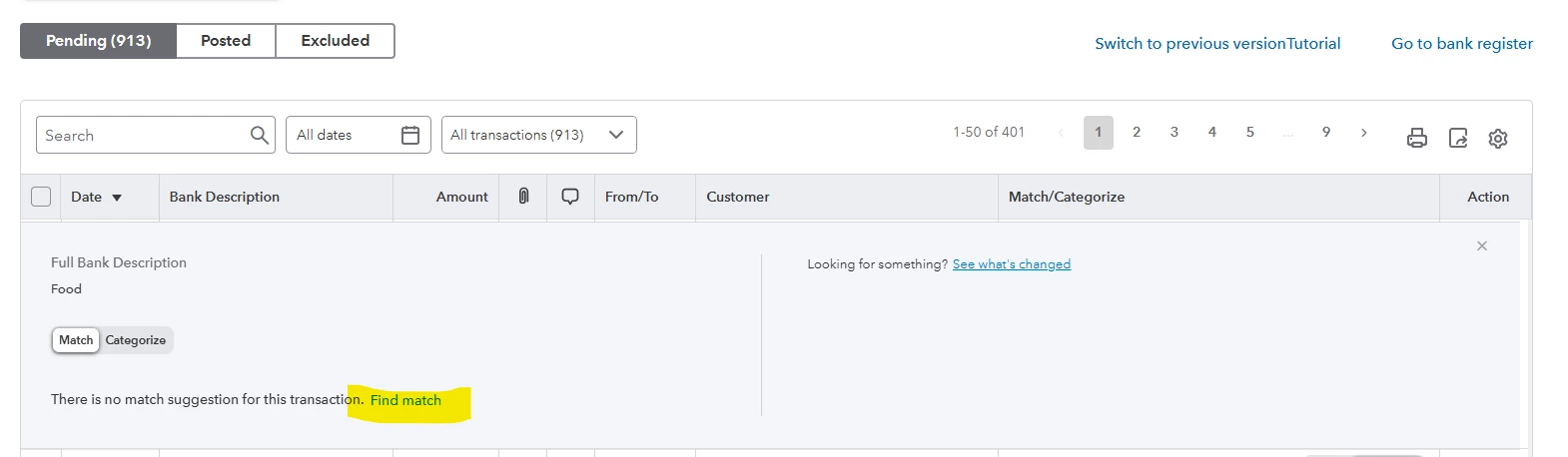
  4. Verify the details and click Match to confirm.


If there’s anything more you need or any questions you have, feel free to reach out.

1 reply

QuickBooks Team
October 10, 2025

Hi treasurer184, I appreciate you reaching out to us about this concern. I’ll provide you with the steps on how  you can contact our live support team and match your transactions manually as a workaround.


Since the issue persists despite performing multiple troubleshooting steps, it's best to reach out to our live support team. Our representatives can investigate this further and find a comprehensive solution so you're able to match your transactions.


Here’s how:
 

  1. Open your QuickBooks Online account.
  2. Select the Help (?) menu.
  3. In the Assistant window, type in “Talk to a human” in the field.
  4. Enter your brief concern, then go to the Contact option.
  5. Choose a way to connect with us:
    • Start a chat with a support expert.
    • Get a callback from the next available expert.


In the meantime, you can use the "Find Match" option to manually match your PayPal entries as a temporary workaround.


Here’s how to manually match transactions:
 

  1. Go to the Transactions menu and select Bank Transactions.
  2. Locate the transaction you want to match and click it.
  3. Select Find match option. A window opens, from there select the appropriate transaction to match.

  4. Verify the details and click Match to confirm.


If there’s anything more you need or any questions you have, feel free to reach out.

October 14, 2025

Hi Nathania_P: Thanks, this solved the issue. Specifically, in my case the system had identified the correct match, but re-matching manually did work.

QuickBooks Team
October 14, 2025

Thank you for sharing the solution, Treasure.
 

I’m glad my colleague’s solution resolved your issue with the unexpected matching Error.
 

If you need further assistance, please don’t hesitate to reach out. We are committed to ensuring you have a positive experience with our service.
 

Thank you for choosing us and for being a valued member of our Community. We look forward to serving you again soon. Have a great day!