
SUMMER SAVINGS 90% OFF QuickBooks for 3 months* Ends 8/27

Buy now
Switch to QuickBooks and 70% off for 3 Months
New Member
September 18, 2026
Question

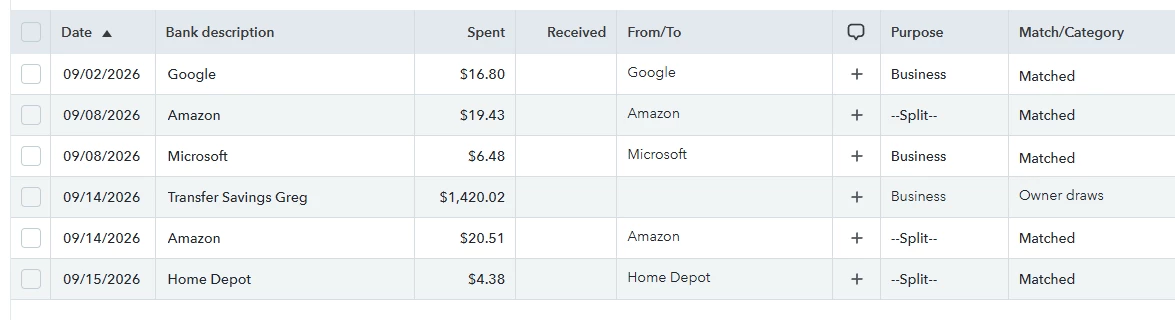
--SPLIT-- showing in Purpose column

  • September 18, 2026
  • 1 reply
  • 4 views

When matching a transaction to a receipt with multiple line items puts --SPLIT-- in the Purpose column. This makes it look like that transaction is split between Business and Personal. I have no control over Purpose when the transaction is still pending “says can’t be added when matching,” and I don’t see any options on the receipt side. Am I missing something here?
 

1 reply

QuickBooks Team
September 19, 2026

You’re not missing anything here, and nothing is wrong on your end. This happens because the matched receipt has multiple line items, so QuickBooks Online displays Split instead of a single label. This can also happen if the line items fall under different categories or expense types. This does not automatically mean the transaction is divided between Business and Personal. It simply means there are multiple categories attached to it.


If you prefer to leave things as is, that's perfectly fine. However, if you want a transaction to show one specific label, I suggest you keep the receipt as your record. Then, unmatch and exclude the bank transaction, and categorize each line item on the receipt individually so that each one gets its own unique label. Keeping both the receipt and the bank transaction at the same time can cause duplicates.


Please feel encouraged to use the Reply button if you need anything else.