
Get 50% OFF QuickBooks for 3 months*

Buy now
Switch to QuickBooks and 70% off for 3 Months
July 26, 2021
Solved

Can i change address details for an existing customer

  • July 26, 2021
  • 1 reply
  • 1 view
No text available
Best answer by LieraMarie_A

Yes, you can edit the address for an existing customer, brenda58.


All you have to do is enter the information on the customer's profile. Here's how:
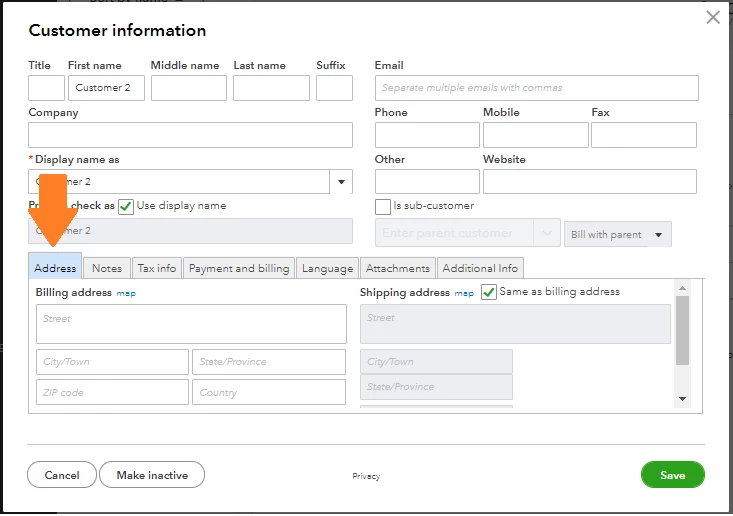
  1. Go to the Sales menu and select the Customers tab.
  2. Select the customer's name from the list.
  3. Click the Edit button to open the customer's profile.
  4. Edit the details under the Address section.
  5. Once finished, click Save.


Whatever we set up in the customer' profiles will come up automatically on the forms. It helps us to be consistent and save time. You can check out this article to learn more: Edit, delete and restore list elements.


You can also utilize the Customer Contact List report to view all your customers' information.

  1. Go to Reports.
  2. In the Find report by name field, type in "Customer Contact List."
  3. Select it to open the report.


To learn a bunch of ways to customize your reports, refer to these articles:


You can leave a comment below if you have any questions. The Community is always here to help. Have a good one.

1 reply

LieraMarie_A
Level 8
July 26, 2021

Yes, you can edit the address for an existing customer, brenda58.


All you have to do is enter the information on the customer's profile. Here's how:

  1. Go to the Sales menu and select the Customers tab.
  2. Select the customer's name from the list.
  3. Click the Edit button to open the customer's profile.
  4. Edit the details under the Address section.
  5. Once finished, click Save.


Whatever we set up in the customer' profiles will come up automatically on the forms. It helps us to be consistent and save time. You can check out this article to learn more: Edit, delete and restore list elements.


You can also utilize the Customer Contact List report to view all your customers' information.

  1. Go to Reports.
  2. In the Find report by name field, type in "Customer Contact List."
  3. Select it to open the report.


To learn a bunch of ways to customize your reports, refer to these articles:


You can leave a comment below if you have any questions. The Community is always here to help. Have a good one.
