
Get 50% OFF QuickBooks for 3 months*

Buy now
Switch to QuickBooks and 70% off for 3 Months
September 24, 2025
Solved

how can i import multiple new contractors

  • September 24, 2025
  • 1 reply
  • 12 views

Looking to add multiple payees as contractors. I have them in excel but need to import them all together

Best answer by Erika_K

I'd like to provide some information about importing contractors, Michelle.


Uploading payroll contractors directly to QuickBooks Online (QBO) isn't available. Instead, you'll need to add them as vendors first. Once added as vendors, you can update their profiles with tax details and payment preferences to configure them as payroll contractors.


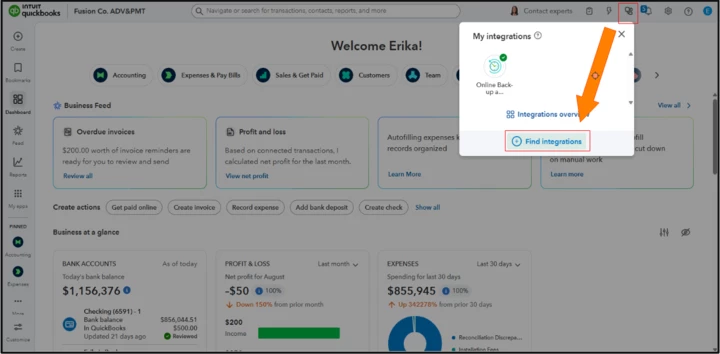
As a workaround, you can follow my colleagues' recommendations by editing the list and checking the Track payments for 1099 box. If you need to add a large number of contractors, you can also use a third-party app to upload them directly into QBO. Visit the QuickBooks App Store or the Find Integrations page to explore supported apps.
 

We're still available for any follow-up questions about importing your new contractors to QBO.

1 reply

QuickBooks Team
September 24, 2025

You can use the Import data tool to upload your new contractors to QuickBooks, Michelle.


Here's how:


  1. Click the Gear icon and select Import data.
  2. Choose Vendors as the category to import.
  3. Select the Excel option and upload your file. To ensure accurate mapping, I recommend downloading the sample file provided by QuickBooks. 
  4. Once your file is ready, follow the on-screen steps to map the columns in your file to the correct fields in QBO (e.g., Name, Email, Address, etc.) and complete the import process.


After importing, the contractors you uploaded will initially appear as vendors in QBO. To ensure they show up as contractors and are properly tracked for 1099 reporting, you'll need to manually convert them to contractors.


Here’s how to convert them:


  1. Go to the Expenses menu and select Vendors.
  2. Open the profile of each contractor you just imported.
  3. Check the box for Track payments for 1099 in their profile.
  4. Click Save to apply the changes.


Once your contractors appear in the Contractors tab, you can finish setting up their profiles.


If you have any additional questions or need further assistance, feel free to comment below. 

September 26, 2025

Thank you, I tried that, but the list is not Vendors but independent contractors. If it's available for Vendors, why not payroll contractors?

Erika_KQuickBooks TeamAnswer
QuickBooks Team
September 26, 2025

I'd like to provide some information about importing contractors, Michelle.


Uploading payroll contractors directly to QuickBooks Online (QBO) isn't available. Instead, you'll need to add them as vendors first. Once added as vendors, you can update their profiles with tax details and payment preferences to configure them as payroll contractors.


As a workaround, you can follow my colleagues' recommendations by editing the list and checking the Track payments for 1099 box. If you need to add a large number of contractors, you can also use a third-party app to upload them directly into QBO. Visit the QuickBooks App Store or the Find Integrations page to explore supported apps.


We're still available for any follow-up questions about importing your new contractors to QBO.